Any help Please!
K
Posts made by Kh
-
Cloth Surface Thickness Causing Bevel Issues on Loftposted in Question & Answers
Hi everyone,
I'm using Cinema 4D 2027. I created a model with a Loft and added a Cloth Surface with 2 cm thickness. The thickness works on the main surface, but it causes distortion around the bottom Bevel.
I've tried reversing the normals and adjusting the Bevel and Cloth Surface settings, but the issue persists.
How can I fix this while keeping the bottom Bevel intact?
Interestingly, this problem does not occur in Cinema 4D 2024. It seems to be specific to Cinema 4D 2025, 2026 and 2027.
Has anyone experienced this issue or found a solution?
Thanks!
Thanks!
-
QUESTION: Store color to AOVposted in Question & Answers
Hi Master, how are you?
I have a simple pillar with a white material, and I've assigned a red material to a polygon selection.
https://imgur.com/a/xYKcY3y
I added a Store Color to AOV for the pillar material and another one for the red material. However, when I render, the pillar's AOV also includes the red section. I want to be able to change only the pillar color in After Effects.
Any idea how to fix this?
-
RE: lock rotation in rigid body simposted in Question & Answers
Hi, maybe you can increase the Linear Dampening , Angular Dampening to 100% or more.

-
RE: lock rotation in rigid body simposted in Question & Answers
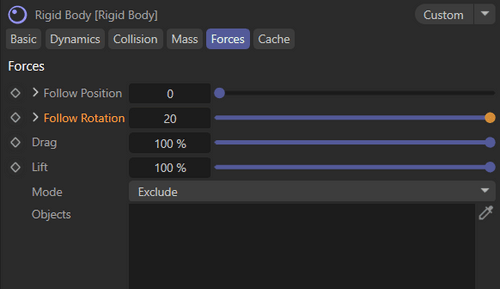
Try to increase the Force> Follow Rotation in the Rigid Body to 20,50 or as you needed.
-
RE: Rolling any object Problem!posted in Question & Answers
Hey everyone, just wanted to update this since I found the solution, in case anyone runs into the same issue in the future.
The problem was that the Bounding Box node in XPresso doesn't read object dimensions properly when the object is still a Primitive. That's why the rotation was breaking and messing up on the Z-axis.
As soon as I made the cube Editable (hit C), the Bounding Box node could finally read the actual geometry/vertices, and the automatic rolling now works perfectly on both X and Z axes!
Thanks anyway!But there is a problem I faced witch is there is a little slideing when I move the objects!
any Ideas to fix it? -
Rolling any object Problem!posted in Question & Answers
Hi Masters,
I'm trying to create an XPresso setup that lets any object roll automatically as it moves. However, I can't figure out what I'm doing wrong.
The cube rolls correctly when I move it along the X axis. But when I move it along the Z axis, it rotates around the Y axis instead of rolling correctly.
Does anyone know what might be causing this?
Thanks!
-
Redshift Error: Failed to allocate necessary GPU recyclable memoryposted in Question & Answers
Hey!
I am getting a persistent render crash on my laptop (RTX 5070 GPU). The scene is very simple, but it crashes immediately with this red error:"Failed to allocate necessary GPU recyclable memory. Aborting the render"
Note: This error only happens when I use OptiX Denoising. If I switch to OIDN, it renders perfectly.
I have attached a screenshot of the error and the RS Feedback Display. How can I fix this to use OptiX normally?
Thanks.
-
RE: Spacing between the instances is not uniform.posted in Question & Answers
Thank you Noseman,
Quick question:I'm trying to get a size gradient on Cloner instance (smaller toward the center) but with zero gaps, each clone touching the next, no overlap. Any clean way to do this in C4D?
Cloned Size.c4d -
Spacing between the instances is not uniform.posted in Question & Answers
Hi,
I want to clone a cylinder object along a helix, but the spacing between the instances is not uniform.
Is there a good way to distribute clones on any helix so that the distance between each instance stays exactly the same, without any manual adjustments or interaction?
https://imgur.com/a/pc7rxPa
C4D File:
Clone on Helix.c4d -
Missing Node Asset Error: Memory (Preferences) 1.0 in C4D 2026.3posted in Question & Answers
Hi,
I am encountering a 'Missing Node Asset' error when opening a file in Cinema 4D 2026.3.
The missing asset is Memory (Preferences) 1.0. According to the Project Asset Inspector, it is located inside an Object Group within the Scene Nodes space.
Is this node deprecated or moved in this specific version? How can I restore it or update my asset database to resolve this issue?
I have attached screenshots of the error and the Asset Inspector for reference. Thank you!

-
RE: Alembic animation in Cloner – instance count issue + time offset per cloneposted in Question & Answers
Yes, I am trying to replicate it, so I can learn more.
-
RE: Alembic animation in Cloner – instance count issue + time offset per cloneposted in Question & Answers
lets say that i have a baked rolling animation can I make it moving along a spline, or its cant be done, see the pic, I want the cube to move on x axis and then down on y axis? while its rolling?
https://imgur.com/a/S7OtzR4 -
RE: Alembic animation in Cloner – instance count issue + time offset per cloneposted in Question & Answers
As far as I know, it's a rolling cube animation that was baked into an Alembic, and later the end frame of the Alembic was changed.
To be honest, I'm not sure how that was done or exactly what the creator meant when describing the process. -
RE: Alembic animation in Cloner – instance count issue + time offset per cloneposted in Question & Answers
Thank you so much.
Is it possible to make the Alembic follow the spline direction? while its in the cloner?
Also, could you take a look at this animation and give me some tips?
https://www.instagram.com/p/C3Xxie8NBqO/
Best, -
RE: Alembic animation in Cloner – instance count issue + time offset per cloneposted in Question & Answers
Here is the file. I thought the C4D file would contain it as well.
https://drive.google.com/file/d/1zO9CBRcUZ0XUtyirGHFxj4Ot8ThSTkPB


