Post your questions here!
https://redshift.maxon.net/categories
Post your questions here!
https://redshift.maxon.net/categories
Hello,
Gemini
That is a small stroke of luck! Since it is a .ksp file, you can at least crack the package open right away and won’t have to start from scratch with your materials and lighting in Cinema 4D.
Here is your exact battle plan to get the best out of this situation:
Step 1:
Rescue Textures and HDRIs
A .ksp file is essentially a ZIP archive that bundles the actual scene file (.bip) along with all the associated assets.
Make a backup copy of your file just to be safe.
Rename the file extension of the copy from your_file.ksp to your_file.zip.
Unzip/extract the folder.
Inside the extracted folder, you will find subfolders (usually named Textures, Environments, etc.). This is where all the image textures, labels, and the original HDRI lighting used in KeyShot are stored. Save these—you will load them directly into your materials and lighting setups in Cinema 4D later.
Step 2:
Get the 3D Geometry
Inside that same extracted folder, you will also see a .bip file. This is the raw 3D scene data, which unfortunately still cannot be opened without KeyShot. Since you don't have KeyShot, you have two efficient ways to move forward:
Option A: The 15-Minute Trial Route (Recommended)
Since you already have the assets extracted, you truly only need KeyShot for exactly one click.
Download the free trial version of KeyShot from their official website.
Open your original .ksp file.
Immediately go to File > Export > FBX.
Uninstall KeyShot if you like. You now have a perfect FBX file ready for Cinema 4D.
Option B: Have Someone Convert It
If you absolutely cannot or do not want to install any software, you can send the file (or just the .bip file from the ZIP folder, which is much smaller) to a colleague or ask briefly in a 3D community (like Reddit's r/KeyShot or r/Cinema4D). Exporting it to an FBX takes less than a minute for someone who has KeyShot running.
Step 3:
Assembly in Cinema 4D
Once you have obtained the FBX file from Step 2, import it into Cinema 4D. Since the FBX file contains the geometry and the correct UV coordinates (the "mapping layout" for textures), your remaining steps are straightforward:
Create a Sky Object (or a Redshift Dome Light) and load the rescued HDRI from the Environments folder into it.
Create new materials in C4D and plug the rescued textures (Color maps, Normal maps, etc.) from the Textures folder into their respective material channels.
Are you planning to render the scene using the classic Cinema 4D Standard/Physical renderer, or are you using a modern engine like Redshift or Octane?
You have always helped us immensely. Thank you very much, and all the best to you.
Thank you very much, Dr. Sassi, that was the right tip. Everything is fine now. See you next time.
Hello,
This is a simple example.
I want the blue tip to fly to the red target point on the right and the cable to move accordingly.
Unfortunately, I don't have enough knowledge to implement this. Can you help?
Thank you very much.
Wow, it's hard to come up with an idea like that. I'll test both versions.
Thanks for the support, it's very helpful.
Hello Dr. Sassi,
Thank you very much for your support and commitment here in the forum.
Your scene helped me a lot.
Have a nice day and a nice weekend.
Hello Dr. Sassy,
Please excuse my English.
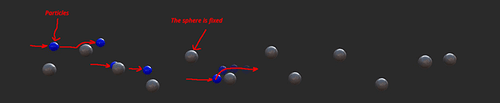
I’m working with the particle system for the first time and I’ve run into a problem.
The (blue) particles should not penetrate the gray rigid spheres upon impact. They should glide along the surface of the rigid spheres and then continue flying.
Do you have a solution for this?
Thank you for your efforts.
Hello Dr. Sassi
Thank you very much for your help.
It works well for me.
Have a nice weekend.
Thank you very much for your support.
On the left in the picture, the original has a completely different waveform to the one on the right in our example.
I can't adjust this with the shader.
Thank you very much
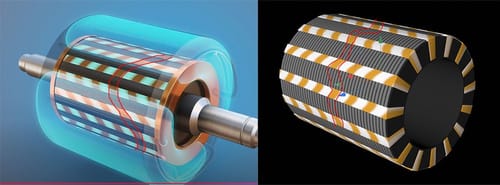
Animation and projection of a texture
The Youtube video shows a rotor on which magnetic lines (OPrange) swing back and forth.
In my attempts with an animated texture, I cannot create this effect.
It looks simple but it is difficult.
https://youtu.be/GveMZDKAQ-A?t=230
magnetlinien_beispiel_1.c4d
I would be very grateful if you could help me.
Thank you very much
Yes it is
Thank you very much for your help
Thank you very much,
great for controlling the color.
Do you have any ideas on how to emphasize the edges? In the original image, the edges are more intense and glow.
I really appreciate your help
Hello
Sorry for my English.
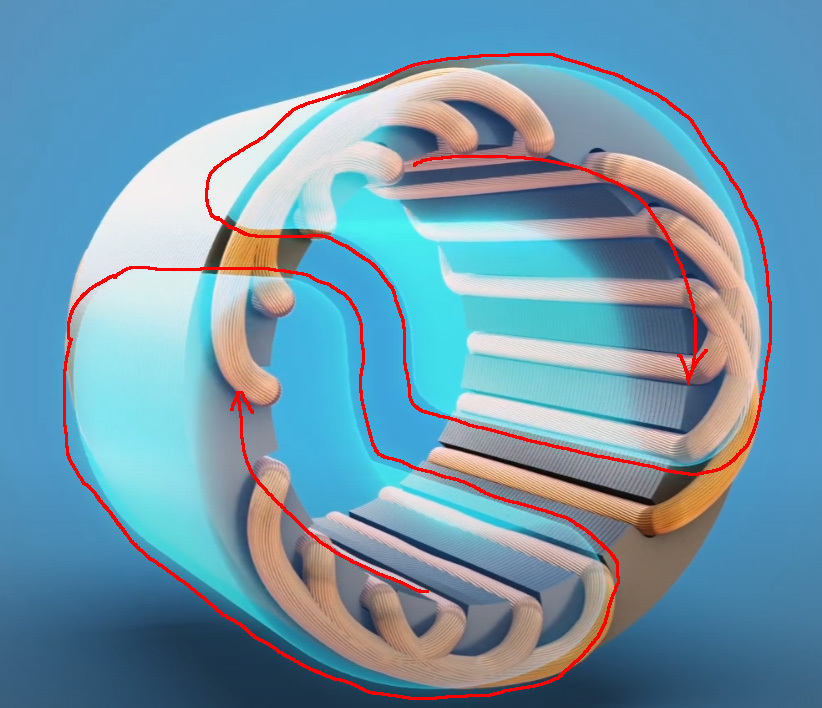
In an animation two half shells are rotating, drawn in red by me.
This was added in a compositing program.
I just want to create the half shells how to get the look created in Redshift.
Thank you very much
Many thanks for the support
I will test the scene.
Have a nice weekend
Thank you for your answer.
I don't know if this is usual, but I would like to continue bilingually from here on.
The Fraunhofer animation serves as a template.
I would like to illustrate the following.
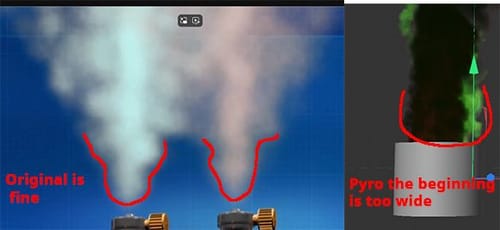
In gas welding, the gases acetylene and oxygen are mixed to produce a welding flame. If these gases escape in an uncontrolled manner and a spark is created, an explosion occurs. The gases are contained in pressurized gas cylinders.
When the gas escapes through the small outlet opening, the outlet cone is very narrow at the beginning and then becomes wider.
I cannot adjust this in Pyro.
It also looks too much like smoke.
Due to the pressure in the cylinders, the exit should be much more even and faster.
The animation from the Fraunhofer Institute comes very close.
The good thing is that I have been working very intensively with pyro over the last few days. But I haven't achieved what I want with pyro.
Perhaps there are other possibilities within C4d.
Sorry for the confusion. I have corrected my answer, it was inappropriate.
Thank you very much for the answer and the provided scene Dr. Sassi
I have spent many hours and worked through many tutorials.
The biggest problem is starting the simulation.
Thank you very much and have a nice weekend
Thank you for the answer Dr. Sassi
The video shows the effect I want to achieve from 0.12 onwards.
https://www.youtube.com/watch?v=W4w7bk59YNM