Cloned Object movement along path with offset
-
Hello, maybe you can help with this, I couldn't find any info on this. Maybe I wasn't sure what to look for.
I'm having an animated object.
I want to clone said object with a time offset, so the clones animate in with a delay. That works fine.
Now I want those clones to follow a spline but I also want the movement along the spline to be delayed with a time offset.That's where I struggle. I attached a file for testing in there. I'd just like to have the movement along the path also affected by the time offset. Does this make sense?
Many thanks in advance.
Cloner_Offset_Test.c4d -
Hi deal-blind,
Thanks for the file!
The offset is based on Object Keyframes. So we need to produce them first.
I used the Cube alone first, with a Spline Align Tag. Set to 0-100% (linear keyframe interpolation.)
Then, the Cappucino function (Shift + C) was used to record the Animation for Pos and Rotation (Tangential was on in the Tag.)
Removed the Align to Spline tag.
Placed the Cube under the Cloner and switched off the Spline Effector.Example.
CV4_2026_drs_25_MGto_01.c4dIs that working for your needs?
All the best
-
P.S.: As an alternative, how about using Particle as the driving force?
The age of each particle drives the animation individually.Example
CV4_2026_drs_25_MGto_11.c4d -
Hi Dr. Sassi,
many many thanks for answering so quickly and many more thanks for taking the time for a second approach.
I think the particle solution would be more art directable since I wouldn't have to bake the keyframes each time I changed the animation. It also solves most of my other challenges. The only thing I can't seem to achieve is that the animation along the spline is timed to a curve.
I'd like to achieve something where a particle/cloned object is born, stays where it is for a few frames, then starts moving along a spline but I'd like to ease/f-curve the speed of that animation fully art directible. Is that achievable with the particle solution?Thanks again and all the best.
-
Hi deal-blind,
To get no motion first, then after a specific time, motion can be done as shown in the file below:
The Particle Emitter is set to speed equals zero, and the Emitter is aligned (tangential) with the Spline.
When a specific Age is reached (Which you can adjust in the Condition), the Condition tells them to move on to the next Group.
This Group has the Follow Spline and allows so to move the clones accordingly.The typical problem would be two groups, while the Cloner allows only one.
The Multi Group helps here to keep the data in one "folder".Enjoy your project
-
Hi Dr. Sassi,
that helps a lot - many thanks once again! Also sorry but I find two challenges here:
- The animation along the spline is happening with linear speed and I can't really art direct the particles to start slow, speed up and then slow down the way I'd do it with a Spline Wrap or Align to Spline Tag. I tried doing speed control with a friction object and some fields and that might work with an open spline but if I have a closed loop it would be hard to have the particles start slow in the beginning, then do a few loops at high speed and then slow down on a final loop. Especially if I don't want all of the particles to speed up and slow down at the same time.
- The transition between the two particle groups is super helpful but has a distinct hickup at the frame where the particles cross over between groups - it snaps over to the new position. Probably how it is intended, but if there'd be a way to have it "cross over" between two groups over the course of more than one frame that might help to smooth that animation out. Couldn't find that though.
Don't want to take too much of your time but if you have any pointers there, I'd appreaciate it a lot.
In any case - thanks a lot for all the help. Extremely helpful as always.
-
Hi deal-blind,
You’re very welcome!
I have set up the Spline with more points (Uniform 128), then used the Current State to Object. This Spline is the new one to use in the Follow Spline.
Take from the Object Manager.Tags> Others Tag > Vertex Map, while the new spline is selected. Shift Double Click on the new tag to get the Brush option in the Attributes. Paint the values to your speed needs.The screen shot is manipulated to show the weight painted on the Spline more clearly
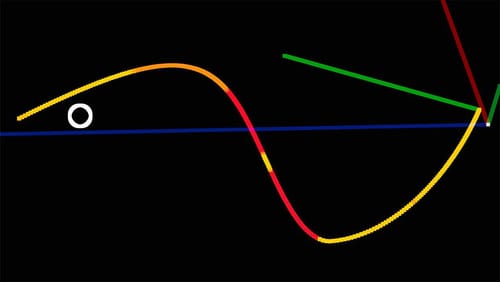
More in detail
https://help.maxon.net/c4d/2026/en-us/Default.htm#html/OFPFOLLOWSPLINE-FP_FOLLOWSPLINE_OBJECT_GROUP.html#FP_FOLLOWSPLINE_OBJECT_FOLLOW_STRENGTH_MAPThere is no option for single clones to adjust each and every clone separately. If needed, the driving Practice or Particles need to move into a new Group.
Cheers
