Hair Collision with Brush not working anymore
-
Hi there,
on the new versions of C4D (2026 and above) I have experienced an issue with the Hair Brush (set on Move) and Collisions on another Mesh.
I have setup up everything correctly. Hair collider tag and checked the Collisions in the Brush itself. It worked in previous versions. Can you tell me if there were made any changes or do I need to change any settings?
Important info: Collisions are working fine when Simulating /Animatic the Hair. Collisions just not working with the Brush Tool.
-
https://www.dropbox.com/scl/fo/nu7nl1nmxcx7ei3yz3cpb/AHv4S5x2A1PAB9gV8SpfB48?rlkey=f3d54umdma2xkqcjelwt9ufd6&dl=0
Here a link with screenshots and the file.
-
Hi whereas-stuff,
Thank you for the file and information.
Hair collisions in C4D only happen while dynamics are running — the program steps through time in little slices (sub-steps) to check if hairs hit objects.
When you use the Brush while the scene is paused, you’re instantly moving hair from point A to point B with zero time passing — so the collision system never gets a chance to check.
Even during playback, if you move hair very fast, it can skip past an object between collision checks unless you increase sub-steps in the Hair or Project Dynamics settings.
For grooming, the Brush is meant for art direction, not physics — if you need collision during grooming, play the simulation slowly and brush gently.
Consider (later) enableHair> Dynamics> 'Rigid' mode to lock the style once it’s where you want.In short, movement in no time is like infinite speed, like mph, km/h, or 1/0. In all cases, Simulations are not matching reality; they aim to find the best compromise between reality and computer power, typically with iterations or sub-steps, like 20 per frame.
All the the best
-
Thanks for the reply. But it was doable in previous versions?
-
Hi whereas-stuff,
Where do you got that information?
Not to my knowledge, going all the way back to the introduction of Hair.
All the best
-
Unfortunately I must inform you that your information were incorrect.
I found the error myself.It's working! But only for the mesh where the hair was being build on.
So when add hair to a mesh and add the collider tag to that exact mesh the collisions are working even with the brush.So there might be a little bug, that other meshes are not considered.... What do you think?
-
Hi whereas-stuff,
Please understand that I am always careful when it comes to simulation, as it is always something that is based on a compromise, which is not just my perspective on Cinema 4D alone. Real-world physics are complex, like how often light bounces in a millisecond, and how many bounces are in any given renderer calculation?
With that mindset, I answer here. E.g., you will not hear from me the false label "physical correct" for simulation in visual arts at any time, "plausible" --sure. Visual Arts have specific targets.I’m not clear what you expect, brushing and no matter the actions impact, that the collision effect works, or as suggested, brush and keep it gentle, as the Collision can be overcome with certain movements. I tried to explain the Collision limitations, but obviously, I did not get it through.
As mentioned, “brush gently,” it will work; however, in any case, it is possible to “brush” through the surface.
Even though your initial example showed clearly that the question is an External Collider, not a Host Collider. So, you seem to change course here. OK, let's go with that:
A similar effect as with the time running, which I think comes closely to the final settings (hence my preferred option), is the Simulation> Hair Options> Dynamic Interaction, where the Iterations are set via milliseconds. (Suggestion: Redraw to one.)
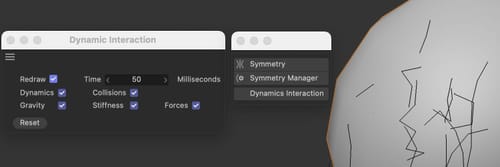
As a reminder, the Collision checkbox of the Brush needs to be on. Also, here, and I assume you have explored this, the Collision Radius (Brush interface) is a compromise, how close the Hair will get, and how fast or strong the Brush is used.If you can get 100% collision on the Host, with any Brush Interaction, great, not my experience, there are limits. If you get that, then that is new to me, and I haven't seen such a 100% effect since its introduction in 2005 (r9.5) – that the Brush influence and power would stop with the collider “surface fully. Not on a still, not running the timeline. I checked well Dynamic Interactions mode, as mentioned. Yet, the brush can dominate the Hair, meaning it moves it through the Collider surface with a certain action. It has a few indicators to stop, but it is also easy to move through the surface after enough power is applied. So, I hesitate to even closely tell anyone - it works 100% (Current version and tested on R25). Both: I just checked it again.
Anyway, it seems you have something working, and you find that something else has a bug when using an External Collider, and you want to know if that is a bug. My suggestion: continue this with Tech Support:
Any bug needs to be discussed with the tech support. Here is the only place to check that, explore it, and share my conclusions. Now it is time to get a second opinion. (I haven’t found in the database any mention that we have a bug here with the Brsuh/Collider, hence I'm moving it over to Tech Support. Thank you for opening a ticket! After all, if there is something I can’t see, it should be handled properly anyway.
https://www.maxon.net/en/support-center
My best wishes.
