C4D Crashes when loading an image into c4d hair material
-
I've been using C4D hair and it works just fine, but every time I open up the Native C4D hair material to add an image, it crashes. Idk what the problem is and how to fix this, and even after updating to 2026.1.1, it still crashes. Any help will be greatful.
Also, are we ever going to get a C4D hair update? it could really use a boost.
-
Hi DjeisonCanuto,
Not fun for you, sorry to hear this.
I have explored it and used ACES or the Legacy sRGB Linear space. Either way, no Problem here.
I’m happy to test more if you would provide more details.
Please check with Tech Support
https://www.maxon.net/en/support-centerI hope there is a simple solution for that.
All the best
-
Hey Dr. Sassi,
Thanks for replying. I never had an issue before, but now it's been such a headache.
I had looked it up before asking the forum and was given a checklist.
- Color space from Aces to Linear.
- PNG 8-bit 2K or less
- Check VRam
- Fresh Preferences
I submitted a ticket to the support center, and I hope they can help.
https://drive.google.com/file/d/1vmwK7JKm_yeZzIv46nfSv5Lvc0D1-VTe/view?usp=sharing
All the best,
-
Thank you for submitting a ticket, DjeisonCanuto.
Thank you as well for the file. I can load textures and render. 2026.1.0 and 2026.1.1 (Mac)
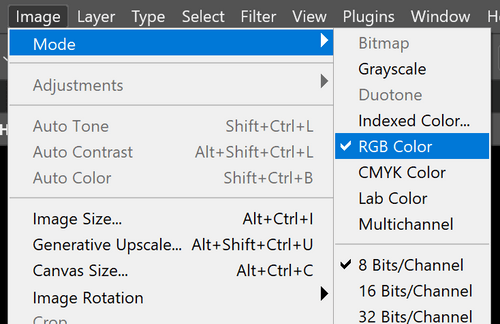
What I saw is that the png is in "Index" mode. (An old technique to create small files, and reduce all possible colors to 256 different values in total. From my point of view, I suggest avoiding this kind of image coding.)
Perhaps open it in Photoshop, go to Main Menu> Image> Mode: RGB
Save this file with a new name, and please try again.
If needed I can do that for you, please let me know.I hope you get a fast solution.
All the best
-
Thats very interesting. I'm on a PC. I opened up the Photoshop file, and it's already in RGB mode. I thought maybe it got messed up when using layer comps to files export. So I export manually, and it still crashes on me.
Is there a chance my C4D is trying to read it wrong?
And I just got this from Tech support
"Looks like this is actually a bug with the hair system. I haven't found a workaround for it in 2026.1, so your best bet for now is probably to use an older version until a fix can be implemented for this."
All the best,
-
Hi DjeisonCanuto,
Thanks for the reply. When tech support can already reproduce it, then the hope is much greater for a fast fix.
Have you tried a Tiff file instead, or even a jpg? Just for tests. OR what happens with a Tex node in Redshift if you load the PNG or another format in?
Without being able to reproduce it here, I can't tell more, and stuck with questions, while perhaps wasting your time. The motivation is here to find something that works.
My best wishes
-
Hi Dr. Sassi,
Yeah, any other file format seems to crash it in 2026. As for RS redshift, it seems to work fine in the nodes. It's mostly with the Native C4D shader where the problem is.
Though, I really appreciate the effort! You are always helpful!
All the best,
-
Thank you very much, DjeisonCanuto, for your kind feedback!
As a side note:
With those tests, we can exclude more and more things. Your overall hardware setup seems to work just fine, would be my conclusion, otherwise the problem would show up elsewhere.The problem is not the image format, another great point to exclude, it is most likely that an image is added at all that triggers it. Which excludes testing more on the image side.
I have also tried to use a Shader in the Hair-material to see if that triggers a problem. Which might not deliver much more insight, but the more data, the easier the tech support to focus.I will have an eye on the development. Thank you for your very much appreciated patient replies. I'm sure it is annoying to have to deal with this.
Fingers crossed, it will be easily fixed.
Cheers
