PNG issue
-
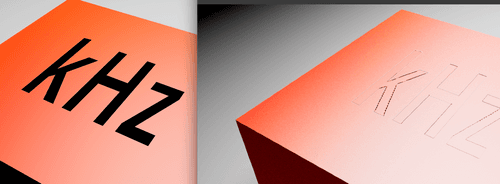
I have a PNG which I need to attach to an image. Yes I could UV map it, but I have not... The question is, why is the solid black PNG seemingly outlined on the final render?
It seems hit and miss...
It is set to flat projection, front view and no tile.Somedays it works no problem, then other days; usually when the deadline is looming it doesn't work

Any help?
-
Hi earth-video,
Feels like the transparency is calculated wrongly. Meaning inverted, that would result in that seam typically. As usual, guessing is not my preferred way.
Please try this, and compare your PNG with the one attached in Photoshop.
https://projectfiles.maxon.net/Cineversity_Forum_Support/2026_PROJECTS_DRS/20260212_CV4_2026_drs_26_RSpg_01.zipIf you can share the PNG (Wetransfer, Google, Apple , Adobe or Dropbox only), if I can, I will have a look at it.
If nothing indicates, please check with tech support:
https://www.maxon.net/en/support-centerCheers
