Clone along spline
-
Hello, I'm having an issue finding a solution for the following. Any help would be greatly appreciated.
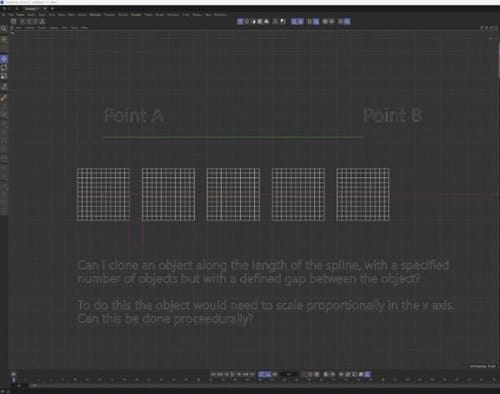
I would like to clone along the full length of a spline, full span from point to point. I need to specify the number of objects cloned but also have a user defined gap between the object?
To do this the object would need to scale proportionally in the x axis in the image attached.
Can this be done procedurally?Thank you.
-
Try the "Spline Bead Distribution" from the Advanced Distributions in the cloner.
-
Thank you @noseman , that's so close to doing what I'm trying to achieve. Unfortunately while it is maintaining the desired gap it is only scaling the last object along the spline to fit the full length, as apposed to scaling all the objects proportionally along the length. I've had a play around but I cant find a way to set this. Thanks for your help though.
-
This can't be done automatically. Here's a semi-automatic workflow:
In the Spline Beads, set the "Fill Gap" to None. This will stop generating the small object at the end.
Set your Gap to the desired length.
Then, start scaling your clone on the Z Axis (that is the axis aligned to the Spline) until you have the count you want.
Maybe a custom Distribution could be made but I would like to know exactly your use-case to make sure it works.
Are you just planning to clone simple objects like cubes? -
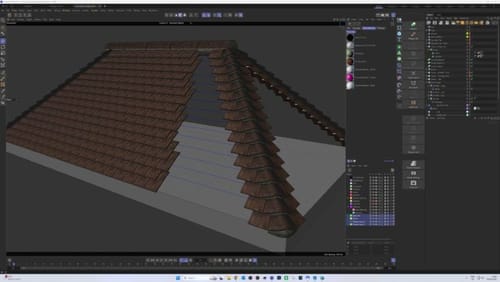
@noseman I'm attempting to save some time by automation for arch viz roof tiles. I have cloned the edge tiles at each corner and I just need to clone the tiles that span between the corners. Hence looking at scaling as it wont always be a divisible distance.
-
I'm afraid there's no "easy" way to achieve it without spline by spline clone-scaling.
This would require a complex advanced distribution or some sort of Python Effector.
Sorry. -
Thanks for your help.