Making a coin rotating along a rotating Sweep
-
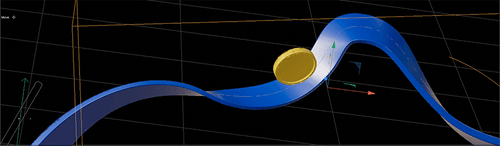
I have got an object that I created with a simple sweep. In the sweep settings, I set some rotation that will be animated.
I have a coin object that will essentially need to slide along the sweep object while also following its rotation.Do you have any heads up on how I can achieve the result? The rotation makes everything complicated.
Here's an image of my scene
-
Hi shoot-laugh,
With "its rotation," you mean the pathway (blue in your image) or the rotation of the coin, like a rolling tire.
Make the Path (in a copy) editable, and use one of its border edges as a new guide. Select the edges and then Main Menu> Mesh> Edge to Spline.
I would use the middle edge of the path to harvest as well as a Spline in the same way, so they are in "sync."Now you can set up three Nulls:
One that is where the coin touches the path
Second, the same as the first, but a little bit ahead of the first.
Third, the Null that follows the outer edge of the path.These three create a triangle, which is stable. All three are animated based on Align to Spline, while the second one is a little bit ahead (+3%)
If the first one is animated, the second and the third can use the data in XPresso, so you have to care on end only about only the first.
The first one receives a Target Tag. The Target and Up Vector inside the Target Tag are based on Null 2 and 3.The outer edge-based spline can now also be treated as a “Rail”. Meaning the coin leans into a curve, or for dramatic effect, leans out of a curve, based on moving the Spline up or down a little bit.
With that set up, the First null can now receive the Coin as a child.
Is that what you are looking for?
Let me know if that needs more data on your side. I'm happy to share, but if you can share teh path set up, it would be easier. (Just the path as c4d file. Thanks.)
Cheers
