CINEVERSITY

    Maxon Logo
    • Login
    • Search
    • Recent
    • Popular
    • Users
    • Groups

    Distribute Cloner on Scatter

    Question & Answers
    2
    5
    42
    Loading More Posts
    • Oldest to Newest
    • Newest to Oldest
    • Most Votes
    Reply
    • Reply as topic
    Log in to reply
    This topic has been deleted. Only users with topic management privileges can see it.
    • E
      effective-mode last edited by

      I want to simply use my Scatter geometry (my Scatter object is a Polygon) as the source of Cloner to distribute other elements on. But whatever I try, it's not working. Any advice?

      1 Reply Last reply Reply Quote
      • noseman
        noseman last edited by

        Cloner in Object Mode. Drag the surface you want to clone onto in the "Object" link and that's it.
        Please share a scene as this should be very straightforward.
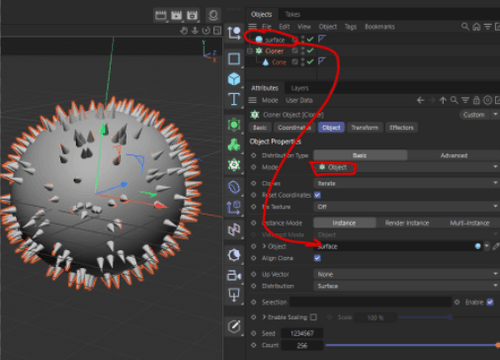
        image.png

        1 Reply Last reply Reply Quote
        • noseman
          noseman last edited by

          here's a project:
          https://www.dropbox.com/scl/fi/6l3zq9ntf0bx1eeaxhm9e/object-surface-cloning.c4d?rlkey=s5kqmmxbaozl6q3pyc5ug095x&dl=0

          1 Reply Last reply Reply Quote
          • E
            effective-mode last edited by

            Nope, Not with the Scatter Brush

            https://www.dropbox.com/scl/fo/1vx0e4x2te5v926ayanp3/AF0ggdOGN1mlPEUt-4w83Wg?rlkey=noub331zg5kn4fckp1sysrekz&dl=0

            1 Reply Last reply Reply Quote
            • noseman
              noseman last edited by

              Unfortunately the Scatter Object internally uses Render instances and, apparently, can't be used as a source for a cloner...
              Let me ask around to see if someone knows of a workaround, and in the meantime please report this as a bug/idea from inside Cinema 4D.

              1 Reply Last reply Reply Quote
              • First post
                Last post