To 1.: Yea i watched that video after i already had the animation done with cloners. If im not mistaken, this only works with particles.
To 2. and 3.: AMAZING! Thats two very valuable things i didnt know!  thanks so much!
To 1.: Yea i watched that video after i already had the animation done with cloners. If im not mistaken, this only works with particles.
To 2. and 3.: AMAZING! Thats two very valuable things i didnt know! thanks so much!
As a matter of fact i just came across this same problem trying to workaround the inability to give tracer (tracing animated cloned nulls) geometry (RS Object -> Curves -> Capsules) random colors via Random effector + Material (color user data).
My workaround was to just bake the whole thing down and give the traced objects individual materials manually. So i used a sweep instead of the RS Object tag geometry since that wouldnt work, and tried baking it as alembic.
Trying to bake the Sweep = Empty alembic
Trying to bake the cloner = Empty alembic (makes sense)
Trying to put the sweep in a connect and baking as alembic = C4D Crashes
Here is the file:
https://www.dropbox.com/scl/fi/m7v8rpmf3bgbfcu85qhxw/SwirlStrokes.c4d?rlkey=50iul5hkypw99lwkjr27c352a&dl=0
I didnt try it with a connect object. If i come across this problem again, i will try it out. I have my doubts though since i have had so many problems with the alembic process over the years that i rarely even try it anymore.
Im a bit confused that this is not a straight forward process in 2026 but i find myself again trying to figure out how to create individual animated (baked) objects from a cloner that had animated properties and effectors.
Current state to object = fail (makes sense)
Caching the animation (tag on cloner) + Current state to object = fail (makes less sense)
Timeline Function "Bake Objects.." = fail (probably because the cloned objects were in hierarchy and there is no checkbox for it.. aka makes no sense at all)
Baking as a Alembic = If it's gracious enough to work at all, it explodes as soon as you change its hierarchy.
Is there truly no way to simply press a button and have the cloner turn into individual keyframed objects?
Oh hey im so sorry for the late answer, i managed to kind of work around it by copy -> paste -> "Zero Angle"-Button -> manually re-aligning if there was an angle i wanted to preserve.
I tested with a minimal setup:
Test scene.c4d
If you copy ease from the 2nd Y keyframe onto the 2nd X keyframe, the break shows in cinema version 2025.3.1
I think this only happens if the keyframe from which you copy has broken tangents and an angle. It seems it also kind of breaks the "Keep Visual Angle" function (at least often) into not functioning anymore for that keyframe.
Anyway thank you so much for taking time for this out of your vacation. There is no urgency anymore so feel free to close this or check it out after vacation 
All the best
Hi Dr. Sassi im behind in a project and need a fast fix for my problem.
I guess its a bug or limitation. I hope there is a fix or workaround.
If i copy the ease of one keyframe and paste it back to that exact keyframe or any other keyframe, that ease is not the same anymore because its tangents are not keeping the same visual angle anymore. Not sure if this only happens with keyrames that only have broken tangents (i need to break them to make them longer on one side but i keep visual angle doing it).
I select this keyframe and copy the easing:
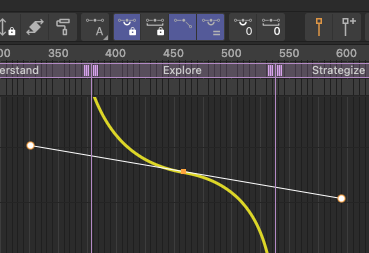
This is it after pasting the ease:
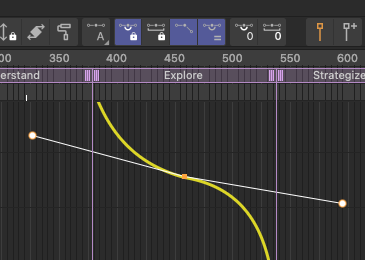
If i paste it to different keyframes, they just break into uselessness:
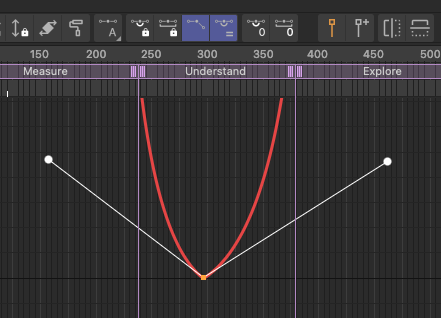
They all break differently but they all break:
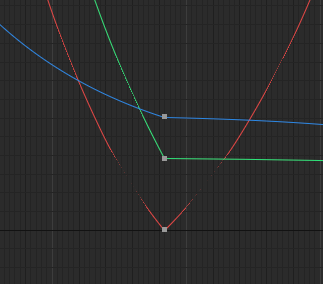
Questions that come to mind:
Is there a way to copy+paste interpolations of broken tangent keyframes and maintain the visual angle?
Is there a way to restore visual angle like the "Zero Angle (tangent)"-Button does but without actually zeroing out.. just re-aligning the left tangent to fit the right one?
Is there a way to elongate one tangent (but not the other) without breaking tangents?
Any other way this problem could be fixed?
Sadly i cant just redo stuff fundamentally because i cant redo the whole animation. Its due today