CINEVERSITY

    Maxon Logo
    • Login
    • Search
    • Recent
    • Popular
    • Users
    • Groups

    Lotto Ball - how do I create a texture map?

    Question & Answers
    2
    5
    1177
    Loading More Posts
    • Oldest to Newest
    • Newest to Oldest
    • Most Votes
    Reply
    • Reply as topic
    Log in to reply
    This topic has been deleted. Only users with topic management privileges can see it.
    • A
      alcohol-screw last edited by

      I've been searching the net for an answer, with no joy, hoping someone here might be able to help. I need to make a texture map to model a UK lottery ball. I have no idea how this is done, any steer on how to approach this would be appreciated.

      lottery_ball_reference.jpg

      1 Reply Last reply Reply Quote
      • Dr. Sassi
        Dr. Sassi last edited by Dr. Sassi

        Hi alcohol-screw,

        Here is a quick example
        Preview
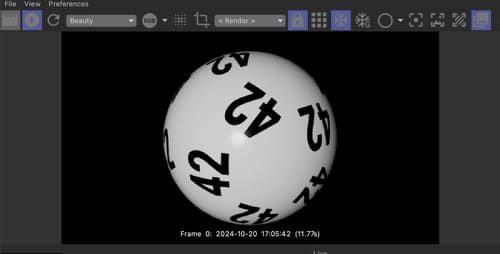
        Screenshot 2024-10-20 at 6.18.13 PM.jpg
        Texture
        42.jpg
        File
        CV4_2025_drs_24_TXls_01.c4d

        Would that work for you?

        I used an Primitive>Platonic>Icosa.
        I made it editable.
        Selected all the UV polygons and used the Command "Max UV".
        Then, I selected the lower point of the UV and moved it to be an equal-sided triangle (roughly). It looks like one triangle, but they are all on top of each other.
        With a Spherify Deformer and SubDivision Surface, I created then a round sphere out of it.
        I used the Object Manager> Object> Current State to Object.

        That is pretty much all. The texture is a placeholder.

        Let me know if you have questions, and I'll be happy to look into it.

        Enjoy your Sunday!

        Dr. Sassi Sassmannshausen Ph.D.
        Cinema 4D mentor since 2004
        Member of VES, DCS.

        A 1 Reply Last reply Reply Quote
        • Dr. Sassi
          Dr. Sassi last edited by Dr. Sassi

          P.S.: just in case you need a sequence of numbers
          https://projectfiles.maxon.net/Cineversity_Forum_Support/2024_PROJECTS_DRS/20241020_CV4_2025_drs_24_TXls_99.zip
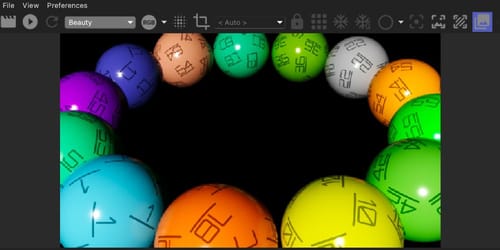
          Preview_Lotto_01.jpg

          Cheers

          Dr. Sassi Sassmannshausen Ph.D.
          Cinema 4D mentor since 2004
          Member of VES, DCS.

          1 Reply Last reply Reply Quote
          • A
            alcohol-screw @Dr. Sassi last edited by

            @Dr-Sassi Thank you so much, this is just what I needed to understand how to approach this model. Really appreciate the reply and example model and link to the other zip. Thank you.

            1 Reply Last reply Reply Quote
            • Dr. Sassi
              Dr. Sassi last edited by

              You're very welcome, alcohol-screw, thanks for the feedback.

              My best wishes for your project!

              Dr. Sassi Sassmannshausen Ph.D.
              Cinema 4D mentor since 2004
              Member of VES, DCS.

              1 Reply Last reply Reply Quote
              • First post
                Last post