Pyro Won't Render
-
Pyro won't render. I've tried using a pyro material and a volume material. I've cached the scene, etc. Here's the link to the project file.
https://we.tl/t-ylF9V3mkTg
-
Hi airline-spray,
Thank you very much for the file.
Please have a look here:
CV4_2025_drs_25_PYcs_11.c4d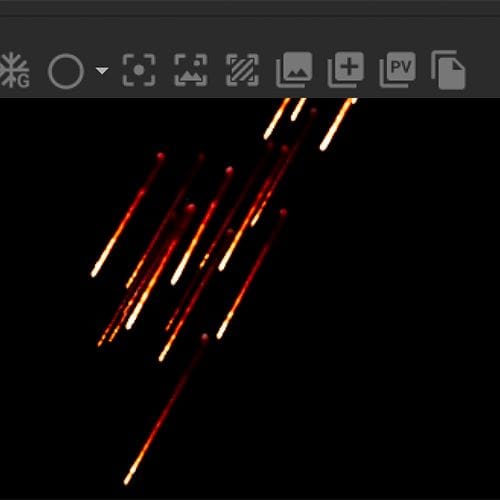
Start at frame zero, stop perhaps at frame 20, and render.
I have swapped out the Pyro Output, the material, and deleted the Scene Object (it was empty).Is that rendering for you in that way?
Please let me know.I do not have the computing power here to dive deeper into it. My machine crashes after a few explorations.
My tip, check with tech support.
https://www.maxon.net/en/support-centerAll the best
-
@airline-spray
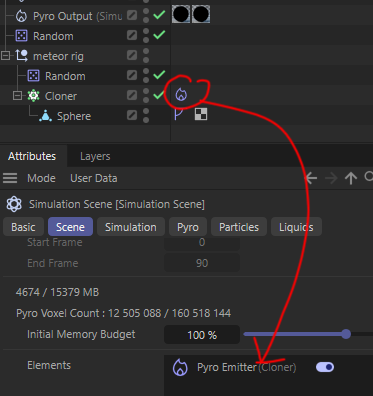
The reason it's not rendering is that you haven't included the Pyro Emitter Tag into the "Simulation Scene" Elements. The simplest solution is to Drag the Cloner's Pyro Tag into the "Elements" Box and rerun the simulation.
Step by step:- Rewind, delete and disable caches
- Select "Simulation Scene" Object and go to "Scene Tab"
- Drag the Pyro Tag (NOT THE OBJECT) into the "Elements" Box
I had to decrease the sim resolution as my GPU can't handle it, but it did render.
-
Noseman, Yes, it was empty, so I deleted it, and the rendering worked, as it was applied to the default scene.
My idea here was first to make the setup small and working, as rendering was the main question. After that, check why things are set up as they were. Then explore what is needed and wanted. So we have a good progression and a savvy feeling about it.
So, with two solutions now, perhaps there is confusion for people reading along.
The short answer is: both are correct, while using no Scene Object places it all into the default scene (Attributes>Mode> Scene> Simulation), while using the Scene Object (or more than one) allows creating independent Simulation setups. What is the right one now should be easy to decide.
Cheers
P.S.: thanks for confirming that the scene is demanding, I checked it on several computer here, all show very little responsiveness here.
-
Thank you both for your contributions. Very helpful!
I know this must've been a relatively simple problem to solve and I prefer to ask the masters harder questions. With consideration of this, is there another resource that I could have referenced to solve this issue (c4d documentation, specific training videos, etc.)?
Thanks again!
-
Hi airline-spray,
Thanks for the feedback. Please consider every question that leads to a solution, no matter the complexity, might be something that helps others. So, please never hesitate to share your question. I understand your point, you have set up a Major Feature Film Level VFX Effect, and then that tiny little problem seems to be in contrast to it. I think we all have been there …
.
You ask for a different way, Noseman often suggest to contact him on X, perhaps something to consider: @nosemangr
.
There are a lot of resources; the question is always what fits you.
.
Redshift Forum
https://redshift.maxon.net
.
Maxon on YouTube
Noseman runs the Ask The Trainer show twice a month, and questions are even preferred beforehand, during the live stream; they are welcomed. He is surely the go-to specialist for anything Simulation (but not limited to this)
Most shows that cover those themes are timestamped to avoid endless timeslider manipulation
https://www.youtube.com/@MaxonTrainingTeam/streams
.
More YT Channels
https://www.youtube.com/@MaxonZBrush
https://www.youtube.com/@MaxonRedgiant
https://www.youtube.com/c/MaxonVFX
.
Cineversity Videos
To make this point, Athanasios Pozantzis AKA Noseman, has a few series worth watching
https://cineversity.maxon.net/en/results?term=Pyro
The more you know, the more it might be a refresher, but have a look.
.
Documentation
https://www.maxon.net/en/support-center
.
The manual is mostly designed to set it up as intended by the developer, but of course, this is not a solution for problem-solving.
.
Tech support is for anything, as the name suggests, technical. In short, things that need more than creative problem-solving.
.
FAQ from tech support
https://support.maxon.net/hc/en-us/sections/17552911375516-Cinema-4D-2025
.
Some thoughts
.
Search engines send their bots often to visit the Forum, and an internet search often leads to the YouTube Channels or back to the forum. Thanks to all the questions asked - so thank you.
.
My method is most of the time to check if there's a simpler setup, and not just tell what to do. Since I have been doing this since 2004, I have collected a few ideas to provide more than just do this, do that answers. I want everyone to feel empowered afterwards. It makes me happy when things grow and work.
.I hope my text was inviting enough.
.
Happy Holidays