Animated Alembic cannot Pin Material
-
I have a material which doesn't pin or stick under certain circumstances. I have been working on solutions for days. I have created a simple precise example scenario to show you. Unfortunately, I have to begin at this step, rather than from an earlier point in the process. It has a baked alembic animation of a human puppet walking. If I place a material with a maxon noise, it doesn't stick/pin to the alembic. Is there a way, beginning with the linked project file to attach the material and it not move/swim across the object as it moves? I have tried pin material tag, RS Object-Geometry Reference, and mesh deformers, but was unsuccessful. Can you help?
Texture Swimming Project File Google Drive Share
https://drive.google.com/drive/folders/1bosIBswPraJzF34SJVJHt6tBpGBfl5t5?usp=sharingThere are 2 video files inside the folder, of the current outcome, and the desired outcome. While I understand that I can make it work (evidenced by the desired outcome video), I have to learn how to work with only the baked alembic source file, rather than the entire original project.
Thank you.
Cinema 4D 2026.1.0 RS 2026.2.1 MacOS 15.7.3 M1 -
Hi appointment-insect,
Thank you very much for your files.
Please add this file to your folder, so the Alembic that you have can be read.
CV4_2026_drs_25_RSmn_01.c4dI have excluded the TriPlanar and set the Noise to
Maxon Noise>Inputs> Input> Source> UV/Vertex Attributes
Maxon Noise>Inputs> Input> Vertex Attribute Name: Drag the UV tag that sits on the Alembic in this fieldMore in depth:
https://help.maxon.net/c4d/2026/en-us/Default.htm#html/COM_REDSHIFT3D_REDSHIFT4C4D_NODES_CORE_MAXONNOISE-NET_MAXON_NODE_BASE_GROUP_INPUTS.html#COM_REDSHIFT3D_REDSHIFT4C4D_NODES_CORE_MAXONNOISE_COORD_ATTRIBUTE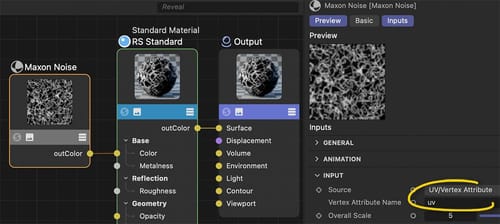
Here is the rendering:
https://projectfiles.maxon.net/Cineversity_Forum_Support/2025_CLIPS_DRS/20251228_CV4_2026_drs_25_RSmn_01.mp4Please let me know if that works for your project.
Have a nice Sunday!
-
I want to thank you for this, not only the quick timing, but the quality solution. Your idea does work with the triplanar modification removed in my actual project.
If I had to use a triplanar in my material, is there a way for that to work? No need to respond immediately, and thank you Dr. Sassi!
-
Thanks for the reply and feedback, appointment-insect.
You're very welcome.Part one: Exploring your file and the Triplanar problem
Sorry for the long text: This is an exploration of what I got from you and what prevented TriPlanar from working properly. Since your file was an educational file, I will detail it carefully. The short answer is: A setup that works with a different character is in the next post.The tip I would typically give is to have a UV setup that takes care of the texturing. I'm aware that this is a little bit of an abstract theme. For now, please let me leave you with this short seed for the future: UV polygons are the bridge between a 3D surface and a 2D texture.
It takes perhaps some time before one can feel savvy with this, but it is worth it to know.
Anyway, TriPlanar and Alembic. There is the Reference option in the TriPlanar. But it obviously doesn't work for the example scene that you shared. The reference is a record of the given data, and the idea is to use that throughout the whole shot. However, Alembic allows for changing the point amounts of objects. I have no idea why I can see variations in your model over time. When the point amount changes, the reference is useless. It is that simple and sad at the same time. Some functions in the original setup might have a "weld" option, and merge in certain frame points very close to each other. (Just a guess, as I don't have the original scene, only the abc file from you)
Let's assume for a moment we have an Alembic file with a constant number of points, and the points are keeping their structure, think of it as the neighbors don't change. Then the reference should work of the Triplanar. If the swimming continues, a Redshift Render Tag might help. Here, the Geometry> Snapshot helps. It shows BTW as well as the point amount. Which gave me the hint about the changing amount in your file. I would use frame zero to take the snapshot, but explore along the timeline if the point amount changes. With this set, the swimming should stop.
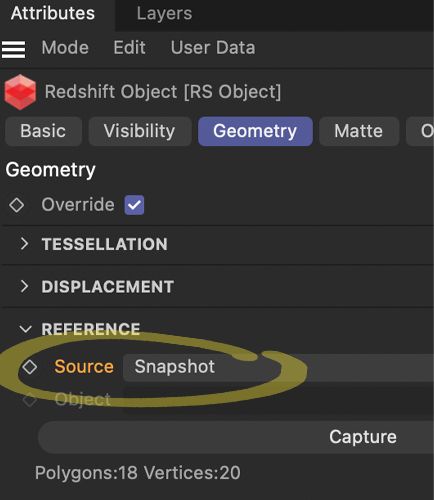
If not, we need plan B. Have a look at the scene file. I have placed a camera with a 36mm focal length (as it was cleverly designed for many decades at 36mm, now it is 35mm and needs to be set for this). With 36 mm, it matches the default "sensor Size. Which means, if we have an object of 400cm, then the camera distance to that object will will 400cm cover precisely the object. Given a square and the render settings to a square as well, while the view axis hits the object center, you can render any texture or shader. (Switch off reflections and preferable use on the Luminance (weight 1.0).
CV4_2026_drs_25_RSrn_01.c4d
With this, you get the Maxon Noise to any size of a texture, and that creates stable results. Again, the TriPlanar is great for static objects, and in the moment the point amount varies, the effect will be "a swimming texture".A side effect of TriPlanar, especially with Noise "Sema", is that the seams are quite visible. Another reason I avoid those options.
https://projectfiles.maxon.net/Cineversity_Forum_Support/2025_CLIPS_DRS/20251228_CV4_2026_drs_25_RSmn_02.mp4
In the clip above the "Blend" is animated.I hope that helps, scroll down:
https://help.maxon.net/c4d/2025/en-us/Default.htm#html/TRSOBJECT-REDSHIFT_OBJECT_TAB_GEOMETRY.html#REDSHIFT_OBJECT_REFERENCE_SOURCETo cover this more completely:
There is an UV Transfer option, which might need more data from the source scene, or some experimentation to get this extracted from the abc file. Not sure it is useful here.All the best
-
Part two: A working example file
Here is a freshly downloaded Mixamo animation, turned into an abc file.
I used this motion capture as it has dramatic changes, perhaps better than I could do with my Motion capture setup.
The TriPlanar is set to Reference, and the RS Render Tag to Snapshot.
The geometry is stable, e.g., in point and polygon count.
I think the Noise is pretty stable.
https://projectfiles.maxon.net/Cineversity_Forum_Support/2025_PROJECTS_DRS/20251229_CV4_2026_drs_25_RStr_01.zip
Preview render
https://projectfiles.maxon.net/Cineversity_Forum_Support/2025_CLIPS_DRS/20251229_CV4_2026_drs_25_RStr_01.mp4
All works fine on my side. -
Firstly, your help and instruction is invaluable. You have to be the most patient and kind trainer on earth. That being said, I ended up using the textures with the triplanar off and used the UV tag inside the nodes to fix my current problem, and I think it is working well. Your explanation of how points could change in the Alembic was something I was guessing at, but didn't truly understand. I plan to experiment with the triplanar, baking UV's, and your latest noise breakdancer from mixamo. All of this current problem came out of a project where one person animated a character (character object) in one project, but then we were trying to place it into tracked footage. However, we couldn't seem to move the rigged character animation to a different area of the scene. This is probably evidence of another gap in my learning. So the alembic was used to store the motion, but there was probably a better way.
Thank you again for your responses Dr. Sassi, I won't take up any more of your time this year! -Ha! -
Thank you very much, appointment-insect!
You’re very welcome! Thank you so much for the kind feedback!
I do not felt that you take time from me, and there is some little bit left in 2025!I like to read that you got it fixed!
Please always keep in mind that the time spent on any question will hopefully help others in the future. In other words, please never hesitate to ask.
Things change, and questions keep the forum up-to-date!If you like to explore the problem of tracked footage and character animations, I’m happy to look into it.
Please use a new thread for it if you would like to explore it. A new forum’s thread means that things stay readable and perhaps “findable”.For all your projects that come to you in 2026, I wish you a lot of success and fun with them.
Enjoy!
