C4D Particles Tornado Effect?
-
I've got another challenge for you, Dr. Sassi.

I'm trying to come up with a solution, using the C4D particles, where I can create a long, thin, vortex / tornado.
(Imagine, a dust devil, or the water circling a drain.)There only seem to be two options related to this; the Rotation Object and the Spin effector.
However, neither some to get close:
The Rotation Object has limited controls, and at higher strengths it makes the particles rotate / orbit outwards.
The Spin effector mostly seems to control the orientation of individual particles.I've tried to use the Twist Object, as this is the kind of control I'm after, but not surprisingly, it doesn't work with the particle engine.
I've tried to combine the Rotation Object, as well as the "Follow Spline" object, but alas, that just seems to create a mess as the two effectors just fight against each-other.
Am I just missing something? Is there a simple solution, to get the particles to twist like I'm envisioning?
Thanks!
-
Here's a simple project, showing what I'm trying to do. Essentially, I want the ability to have all the particle activity mostly adhere to the overall shape of the spline. But the "rotate" object really has different plans...
-
Hi entry-newspaper,
Thank you for the file.
Please have a look here, to get more input:
CV4_2026_drs_26_PAtt_01.c4d
CV4_2026_drs_26_PAtt_11.c4d
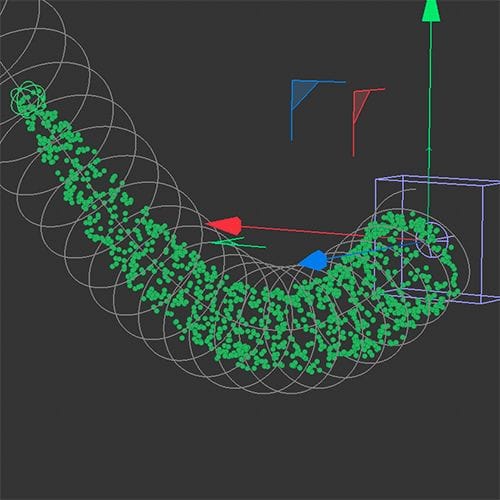
I assume file …_01.c4d is not the outcome you are looking for, but perhaps …_11.c4d is.
Or have a look here
CV4_2026_drs_26_PAtt_21.c4dLet me know what works or not.
Cheers
-
Oh, wow! Thank you so much. It's going to take a little time for me to study what you have set up, in those scene files. But I'll report back.
-
Thank you very much, entry-newspaper.
Let me know how it goes and what else is needed. I'm happy to look into it.
Enjoy
