CINEVERSITY

    Maxon Logo
    • Login
    • Search
    • Recent
    • Popular
    • Users
    • Groups

    Sweep and Bevel

    Question & Answers
    2
    8
    79
    Loading More Posts
    • Oldest to Newest
    • Newest to Oldest
    • Most Votes
    Reply
    • Reply as topic
    Log in to reply
    This topic has been deleted. Only users with topic management privileges can see it.
    • S
      smckenzie last edited by

      Not understanding why the bevel controls aren't working. here 🙂

      https://www.icloud.com/iclouddrive/0068Ixf4qAWXo8yrqosaRatAg#bevels

      1 Reply Last reply Reply Quote
      • Dr. Sassi
        Dr. Sassi last edited by Dr. Sassi

        Hi smckenzie,

        Thanks for the file. 🙂

        Here are two options for Bevels.
        CV4_2026_drs_26_MObv_01.c4d
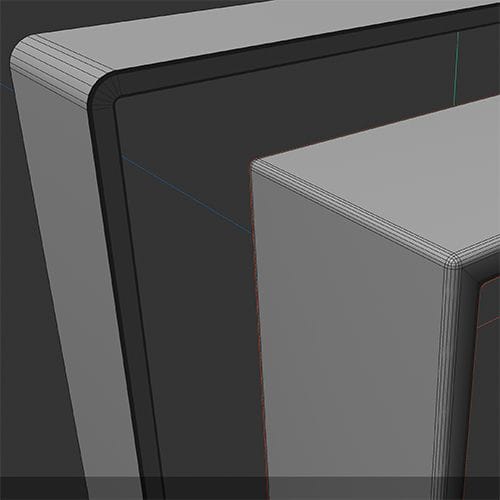
        Screenshot 2026-01-30 at 12.12.41 AM.jpg

        The Bevel tool will not affect generated results; it is for Polygons.

        The Way a Sweep result can be beveled is either by setting up the Spline or with the Bevel Deformer.

        In some cases, I could see the Volume Object as an …

        Cheers

        Dr. Sassi Sassmannshausen Ph.D.
        Senior Trainer, Maxon Master Trainer, L&D - Strategist
        Cinema 4D mentor since 2004, Member of VES, DCS.

        1 Reply Last reply Reply Quote
        • S
          smckenzie last edited by

          Thanks - so why is there a Bevel control under Caps on the Sweep object if it can't be used?

          1 Reply Last reply Reply Quote
          • Dr. Sassi
            Dr. Sassi last edited by Dr. Sassi

            Thanks for clearing that, smckenzie,

            The caps are on the end of a Path.

            CV4_2026_drs_26_MObc_01.c4d

            You used a closed path, no cpas, no "Bevels".

            All the best

            Dr. Sassi Sassmannshausen Ph.D.
            Senior Trainer, Maxon Master Trainer, L&D - Strategist
            Cinema 4D mentor since 2004, Member of VES, DCS.

            1 Reply Last reply Reply Quote
            • S
              smckenzie last edited by

              Got it. So there's no way to procedurally create bevels on closed splines, i.e. stepped bevels on a picture frame?

              https://www.icloud.com/iclouddrive/0405f7k3IjtmY2ksuNmD-Pe8A#bevels

              1 Reply Last reply Reply Quote
              • Dr. Sassi
                Dr. Sassi last edited by Dr. Sassi

                Thanks for the additional information, smckenzie.

                That means you need to get the Caps to the side where you need them, like with the Extrude:
                CV4_2026_drs_26_MOpf_01.c4d
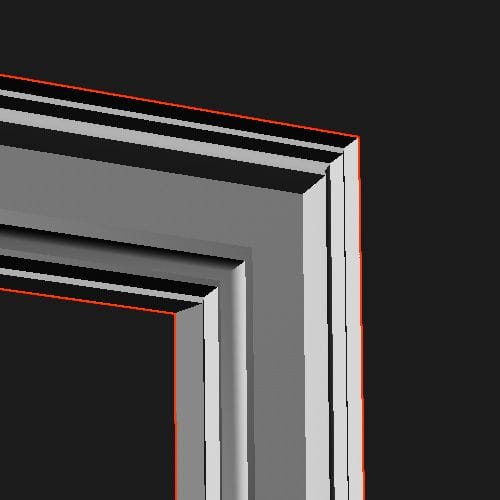
                Screenshot 2026-01-30 at 1.18.51 PM.jpg

                Or just use the setup of yours with the two rectangle Spline and add to the Profile a quick Spline-Sketch
                CV4_2026_drs_26_MOpf_11.c4d
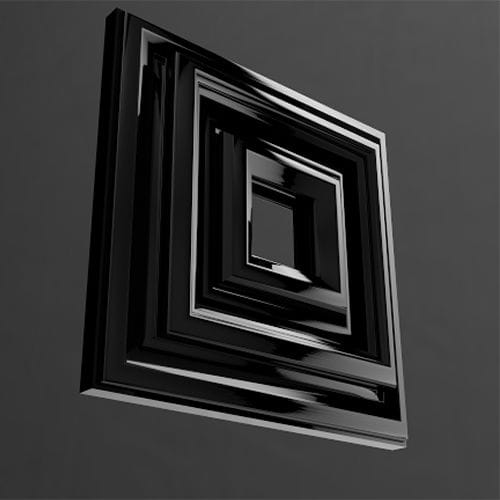
                Screenshot 2026-01-30 at 1.26.59 PM.jpg

                Is this working for you?

                Cheers

                Dr. Sassi Sassmannshausen Ph.D.
                Senior Trainer, Maxon Master Trainer, L&D - Strategist
                Cinema 4D mentor since 2004, Member of VES, DCS.

                1 Reply Last reply Reply Quote
                • S
                  smckenzie last edited by

                  Didn't think of the Spline Mask. That's super helpful, thank you!

                  1 Reply Last reply Reply Quote
                  • Dr. Sassi
                    Dr. Sassi last edited by

                    You're very welcome, smckenzie!

                    My best wishes!

                    Dr. Sassi Sassmannshausen Ph.D.
                    Senior Trainer, Maxon Master Trainer, L&D - Strategist
                    Cinema 4D mentor since 2004, Member of VES, DCS.

                    1 Reply Last reply Reply Quote
                    • First post
                      Last post