Render C4D Particles in Standard Render Engine?
-
Dr. Sassi,
This post piggybacks mine from earlier, regarding motion vectors.
I'm still running some experiments, trying to find ways to generate motion vector data, without the tremendous render times inside Redshift. I feel like I might be able to get away with generating them with the standard renderer for some of my scenes / objects. However, I'm going to have several instances where I'm creating (C4D) particle effects. Those beauties will be rendered through Redshift, however, I'm wondering whether I can create the particle motion vectors in Standard? I know that the C4D particles are just data, hence the need to generate the visible results with a RS tag. But what's the equivalent, in standard render? I'm guessing there is no perfect 1:1 solution. Would it be a MoG Matrix object, which could use the particle data?
Thanks, for any ideas you might have!
-
Update, I did figure out that it's not terribly difficult to accomplish some of what I was asking about, in regards to the native particles.
Use a MoGraph Object, set to "Object" mode, then drag the Particle Group into that selection. With the MoG set to "Multi-Instance" it's not terribly laggy, either.All good!
However...I'm realizing that MoGraph is not likely going to read the Data Mapper I have used to control the scale of the particles, over their lives.
So I'm not sure I'll be able to get close enough to make the resultant motion vector render match that of the RS particles beauty pass. -
Hi entry-newspaper,
Thanks for the update. Yes, combining things is often a great way.
I have no idea about your target, so please ignore it if it doesn't fit, but I hope it triggers some other ideas.
Color is often used to store values, and with the Particle Node Modifier, you can just feed data into single color channels. A single channel of color becomes a gray-value, usable as a mask, etc.
Example:
CV4_2026_drs_26_PTmg_01.c4dhttps://help.maxon.net/c4d/2026/en-us/Default.htm#html/NET_MAXON_NODES_SIMULATION_PARTICLENODEMODIFIER_MODIFIER-NET_MAXON_NODE_BASE_GROUP_INPUTS.html
Cheers
-
Good morning, Dr. Sassi.
Thank you for the example. You beat me to the punch, because I was going to show you (attached) a much closer proxy of what I'm creating.
You can see that the Data Mapper is controlling the radius of the particles, over their age percentage.
However, when you enable the MoG Object, you'll notice that it (not surprisingly) doesn't see that data, so the radius of the particles (clones) remains constant.
Was your project showing a way to also solve for the radius? My apologies; my brain is still waking up today... -
Please allow a little delay in answering, I was integrated in a deadline project.
-
Take your time, Dr. Sassi. I'm interested to see whether there is a way to make this work, but I'm planning my work project around the idea that I'll still have to generate my native particle MV's through Redshift; just to be safe.
-
Thanks for the patience, entry-newpaper.
Could that help? You want to have the scale in the Standard render, is that correct?
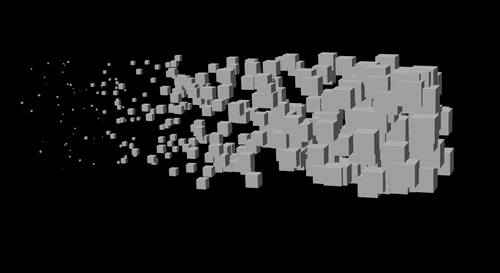
Which is similar to the RS version, matching it might be some work, but for now I try to understand your target.
CV4_2026_drs_26_PAsz_11.c4dI mapped the radius of the particle to color (gray-gradient-wise, linear) and then used this in the Standard Material> Displacement Channel, via MoGraph Color Shader.
Is this of any use to you?
Cheers
-
Dr. Sassi, thanks so much. I'm calling it a day, but I'll study your work tomorrow morning. I'm most certainly trying to find some sort of "cheat" because I'm having a heck of a time getting motion vectors to work with my particles scenes - likely taking all the VRAM I have, because Redshift / C4D is having fits - unexpected quits, left and right.
-
Hi entry-newspaper,
The last one was for scale.
Standard Render> Motion Vector:
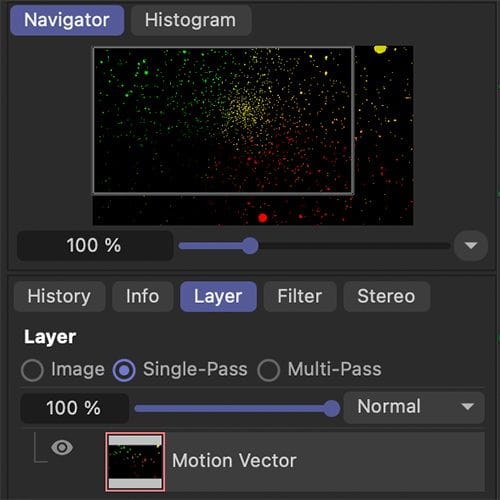
Example
CV4_2026_drs_26_PAsz_21.c4dIs that helping?
Cheers
-
Good morning, Dr. Sassi. I apologize for the late reply, I was grinding away all weekend, on the very project which prompted these questions. I had to proceed with some quicker solutions, to make the deadline, but I'll be looking back over your example projects, to see what you have proposed. Finding more practical ways to generate some of these special data passes, will always be highly valuable.
Thank you!
-
You're very welcome, entry-newspaper!
Let me know if there is anything else, about this subject here, or in a new "thread".
Cheers
