Maxon Noise Displacement Skipping Frames
-
Hi appointment-insect,
Here is a file with the images 3, 5, 17, 27, 28, 45, 47, 58, 66, 74.
https://projectfiles.maxon.net/Cineversity_Forum_Support/2026_PROJECTS_DRS/Displacement_20260127.zip
Please let me know when you get them, so I can take them off the server.Rendered on an M1 64GB, Sequioa
Here as texture
https://projectfiles.maxon.net/Cineversity_Forum_Support/2026_Clips_DRS/20260127_Football-TEX-Render.mp4No idea what it causes, perhaps baking the noise as texture might help. Besides checking with Tech Support, to see if there is something I can't reproduce.
https://www.maxon.net/en/support-centerI have reduced the scene and rendered it again. I'll let you know how it goes
All the best
-
P.S.: As promised, the smaller setup, meaning, just one material for the displacement to smooth animation.
I rendered your scene a few times through, and the problem shows up here and there, randomly.
Since I believe that getting the simplest setup is typically beneficial, I reduced the materials needed to one, as mentioned above. I could not find a problem. I am also in the Vertex tag that updates automatically, just in case. (Nope, I did not find it to have a problem, just to be safe…)
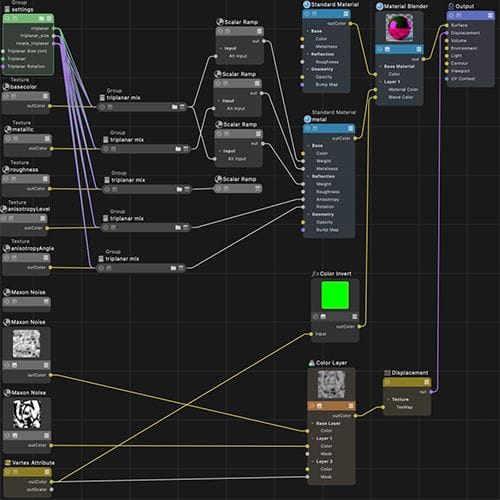
File
https://projectfiles.maxon.net/Cineversity_Forum_Support/2026_PROJECTS_DRS/20260127_CV4_2026_drs_26_RSfn_01_c4d.zipPreview
https://projectfiles.maxon.net/Cineversity_Forum_Support/2026_Clips_DRS/20260127_Football_0002_preview.mp4Please render it and share your results if all frames are rendering now fine. It works fine here.
I have not included textures, so please add the file to your project folder.
Enjoy.
-
As always, I thank you for your prompt response. I have downloaded each of the zips to look at, so you may remove from the server. I rendered your updated single-material version. I understand what you mean about using a single material. But my goal is to make a material that is a simple material swapper (with displacement). Is there something wrong with doing it the way I was that makes it randomly miss the noise on frames? Like when I have a priority problem with rigged parts and the rigged parts don't reset. If I return to frame 0 a couple of times, it fixes. The football project will act similarly. Is there some type of priority problem that affects materials? And again, Thank you!
-
Hi appointment-insect,
You're very welcome.
Please try this RS-Mix material if that works for your workflow. This is a setup for you.
CV4_2026_drs_26_RSmm_01.c4d
In the Attribute Manager, you can add Mat.A, and Mat.B into it, as well a Vertex Tag. The names are not required, I used A and B for clarity.
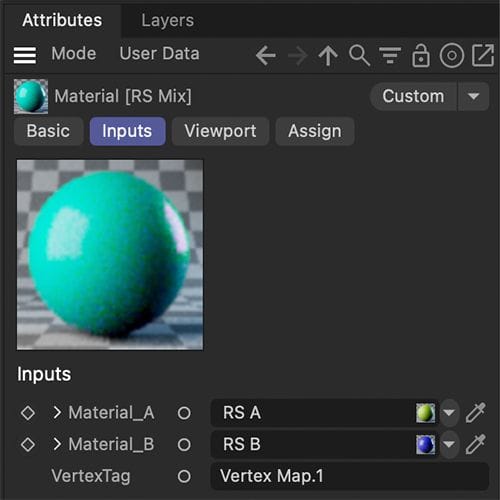
Priority problems need to be explored separately.
I'm not aware of what you have explored to solve it. It can be in XPresso, in the sorting of the Object manager, or somewhere else. There are limitations.If you want to look at it, please share a file that shows that problem, open a new thread for that, please.
Given that the file is below 1MB, please upload the C4D file here. (Sorry about the long text…) If larger, for security reasons, please upload uncompressed to either WeTransfer, Google, Dropbox, Apple, or Adobe cloud services. The URL is fully pasted here, no HTML wrapper.
All the best
-
P.S.: Please try this if there is any problem showing up with the previous file.
CV4_2026_drs_26_RSmm_02.c4dIf I set the System in RS to a lower Bucket Size and move the timelsider randomly and fast, I can recreate the Drop out of one material.
A few years ago, we had a refresh problem with Fields, and Lionel suggested to animate one field just a tiny bit, forcing a refresh.
I hope we can pinpoint your problem.
Cheers
-
Thank you again. I have taken your RS Mix material, and added it to my project. Using the RS Mix, I am getting the same drop-out of the displacement in random frames. I have only one field driving the vertex map for the swapping materials. Both of the noise patterns in the galvanized gold are animating.
I uploaded the complete project to the folder I shared before. Here is a direct link to the subfolder which has the RS Mix swapper in use.
https://drive.google.com/drive/folders/1gopgnSQw0yOK3d0RzFCTklcmL02cf4sT?usp=drive_linkHere is a link to the rendered video:
https://drive.google.com/file/d/1URCBj9XOleSx6ijH6lVjLh_y1hyx0mQE/view?usp=drive_linkAnd about the priority question, I didn't have a problem with priority to work on, rather, it was just something I recalled about the order of processing that mattered. I wondered if there was such a thing with establishing displacement in RS.
Should I try Saul Espinosa over at the Redshift render forums on FB? He may know if it was a quirk in RS rather than C4D.
-
Hi appointment-insect,
While Saul surely has an encyclopedia knowledge about many things, including a vast background of RS, I noticed today some dropouts even with the Color Vertex map.
Which means, if you have a minute, please send your file to Tech Support. Thanks for considering!
https://www.maxon.net/en/support-centerI have not found a trigger to produce this deliberately. If you notice a pattern, please share with tech support.
Cheers
-
I ended up doing as you asked and sent the issue over to Tech Support. They see what you do. They made a suggestion to try the other type of Displacement (Texture) but that doesn't work because Texture doesn't work with Displacement Blending. I uploaded more renders and debug logs to support, so perhaps they can find something.
Thanks for the wisdom and kindness as always! -
Thank you very much for the time you spend with tech support, appointment-insect.
Any suggestion from the tech-support team should be understood as their willingness to help or find a way.
I'm not sure if I get your full idea about Displacement Blending.
If you have each Maxon Noise as a separate texture (perhaps even animated as a sequence), where would be the difference?I have done a few more tests, and each material separately shows no problem, but with the Material that combines, I get problems. Can you confirm that?
Cheers
-
They seem to be on the right track. So one of the suggestions they asked me to do was to try in the RS render tag-Geometry-Displacement Type (Vertex or Texture) to try the Texture Type instead. But in the Help for this new(-ish) RS Type it says in a special section that "Displacement Blenders are not compatible with Texture Displacement." And I am using a Displacement Blender. What happens is that when the field washes over, the displacement stays throughout, rather than revealing the smooth polished gold side. It was funny looking at first, but then I read the help, where it said it doesn't work.
Anyway, I seem to have no problem rendering the animated noise displacement individually. -
Hi appointment-insect,
EDIT: re-rendered, and get drop outs. Since it works and then not, I'm uncertain what to do. Tech Support. /edit
I rendered the Mix material, but created a Ramp for the transition, to exclude the Vertex map data. Same problem.
Next, the Displacement material alone, and the Shiny Gold material alone, no problem.
Which excludes the Vertex map, or any Displacement map.
So, back to your scene as it was.
Now I went to the RS Render Tag, and animated the Displacement Scale from frame 0 with a value of 1.05 to frame 90 and a value of 0.95. The change is nearly invisible, but the number change means that a new displacement case is needed, a “refreshing-problem” would be my best guess for now.
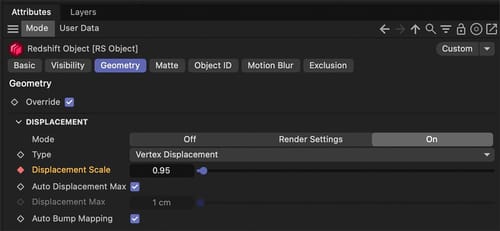
Rendered it three times to see if any of the random drop-outs appear. All fine.
I get no "displacement drop-outs " anymore. Can you confirm that?~~
All the best
