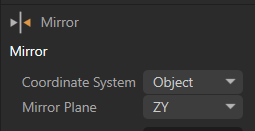
issue with Mirror Tool in Polygon mode
-
Hi guys, I used to use the mirror tool without any problem. With the latest release I can't change the coordinate system and the mirror plane of the tool active in polygons mode
Any help? thanks
-
I just used it in 2026.3.4 and it works fine. Changed Mirror Plane and Coordinate system and it just works as expected.
Can you elaborate a bit more? -
Hi Noseman, it's a pleasure talking to you (I'm a fan :)). I've uploaded a screenshot of the issue. I recall never having any trouble changing the plane or mode before. Now, the drop-down menu isn't available (at least not for me). What am I doing wrong? Thanks for the help.
https://youtu.be/8kZ7mtu3O3Q
-
You're doing nothing wrong as far as I can see... this appears to be a glitch on your system right now.
Do the usual, restart C4D, Restart PC, remove Preferences, reinstall C4D in a new Folder.One at a time

-
Hi Noseman, here’s an update on my situation.
I’ve run the following tests; you can view them at this link:https://youtu.be/S1EJ2N-VRzQ
- updated graphics card drivers
- uninstalled C4D R2026
- deleted the preferences folder
- installed R2026 (releases: 2026.3.4, 2026.3.3, and 2026.3.2; one at a time)
but the problem persists across all versions.
- I installed the older version, 2025.3.3, and I have no issues with that one.
It seems strange to me that the problem would be related to my setup.
For now, I’ll use R2025 for modeling.
Thanks.
-
That does sound odd. I think you may need to contact customer support and report this. Maybe it happens on some configurations.