Baking after alembic doesn't keep position
-
Hi there!
I should make a loop animation with a cloner. So I follow these steps:I have my animation done
Then I convert cloner into alembic
Then bake objects... and HERE IS THE PROBLEM, IN THE MIDDLE.So, the problem is:
- If I convert the alembic as TEST 1 (please check c4d file) , so a cloner with an object inside with colours applied, the alembic respect the colours, but when baking it doesn't keep positions
- But, I NEED to conserve that colours AND positions, so if I put the object inside a null, or a connect, it doesn't keep the colours but if then I bake it, it keep positions...
I tried almost everything, I put the colours inside of the connect too, but it doesn't work either.
I've attached a video file, as I think it's better to understand what I'm trying to say + the file. Link for the video file here (sorry it doesn't let me upload it here):
https://limewire.com/d/vYqJ2#BDgQ2sZ5No
problem alembic.c4dPlease help...
-
Hi Cit,
Thanks for the file.
I have no idea about Limewire, sorry, I checked it on an old computer, and this is nothing I like to explore.
Please, Wetransfer, Dropbox, Google, Adobe, or Wetransfer, of course, YouTube or Vimeo is OK.The simple answer is, Alembic has no option to store materials. Of course, there is the hope that OpenPBR might be an agreeable format. However, I'm not aware of anything new here. I will define that below in more detail.
You can create an Alembic file inside the Object Manager> Object> (See Bake)
Then all materials are as before.
See example _01
https://projectfiles.maxon.net/Cineversity_Forum_Support/2025_PROJECTS_DRS/20251125_CV4_2026_drs_25_MGal_01.zipTo transfer color from a Merged object, Vertex Colors might be a way. Please note here that Vertex Colors are Raw Colors if not retrieved from a Color Space-based source.
See example _11
https://projectfiles.maxon.net/Cineversity_Forum_Support/2025_PROJECTS_DRS/20251125_CV4_2026_drs_25_MGal_11.zipMaterials in Alembic: (More in detail)
Direct material storage: Alembic itself does not natively store full material definitions (like shaders, textures, or node graphs as you'd have in most 3D apps).
Possible metadata: What Alembic can store is arbitrary metadata, such as names or IDs referencing a material, but the actual material data is not stored in the typical way one would hope.
Workflow: If you export an Alembic file from one application to another, you might get material assignments (meaning: object "X" references material "Y"), but the artist will need to recreate or re-link the actual material in the destination software.
Why: The format was designed for high-performance production pipelines (especially in VFX) to move baked geometry and animation between DCC tools, often with shading handled separately.In short:
Alembic can carry material assignments as metadata, but will not store complete material/shader definitions or textures. If you need to transfer fully textured models with materials intact, formats like USD, FBX, or glTF are better suited.Cheers
-
Sure!, here is the video file by wetransfer:
https://we.tl/t-YnSBkMIBphPlease check: Alembic does keep the materials when using one method, but not when using the other. More precisely, it keeps the polygon selections where the materials are applied, with the materials on the same object.
I've double-checked everything, and once it is converted to Alembic (I tested the baking and everything is fine), if I send the material to the object layer, then the baking is wrong.So it’s not the step of converting to Alembic, but the materials applied as object tags that mess everything up. It creates the new baked object under a null, maybe that has something to do with it, but I don’t understand why this happens.
I don’t need to export my Alembic to any other program, it’s just a previous step to bake the animation, and I need the animation with the polygon selection tags and the materials assigned to each object.
This is an example, but the real project is more complicated, so I hope not to have to put all the materials on each object one by one.I’ve made another video showing the last thing I explained too, you have it in the wetransfer link.
Thanks!
-
Hi Cit,
Staying inside Cinema 4D makes it easier. Thanks for the addition information.
In your video, the setup that will be the base of the Alembic had no material at all to begin with. 00:03 [min:sec]
However, I get your point.So, create a copy of your setup, with materials applied, then select the Connect object and press the C key for a moment to make it editable.
Now select the Cloner and use the Alembic options to Bake.Image below the three steps.
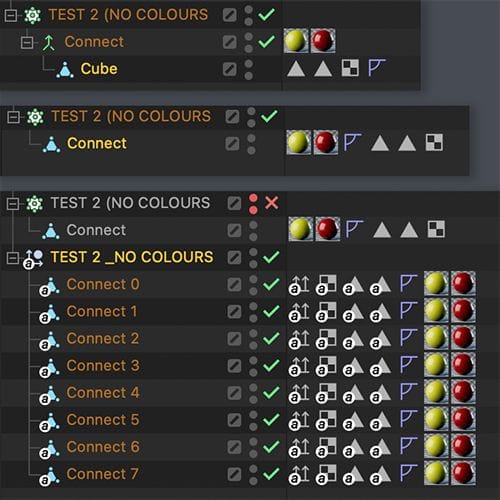
Alternative, select the Connect object, use the Current State To Object, and swap the result (a Polygon Obj. named Connect) with the original Connect Object, now bake to Alembic.
Please let me know if that works.
All the best
-
Hi,
No sorry, it doesn't work either.About the second video, what you say about materials are not applied, I know. But if you keep watching you will see my point:
If I don't apply the material to the alembic (the step for example, you suggest in your last post), when is baked, you will see it doesn't keep the original cloner position.
But, and this is the amazing thing, if I delete the materials; when I bake, (or making the alembic editable too), it keeps the original cloner position.Really I don't get this misterious thing. I think that maybe it has something to do with the null folder that carry the new object inside.
When you bake with the material applied, the new creation (making editable or baking it) comes inside a null. But if you make it editable or baked without the materials applied it doesn't appears with any folder, I think that could affect position.Here the video, starting at the point you talk about in the last post:
https://we.tl/t-xWJMCpMPX1Thanks,
-
Hi Cit,
Please have a look here:
https://projectfiles.maxon.net/Cineversity_Forum_Support/2025_CLIPS_DRS/20251126_Alembic_Internal_MG.mp4I do exactly what I have suggested above. I leave sometimes in the clip, two setups active at the same time, to showcase that they match 100%.
All of that, while the materials are applied during the baking, no manual work is needed to add materials to them again.
I'm not clear what else you need. If that isn't working, please explain.
Please note: This is my week off, and tomorrow is a Holiday here, but I will take a look on Friday, if there is a different question to answer for your set up. I'm happy to look into it.
All the best
-
Hi,
You just stop on the alembic step, and yes, it works there, it always did, but:
I should transform the alembic into a keyframe baking (as I show you in the videos) So, I go with my alembic into timeline, bake frames and here is the problem, the same happens if you (in the alembic object) make a current state to object, it changes the object position.
Just try to make a current state to object in your current alembic object:- Case 1. If you have your materials applied on the alembic object, once you do the current state to object, the object will change its position.
- Case 2, if the alembic object DOES NOT have any materials applied, once you do the current state to object (or the keyframe baking) it works!! because it keeps the same position as it was. But we now have to assing materials again.
That is the issue I need to solve.
But, enjoy your free week, I will do manually but I really need to know when you're back how can this can be fixed, please, is like a nightmare hahaha.
Thank you so much.
-
Hi Cit,
I'm back from my Thanksgiving trip to Northern California. Thanks for the wishes.
I think I found the reason, it must be either an older or a corrupt Connection object.
Please check out these four cases; you might find that the result of the c-key function is different.
https://projectfiles.maxon.net/Cineversity_Forum_Support/2025_CLIPS_DRS/20251127_Alembic_Pos_Jump.mp4
Do one of the two below.
Please select all the Alembic Child Objects, press c. Then select all the parent objects of the single Alembic objects and use the Reset PSR.
or
Alternative, toss out your Connect object and replace it with a new one. Could it be that this setup comes from anything else than a 2026.0?I hope that fixes the problem.
Cheers
-
Hi!
And... it works!
So... this has been such a long journey, it feels like the hierarchy thing in Cinema 4D drives me crazy from time to time...The Reset PSR was the key, because I can't assign materials from the Cloner.
About the Connect, I don't see any difference… and no, this project started already in C4D 2026.0.0.Thank you so so much!
-
Hi Cit,
Thanks for the feedback. I'm glad you have something that works for you.
Yes, sometimes simple things are not so simple to find. But your file helped a lot. Thank you for that.
Enjoy your project!
