Parent Null to Polygon Center
-
Hi again Dr Sassi,
Do you happen to know if its possible to parent a Null to the center of a polygon on a deforming mesh?
I can get it working with a Cloner or Matrix, but I was wondering if there was an easier way with Xpresso or Constraints.
I can constrain to Points with Xpresso and Constraints and to a polygon, but I cant get the Null to align to the polygon normal and have it stick while rotating.
Here's my test file, any ideas if its even possible? https://we.tl/t-5fPW19qO3C
Thanks again!
-
Hi MaverickMongoose,
You can set this up in Snapping, which can be switched on/off via Shift-S
Settings as in the Image below Polygon and Mid-Point.
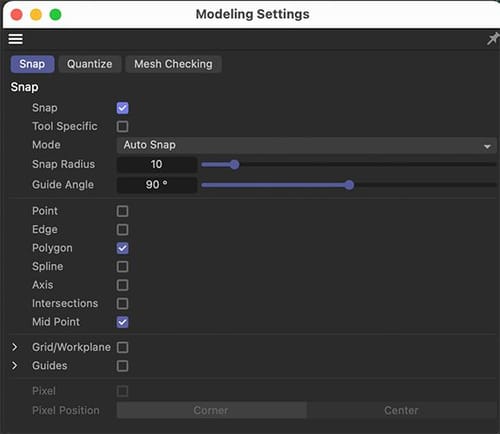
Please let me know if that works for you.
Cheers
-
Cheers, I mean it needs to stick to the polygon and move along with it as the mesh moves and deforms, so it needs to be locked to the surface not just placed there
-
Hi MaverickMongoose,
To find the position for the Constraint> Clamp, this would be an option. I'm not aware of A constraint that has a mid-polygon option.
There is no faster way than via Cloner and limit it with a MoGraph Selection, AFAIK, or if you prefer for single objects a Formula Effector set to id=x (x being the polygon id) and no PSR checked, but the Visibility is checked.
Example:
CV4_2026_drs_25_MGct_01.c4dAll the best
-
Cheers, basically Im trying to make a popup book - I want the page to turn (deform) and some paper objects pop up attached to the surface of the page.
Using the Cloner method almost works but as you can see in my project, it flips around strangley at the start
https://we.tl/t-0VUqoubtzG
I've baked the popup animation as keyframes, but the rotation seems to go crazy when it travels along with the mesh.
Any idea if there's a better way to stick objects to a page like this: https://youtu.be/1jxodEBzsRc
-
Looks like the moving mesh (which was a cloth sim) is the problem - for some reason the normals flip randomly in the sim itself
here's just the original plane sim, you can see if you select any polygon that the normals freak out during the sim. https://we.tl/t-oyCm5fWeg2
Do you know if thats something that can be fixed? Or do polygon normals always go crazy in a cloth sim?
-
I tried parenting it to an edge instead and it works fine. Looks like the normals in a cloth sim are fine on edges - weird that polygons get messed up though
-
Hi MaverickMongoose,
Thanks for the files.
The problem is typically an Euler Angle Problem, which is typically a 180º turn. The Normal is selected in Local mode, meaning the Normal axis is 1, and the other two are zero. Switch to World, and the orientation is stable, but the rotation is gone.
In the Cloner, you have set the UpVector to Y, which means when the page flips, the UpVector likes to work as suggested. Switch it off, and it works.
Example
https://projectfiles.maxon.net/Cineversity_Forum_Support/2025_PROJECTS_DRS/20251202_CV4_2026_drs_25_ANlw_01.c4d.zip
.My tip for that I share typically is to use this setup, which works for rollercoaster-cars, or any wildly shaped motion.
https://projectfiles.maxon.net/Cineversity_Forum_Support/2025_PROJECTS_DRS/20251202_CV4_2026_drs_25_ANtp_01.zip
All the best
-
I ended up using edges for the project, I thought I tried every cobination of settings, but great to know it actually works in a cloner on polygons!
Shame there isnt just a simple constraint you can use for this kind of thing, makes it kinda complicated when doing a lot of objects.
Thanks again Dr Sassi!
-
You're very welcome, MaverickMongoose.
This would be a feature that recognizes the position on a specific object, which is always some mix of three or four points (N-Gons might be difficult here), then finds two neighbor points for the "tripod stability" (AKA target and Up-Vector kind of stability).
Recognize the Axis of the placed object with an initialize button.(Which is close to the Surface "Deformer" using UV, which I explored for the above question as well.)
Call it a Capsule -Request for the Asset-Browser, since it might be a low-level complexity to create it. This increases the chances for a quick "drop" of the asset.
There is always the option to suggest this feature.
https://www.maxon.net/en/support-centerI will send it in as well.
All the best
-
Awesome, thanks again for that and have a great Christmas and new years (if you dont hear from me again before!)
-
Thank you very much for the reply, MaverickMongoose.
If you celebrate X-Mas, please enjoy as well. Thank you for the wishes.
My observation over the years was that the question can be higher during the "Holidays". So, I do not take days off during that time.
But the first two weeks are often quieter, where I spent some time. However, I check in here anyway.I'm happy to look into any question that fits the frame here. I learn from the question not only what is needed but also what is currently of interest.
Enjoy