basic particles turn on and off randomly
-
Hello
Once the mograph is deactivated the caching runs without no issue, upon finishing, I activated it
  all works normally, it didn't matter after if it is normal instances or multi instance
Thanks for being supportive
Best -
I noticed also the following,
-putting the mograph in Multi Instance with motion blur renders black frames, back to normal instance object and motion blur works
-in AOV with activating motion blur pass (with or without) motion blur activated renders black frames
At least this happens in my scene, maybe I am not aware of the motion blur limitations with particles or mograph based objects
Cheers -
Thank you very much, resort-sand, for the extra data.
I'm glad we got at least the crashes tamed via the workaround.
There is surely something not OK. I hope the tech support is getting to the bottom of it quickly.
The evaluation of a bug is done by the tech support, which is not my scope here.
All the best
-
submitted as a bug
-
Thank you so much, resort-sand.
Sorry that you had to experience a problem in the first place.
Fingers crossed that the switch on and off "dance" is soon not needed anymore.
My best wishes for your project!
-
Hello
I know it is a simple question, but how we can map the radius of the particles so it is getting smaller before the end of its life, I found the "Radius Over Age" scene in the Asset browser but cannot apply it to my emitter scene
-
I forgot to add that also the appearance of the particles should be progressive, let's say birth / death around 3-4 frames progression before reaching the radius
-
Hi resort-sand,
Please ask new questions in a new thread, even if it feels related. Otherwise, the forum will be uncomfortable to read, especially when the initial theme is discussed further, then the second again, etc. While the headline is not changing, and if so, it becomes over time even more difficult. Thanks for considering.
Here is a setup.
The last frames of a particle getting smaller seem simple, but then we might forget the Variance of the lifetime. To get this handled, the Lifetime and the Age (both provided in Seconds, to allow frame rate adjustments later on) need to be evaluated. Then, if the remaining lifetime is below a certain threshold, the progressive radius change starts. The amount of change for the last segment is in the If Condition. The example has, for a better exploration, a "shrink-cycle" of 2 seconds (See Condition) and a scale down per frame of 0.9 (If Node), adjust accordingly to your needs.
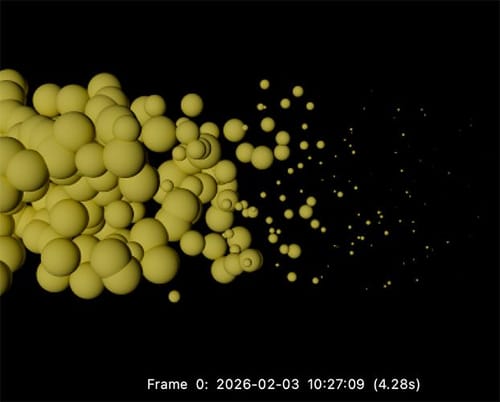
All the best
-
Thanks Prof
My bad for the thread, I didn't want to flood with many threads, will keep in my mind
two questions:
how we can make the birth behaves the same, instead of just popping out, I want to animate the radius progressively until it reaches the radius value
how to tell mograph to copy the radius to the scale of the clones ? I saw you created one but in the scene it stays constant
Best -
I think I found the answers for both questions

if it stalls again, I will start a new thread
All the best -
You're very welcome, resort-sand.
I just after posting saw your answer, I had already set this up, then I had to join a meeting. Sounds great
I will share my prepared post anyway.The simplest way is just a Data mapper, lifetime to Radius. But that is not along your requests, as it sets the fade in, fade out to various lenght, if the life time varies. An exact frame number for all individual particles is not given. If that is not a problem, here is the simplest way.
I left an alternative in it, with a ramp.
CV4_2026_drs_26_PAdm_01.c4dThe beginning is simpler, as all particles start with the first frame; they are "born" and age from there.
To keep it simple, that can be done with a Condition.
Example:
CV4_2026_drs_26_PAst_03.c4dWhen the growth period is over, it gets moved to the next one, which is the same as the one above, discussed with the problem of variance regarding lifetime.
Is this working for you?
Cheers
