Xpresso : distance traveled
-
Hi

I'd like to know how to add and accumulate values in Xpresso. For example, I have a moving Null, and using the Distance node, I get its distance traveled each frame. I'd like to be able to accumulate each value at any given time to increase the gauge. Furthermore, I'd like to be able to increase the gauge even when there's no animation, when I move the Null within the interface. How can I do this?DISTANCE.c4d -
Hi Pitchi,
Thanks for the file.
I added the needed changes, but I'm not sure how the editor view can create stable data, as the nature of the editor view is to constantly update.
I would use Cappucino to record what you need, if we focus on rendering and sharing the result. Then use a Tracer and follow the Null. In XPresso you can measure the length of the Spline, which might be more accurate than to use previous position. The distance between two points is the shortest possible distance, but how about moving in an arc?
Here is the file back, I used User Data to create a simple and intuitive Variable/memory. The value is reset on frame zero.
CV4_2026_drs_26_XPtd_01.c4dAll the best
-
Interesting
the goal is to be able to automatically rotate wheels or tracks based on their size and the vehicle's orientation. I acquired a tank rig (I've attached the C4D file). I isolated the Xpresso function that handles the wheels and simplified it. As a result, the wheel rotates perfectly according to its size, the distance traveled, and the orientation. And the wheel's rotation value doesn't reset to 0; it accumulates simply by moving the controller in the interface. The problem is that I don't fully understand how Xpresso works. I don't know if it can be simplified even further. -
Hi Pitchi,
Thanks for the file.
The previous rotation is used to add the amount that is provided with the Distance.
To get the distance to define the rotation, the creator of this setup used a bounding box, which provides the diameter of the wheel. (For the axis, it is divided by 2) Since I have not your scene here, I'm not sure how the tank's wheels are designed for this, with cogwheel teeth or not. Given the setup's IQ, I assume it is perfect.
The key idea of this setup is the Matrix readout of the v3 (k form the V1-v3 or i, j, k), which is the xyz axis to define the Z vector. The xyz of that vector is the Z and contains the rotation and scale for this vector. This is how PSR is stored for every object; the PSR values are expressed in position, rotation, and scale in the Coordinates, as it is rather abstract to think in 12 axes (Off, v1, v2, v3) length for this.
Since the Matrix is, from my point of view, the most misrepresented item of Cinema 4D’s Xpresso data, here is a deep dive:
https://developers.maxon.net/docs/py/2024_3_0/manuals/manual_matrix.htmlThe Matrix is used to provide part of the direction detection, the Dot Product in tandem. The movement of the Z axis of the "CTRL" in a Dot Product [Normal] will result in a value other than "zero" during change, but based on the Normal setting, results in a "one" either positive or negative, to determine the direction taken.
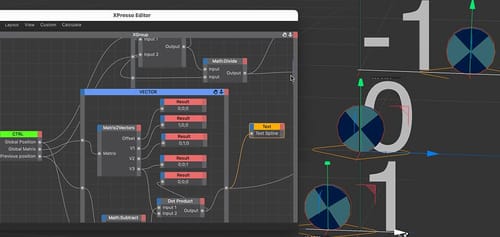
I will share some images, but this XPresso is AFAIK part of t a paid model, so I can’t reshare it here, but you can set the text to is as shown and while holding the “mouse” down, the move direction in Z will show up as -1, +1, or if let go as zero. The following multiplication uses this to add a negative or positive value to it, or nothing if there is no direction.
From experience, the solution can't be a Child with distance/rotation to the Parent. Please check that before going further.
I hope that helps a little bit. From an educational point of view, to share this, when the XPresso system is not muscle memory, this is bad guidance. I hesitate to share those things, as it might just demotivate. Every learning has a gradient, too fast and too steep, and the effect is counterproductive, in many ways. I write this to ask for patience with exploring it. As far as all Node Systems to my knowledge, the main problem is the missing intuitive guidance. Like in most tools, you have a long column of parameters, and typically they are sorted in the way the firstset up is done. Which is guidance, and the feedback on screen is the feedback to learn. Nodes have to be called up, which is not guided by a list of parameters. This is a huge jump from intuitive to kind of abstract, and it needs time to become muscle memory. I hope you can see the advantage of XPresso and harvest some motivation from this perspective.
Enjoy your project
-
Good
Thank you for the explanations. -
You're very welcome, Pitchi.
Cheers -
I managed to create a fairly simple system where I calculate the distance traveled and then use it for wheels and tracks
track.c4d -
Thank you very much for the file, Pitchi.
I noticed you feel quite comfortable in XPresso. This is great to see!
If I may:
.
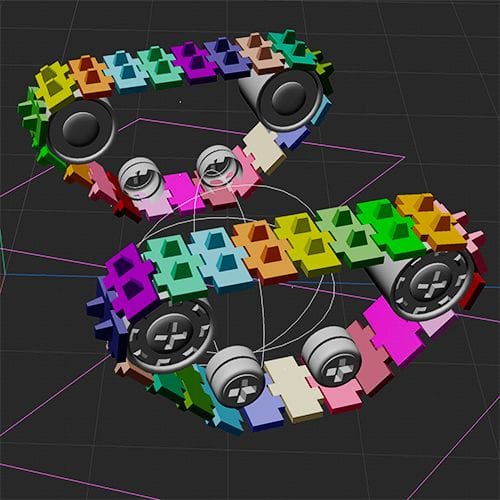
In the sidebar or the XPresso editor> XManager> XGroup, I have sorted the items in the way they get processed. (Top to Bottom. Which is rarely a problem, if at all, but just in case. Preventing hierarchy problems).
.
I also changed the Previous Position to Global Matrix> Matrix2Vector. I assume you like to have two of these on the tank, which might cause a problem if just moved to the side. With this little extra, it is more stable. (In "track.4d" file: If you move the CTRL in X or move the Track (Null) in X, to set up a pair, you will see the result.)
.
The colors from the Random Effector are just used for demo purposes, no extra or needed function otherwise at all.Your file:
CV4_2026_drs_26_XPtc_01.c4d
I hope you have a lot of fun with your project.
-
Yes, of course, it works better with the previous global matrix. thanks you
-
Thank you very much, Pitchi, for the reply.
You're very welcome.
My best wishes
-
I have another question. I created a tank rig (I've attached the files and a video to explain). I'm using a mesh with Deformer Shrink Wrap on a surface the tank drives on. I'm using a Matrix to retrieve the positions of the mesh points, and the average of these point positions orients the tank on the surface. But the problem is that it doesn't follow the surface very well. Is there a technique to make an object perfectly follow a surface like the red cube? As if it were actually colliding with the surface.
https://we.tl/t-RyuQlPtrag -
Hi Pitchi,
A new topic.
Thanks for the files.
What forces will be accumulated here??
The tank is heavy, so the first force is based on the weight and speed, resulting in massive inertia.
The motion up will force the wheels more or less up or down, based on the inertia, and that power will soon be released when the situation changes.
The “teeter totter”effect over the edge will change the balance of the tank, while the inertia is mixed into it.When it is fast, it might “fly” a little bit; if it is slow, it will bounce slowly on the other side.
I also saw the changing direction on top of the little hill, which adds to the summery of forces.
When it bounces off the front of the other side, some energy goes into the ground, and is only partially inverted back based on the suspension system.
There are a few more forces, but you get the idea. With that being said, the engineer in me tells me: I have no idea how to get all these solved with a little setup.
The Artist in me tells me: Let's play.File
CV4_2026_drs_26_SItd_01.c4dHere is a small version; you can find the original version here:
https://help.maxon.net/c4d/2026/en-us/Default.htm#Resources/Scenes/2024-4_Connector_02.c4dI just added one more “wheel” to the Flintstone car. Perhaps add more.
But it allows us to get something that is closer and easier to explore. Is it perfect, nope. Easy to move around, also a clear no. But it provides some direct references.
Perhaps cache it, then use Cappucino to transfer the data into keyframes, and refine those. After all, things in animation are there to express something. It is not a perfect simulation, always just plausible, while typically targeting expression. Or just follow your artistic intention.
I’m sure you can create with some effort a system that measures the ground, levels different “analytic” points, and find a balance, but it might look lifeless, especially when the distance to the ground is the only influence from the scene, hence my long text from above.
Btw, this is a complete new question, and it would be great to have those in a new thread, as it allows them to be found in a better way, or easier to read, if the questions are mixed over time. Thanks for considering.
Cheers
-
Good
i understand, thanks you very much ! -
Thank you very much, Pitchi, for your reply.
I hope this little test vehicle will provide enough data to get your project closer to your target.
I'm not clear if there is enough demand for tank (or similar) motion simulation to suggest a "Share Your Idea!" with Maxon.
But I could imagine an analytic tag for all Wheel Suspensions, which could guide this complex motion/Intertia data extraction.
https://www.maxon.net/en/support-centerAll the best