okay thanks 

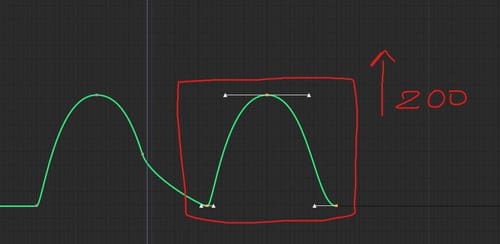
In C4D when i move objets i can qantize the movement, the rotation and the scaling, for example move an objet every 10 cm. Can do the same in F-Curve? I can select some keyframes and up them all by 200cm for example?
Hi i have a S shape with silver materiel, in the renderview i have a strange result with the reflection. I don't know, this is realistic or there are some limitation with redshift?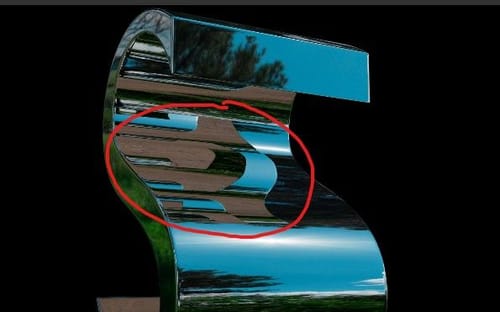
It works quite well by adding this system to both sides.
I'm creating a new post.
So I found a solution for movement on the tank on a surface; with ray collision, I have more freedom of movement. I've attached the file.
https://we.tl/t-SIrv1LYYH9
Good i understand, thanks you very much !
I have another question. I created a tank rig (I've attached the files and a video to explain). I'm using a mesh with Deformer Shrink Wrap on a surface the tank drives on. I'm using a Matrix to retrieve the positions of the mesh points, and the average of these point positions orients the tank on the surface. But the problem is that it doesn't follow the surface very well. Is there a technique to make an object perfectly follow a surface like the red cube? As if it were actually colliding with the surface.
https://we.tl/t-RyuQlPtrag
Yes, of course, it works better with the previous global matrix. thanks you