Stick UV to a animated extrude object
-
Hi,
I am trying to solve a situation where I have multiple splines animated (it's a text animation) from an After Effects paths and imported into C4D. The splines are being extruded by a Extrude object, but the polygon count changes every frame as the text expand/contract. The UVs can't stick to this geo so my textures are swimming static as the text animates.
I am wondering if theres any way to stick the UV on the moving extrude, or if there's any other smart way to make the textures stick to the object.
I tried RS BakeSet and UV Transfer but still no luck.
Any ideas?
-
Hi tallmann,
Not to my knowledge. The Polygon change might come from Adaptive from the Spline Interpolation, or based on the Cap-settings, while the shape of the text or only the extrusion is changing. All of that creates change, and some of the change might be avoidable, others might not. For example, if a letter has created triangles between the outline, then only one part of the plane changes; the given polygon in question could be moved outside of the spline.
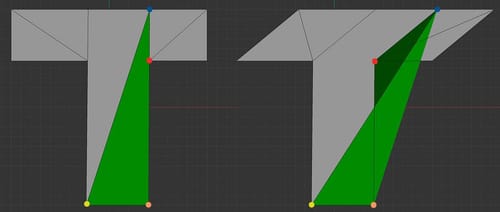
If I knew more, perhaps there is a workaround, but I can't promise that.
Files: A C4D file does provide more data and can be attached here up to 1MB directly. (Sorry about the long instruction…) If larger, for security reasons, please upload uncompressed to either WeTransfer, Google, Dropbox, Apple, or Adobe cloud services. The URL is fully pasted here, no HTML wrapper.All the best
-
@Dr-Sassi Hey Sassi,
Thanks so much for your help so far! Is there any private way I could share the C4D file with you? It's part of a commercial project so I can't share it online.
Thanks!
Thiago -
Hi Thiago,
I got your file. Thank you!
Again, I'm not aware of a general solution, but the more I know… perhaps something can be done.
Cheers
-
Hey Dr. Sassi,
Just uploaded the file there!
Again, thank you very much!
-
Thanks for the file, Thiago.
I will start with a suggestion: Perhaps it is faster to set up a Text object and an FFd cage around and animate it in Cinema 4D
===
There is a part of the "squeezed letters where I don't get the Extrude to work (Frame ~112)
I'm not sure if I should even share this, but my hope is that it triggers some ideas
The idea was to stabilize the Point amount. So I connected all Splines and moved them through a MoSpline, to define a fixed Point number.
Next, extrude the whole thing, and when the letters are nearly equally in size (frame 222 for example) create a "Copy" from that frame.
This Polygon object is then set up with a UV color, Red and Green 90º (from black to green or Red mixed), and stored as a Color Vertex tag.This tag is then used in Index Mode, in the Color Vertex tag on the Extrude object. I got it this far:
https://projectfiles.maxon.net/Cineversity_Forum_Support/2026_Clips_DRS/20260128_Inflamation_preview_01.mp4I then used the Average mode to mix the color in a better way, but some sliding/swimming is left.
The idea was that the Vertices move, but based on the static polygon copy "222", the colors move along their animation in the Spline/Extrude object.
I needed to leave the Caps in N-Gon mode, and any other option created problems. As mentioned above.In the RS material, I used this Red Green result, which was read via a Vertex Node and fed into the Offset of the UV Projection Node.
This node should distort the image along with the animation. It does, but not very "graceful", or at least not as much as I had hoped.As mentioned, there are many questions, and even if the material is perfectly distorted along the letter form changes, it might not look good.
I leave the file here anyway, not production-anything-ready (no textures), and perhaps you have textures in mind that are not so obvious to the stretches.
https://projectfiles.maxon.net/Cineversity_Forum_Support/2026_PROJECTS_DRS/20260129_CV4_2026_drs_26_TXuv_12.c4d.zip===
I also tried the other way, to take the animated object and transfer it to the Static, that resultied in some Artifacts, as shown in the illustration above.
As a side note, yes, the first test was with the RS Render Tag with the defined Polygon object to use the Reference mode. The Texture was swimming.
Perhaps it is faster to set up a Text object and an FFd cage around it and animate it.
Sorry, I have always a feeling there must be a way, and I’m happy to invest my whole evening into it, but it is past midnight, and I have to leave it for now.
All the best
-
Hey Dr. Sassi,
Thank you very much for your time and workaround! This is definitely way far than I even could though inside C4D, and I see your solution working, yes!
The good news is that a Maya team was able to troubleshoot and find a solution on this morning. They used a plane behind the text object and animated the plane mimicking the movement of the text. Then they transferred the UV from the plane to the text, I guess in a frontal projection or something like this. It was a fake UV but it kinda works for the purpose.
Also, I was thinking to use the Mesh deformer in C4D applied to a text object (identical as the original animation) and try to deform it using the animation as a cage, but I had not luck on this side - possibly with your knowledge that may be a workaround?
Well, nothing to worry about now! Thanks again for all the time invested on this and for the knowledge! Really appreciate it.
Many thanks,
Thiago -
Hi Thiago,
Thanks for the kind feedback.
Please have a look here:
CV4_2026_drs_26_ANtf_01.c4d
CV4_2026_drs_26_ANtf_11.c4dBoth use PoseMorph in Point Mode.
Please note that the slider of PoseMorph can go negative and beyond 100%
If you need something else, please share! I'm happy to look into it.I hope that supports your work.
All the best
