Align spline clones to L-Shape
-
Hi,
How would I align cloned splines to an L-shape path? I.e. the cloned splines should be kitchen cabinet doors wrapped around an L-shaped base cabinet.
https://www.icloud.com/iclouddrive/0836esovn6ntI_557DPcszyMg#doors
-
Hi smckenzie,
Doors around a 90º corner via Spline, while having different distances: Sorry, that is not just done with a single Cloner. Below are two setups, one with your Spline.
I have attached your Spline request. This needs to have some Points added to the Spline. I switched Bezier off and Linear for this.
The points could be used, but I would not suggest that. The Extrude can give it a better direction, from there, the Cloner places per Segment/Polygon. Since there are more Polygons perhaps, perhaps the MoGraph Selection and Hide Selected is used.I added an alternative, based on some Null Objects, creating via Tracer a Spline, then Extrude this and use it in a Cloner. Is that the simplest? Well, I would start with a polygon and use that in the Cloner. Sometimes I just use many Polygon Objects under a Connect object for single object Placement via Cloner.
CV4_2026_drs_26_MOkd_01.c4d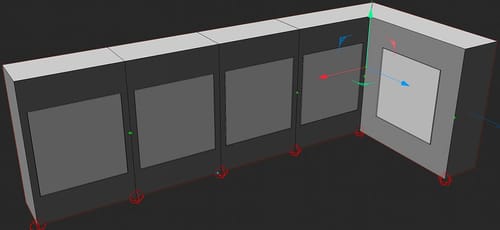
Let me know how it goes.
All the best
