swirling strands moving along the surface of a tree
-
Hi there, I'm trying to achieve a sort of braided/twisted rope look growing on the surface of a tree. Have a look at the example image here: https://cdn.midjourney.com/6790e424-ca71-4d64-9258-0c49d0c16601/0_0.png
I'm less concerned about the small branches and more interested in the effect around the trunk of the tree. The idea is that these strands would start from the base and reveal themselves as they wrap around and move up along the surface of the trunk. I've tried two methods so far and both have yielded unfavourable results.
Splines + rope dynamics: In the first method I used a voronoi fracture + matrix object to break my tree object into linear segments. I then created splines from these segments and applied rope dynamics to them. I used a volume builder with noise connected to a field force so that the splines move along the surface of the tree. It creates an interesting effect but the noise just makes the strands look messy and I can't figure out a way to make them grow from the ground up.
Particles + tracer: In the second method I used a particle mesh emitter with the emission coming from a vertex map (the bottom portion of my tree). I used the same volume builder+field force setup so that the particles stick to the surface of the tree. The idea here is that I'd trace the particles and render them as hair or something. What I can't figure out is how to create a field force that incorporates an upward movement in conjunction with a twisting motion. I can get a linear field to make them move upwards but can't seem to figure out how to multiply that effect with a noise or a twisting motion. I've attached both scene files here in case anyone is interested and has any ideas! Thank you in advance!
https://drive.google.com/drive/folders/126GGWEEK9bPhcc1G9S3z28PMgFk-bR6I?usp=sharing
-
Hi signature-view,
Between the image and the project files, I do not see a direct connection.
I exclude here Ivy Generator, as the twist is needed.
Perhaps this is the way to go:
https://www.youtube.com/live/QaDFSdG2BFI?si=paGl_Xn0Wjn1zLxF&t=2462
I will have a look into this later.Here are three "classic" (brainstorming-) ideas to shape a tree this way, while the examples are not refined to match the beautiful image, but to contribute to your exploration. The particle/collider is taken from another thread here and loosely adapted. Finding what fits to your project and art-direction/-changes was the target here. The idea is more - to "paint" the shapes.
The Disc and Tracer version is mostly set up as a parametric exploration. It might be easier with a fixed visual target - seeing the Dic Tracer as a brush-like tool, then creating an editable "stroke from it and having the ends "distorted".
Files
https://projectfiles.maxon.net/Cineversity_Forum_Support/2026_PROJECTS_DRS/20260202_CV4_2026_drs_26_Tree-01.zipAnother option, not in the files, to create the model from a Sweep, rotating it. In the Sweep, use Details: Rotation and Scale, and then "Ring-Select" harvest via edge to Spline the lines that need to get these results. The Correction Deformer might help to shape the results.
Is there anything useful for you in this?
Cheers
-
P.S.: Here is the file that creates a circle motion upwards around your tree model.
I have reMeshed the tree to keep the scene "light".The basic idea is from this tutorial, as mentioned above:
https://www.youtube.com/live/QaDFSdG2BFI?si=paGl_Xn0Wjn1zLxF&t=2462However, the curly pattern is not your target and I assume it was overused by now anyway, while the motion you are after is kind of intriguing and elegant.
It needed some adjustments from the tutorial content, but the content Noseman and Domenik share should be watched and turned into muscle-memory.To keep the Spline (or the driving Particles for the Tracer) close to any surface, the Closest point was added, plus an Add Node (vector) to add with each frame a great Y value.
The Tree created a problem, as most Particles got somewhere lost in the tree, so the Field moves up and sets new starting points for fresh Particles to provide enough coverage.My understanding is that the Geometry of the "tree-object" is the "blueprint" and should not be seen directly, just the Splines shape the form.
Here is the file
https://projectfiles.maxon.net/Cineversity_Forum_Support/2026_PROJECTS_DRS/20260203_CV4_2026_drs_26_PAsr_01.c4d.zipA preview
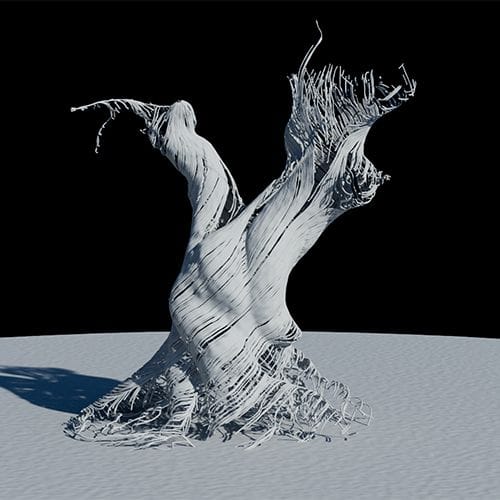
After thoughts:
The scale of the RS Render should be smaller, I guess, and perhaps the add Node before the Nearest Point on Surface is perhaps the more logical way, especially for fast Y+ movements. Note that the Tracer can create only one point per frame max, meaning if it moves too fast, it cuts through the "wood". Higher frame rates are needed then.Enjoy
-
Dr Sassi! Thank you! The first experiements are fantastic but unfortunately I'm aiming to get something that resembles a more intricate surface like the tree, rather than a spline. I think as a last resort something like that might have to do. The preview image from your last post looks very promising! The file you listed in the same YouTube tutorial video. Would you mind sending me a link to the c4d file so I can have a look at see what you've done? Thanks again!
-
Thank you, signature-view,
Thanks for the feedback. Yes, those (three files) were more to recreate the image.
I got it that you like to have the Tree from your file in that way.
Sorry that I messed up the link, I had it uploaded and well, obviously the wrong URL in the "memory". It was way past midnight, after a long day, no excuse, just the context. My fault.
Here is the file, and it is not so much different than in the YouTube file:
https://projectfiles.maxon.net/Cineversity_Forum_Support/2026_PROJECTS_DRS/20260203_CV4_2026_drs_26_PAsr_01.c4d.zip
I hope it works for you.Cheers
-
No worries! I think the link you just posted is the path to the original 3 files from your first post. Was there another one similar to the image you posted?
-
Please check again, I noticed that. Murphy's Law tonight, Sorry about that.
I was just updating the post and double check, downloading my own file and open it again in C4D.
Go to frame zero and press play.Enjoy
-
P.S.: thanks for your patience.
Here is a short preview of the last file.
https://projectfiles.maxon.net/Cineversity_Forum_Support/2026_Clips_DRS/20260203_CV4_2026_drs_26_PAsr_01.mp4
Tip: Once the timeline is one time through (Mode set to Simple) the Tracer can be used for the "Current State To Object", and this can be used in MoSpline>Spline>Simple to animate in many ways.
-
this is incredibly fantastic, thank you! I've never use the particle node modifier so I'll have to spend some time wrapping my head around it. Thanks for the tutorial video. Going to watch that and see if I can make sense of it. I'm guessing the particle node modifier overrides any other forces in the particle group, right?
