Redshift exact color workflow problem
-
Hello,
I'm not sure if this is a bug or my lack of knowledge of how to work with exact color values in C4D/RedshiftI got a few specific colors from the client that need to be rendered as the exact background color behind a transparent object (simplified glass capsule is in the video capture of the problem)
After some time experimenting, I figured out that to have the exact BG color in render, I need to switch color mode to "Invert ACES 1.0 SDR-video".
But when I try to save given colors in a color palette and recall them, I get different values from the saved ones. This can be seen in the video:https://www.dropbox.com/scl/fi/o7fr3xrg58pqhzj10o86n/color_problem.mp4?rlkey=es2nrl9rbh4hbbos8stiujtg7&dl=0
Here is my default scene color management setup, which I use all the time.
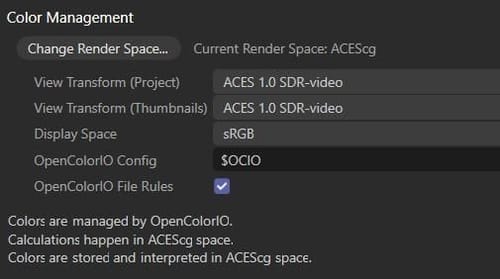 IMAGE
IMAGEAlso, check the video of strange behaviour when trying interactive or direct color values change.
It works as expected in sRGB mode, but in "Invert ACES 1.0 SDR-video" it acts very wierd:https://www.dropbox.com/scl/fi/gueoa4cci9njvyezww0q2/wierd_interactive_behaviour.mp4?rlkey=qqpgnqgb2fx03bfxji91829jb&dl=0
Can someone explain what's going on, or am I doing something wrong?
P.S. Even though demo videos are smaller than 2MB, I can't upload videos here, as I can upload on the Redshift forum, so I provided Dropbox links.Thank you
ZG
-
The "Invert ACES 1.0 SDR-video" is only a last resort to embed brand colors in ACES Color managed renders and cannot guarantee 100% color consistency.
My question is "why are you using ACES Color management when you're doing an sRGB "brand" visual? This is a recipe for headaches.
To guarantee brand colors (99.9% of them are in sRGB Color space), just use a traditional linear sRGB workflow.
If your client requires you to work in ACES Color, then try to add the background and other brand colors in Post.If you think the behavior is inconsistent, please contact customer support.