CINEVERSITY

    Maxon Logo
    • Login
    • Search
    • Recent
    • Popular
    • Users
    • Groups

    Reset rotation axis

    Question & Answers
    2
    4
    26
    Loading More Posts
    • Oldest to Newest
    • Newest to Oldest
    • Most Votes
    Reply
    • Reply as topic
    Log in to reply
    This topic has been deleted. Only users with topic management privileges can see it.
    • arnaud
      arnaud last edited by

      Hi there,

      I have a CAD model of a complex machine, and I noticed that the rotation axis of each individual group of elements is sometimes different.

      I would like to know if there is a way to reset the rotation axis of everything without changing the rotation of the object itself (just the axis not the geometry). It sounds simple, but I’ve been trying to figure it out for quite a while and haven’t been able to.

      Thank you in advance for your advice—I would really appreciate it!

      Arnaud

      1 Reply Last reply Reply Quote
      • noseman
        noseman last edited by

        Select all the objects you ant to reset the Axis and open the "Axis Center" Tool from the "Tools" Menu.
        Deactivate "Center" and activate "Alignment".
        Set Axis to "All" and "Alignment" to "World"
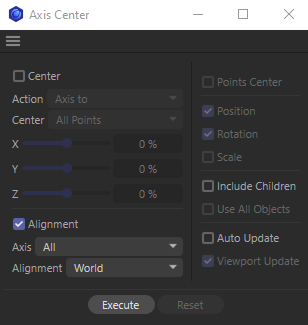
        image.png

        1 Reply Last reply Reply Quote
        • arnaud
          arnaud last edited by

          Excellent, exactly what I was looking for! Thanx Athanasios!

          1 Reply Last reply Reply Quote
          • noseman
            noseman last edited by

            You're very welcome!

            1 Reply Last reply Reply Quote
            • First post
              Last post