Issue with hair render : Redshift hair doesn't match the C4D standard render !
-
I need some help please !
So I added hair to a mesh and controlled its length curls twist ... in the standart c4d hair material and for the color and spec i used Redshift and then arnold standard hair . However when i render in redshift or arnold i dont ge the result i want . The main problem comes from the lengh parametre in the native hair material . Somehow arnold and redshift does not work well with it . Because when i disable it the hair kinda render properly but i dont get the length falloff i'm aiming for .
I just want the same result i get in the standard render to be in the redshift and arnold render !
I hope it makes sense !
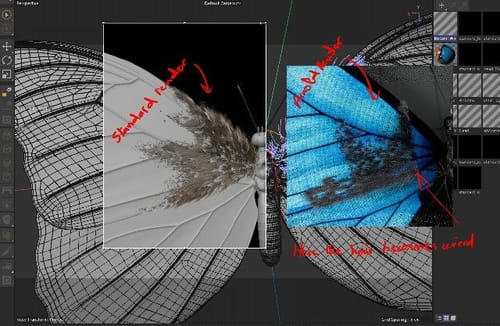
Higher quality image ; (https://ibb.co/9nfqG8W)
-
Hi load-traffic,
I have no file from you, so it is difficult to tell what your setup is and what happens.
I placed hair on an object, curled it, then changed the length. (Each time, I cached it to get started from the same base.)
Perhaps this helps
https://youtu.be/KiElJ-ssIqg?feature=shared&t=3190For any Arnold questions, please check in with the resources Arnold offers; I don't have a license nor any reasonable knowledge about it. (Last training with Arnold was around ten years ago, so that is a no-go.)
Since you say Redshift 3D and Arnold have the same result, I think the images below, rendered in Standard (on the left) or Redshift 3D (on the right), should help. The light is different, hence the brightness and saturation.
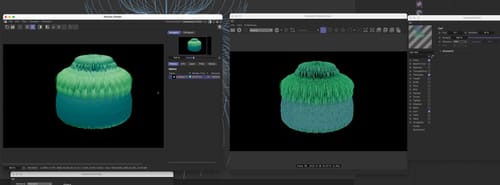
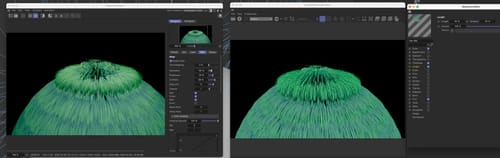
I'm happy to have a look at your file. Either here as a c4d file (below 1MB, just the needed parts) or as cloud share (I touch only Dropbox, Wetransfer, Google, Adobe, and Apple as cloud services; thanks for understanding)
All the best
-
Hello Dr. Sassi !
thank you for the reply !
here is the file : https://we.tl/t-5kLTWT7UQ9 -
Hi load-traffic,
Thanks for the file and for using Wetransfer; it is very kind of you.
Something is off with the file, but I think that would be a case for the tech support, as I can reproduce it in a new file.
My suggestion is that we check step by step what works on your side.
https://stcineversityprod02.blob.core.windows.net/$web/Cineversity_Forum_Support/2023_PROJECTS_DRS/20231230_CV4_2024_drs_23_HArs_02.c4d.zip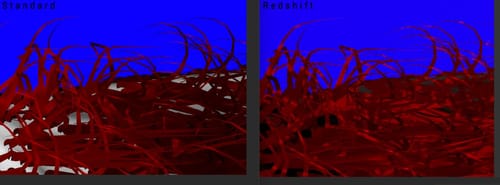
Here is a file that is newly set up based on your wing object. Render it in Standard and Redshift. I get the same result in terms of hair shape.
When I get your results, we can take it from there.Have a great weekend.
-
P.S. I found it.
The UV polygons were sitting X=+1.0.
When moved to X=-1.0, they sit inside the 0-1 UV space. The hair system works for Redshift.
https://stcineversityprod02.blob.core.windows.net/$web/Cineversity_Forum_Support/2023_PROJECTS_DRS/20231230_CV4_2024_drs_23_HArs_11.c4d.zip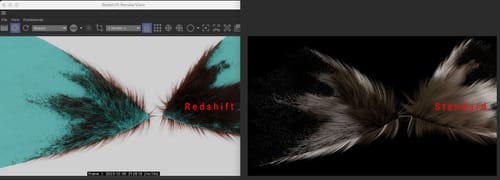
Place the project file in your project folder so the texture ("hair mask o1.png") is found.
Cheers
-
Thank you Dr. Sassi !
I cannot thank you enough .
I really I appreciate your time . -
You're very welcome, load-traffic.
It is very nice of you to take the time to reply.
My best wishes for 2024.
