Vertex map growth and decay - how to achieve
-
I'm using a vertex map on a spline to trigger a rope simulation.
I can grow the weights but I'd like them to dissipate over time . Kind of like a wave or infection where the infected die out. However I can't seem to achieve this with the decay field.
Could anyone advise me on how to do it?
My current setup is:
spherical field that starts the growth set to normal
freeze with growth set to normalWhen I add decay nothing really happens.
-
Hi Sweep Motion,
It is always better to share a simple c4d file here (smaller than 1MB, or via DropBox, Google, Apple, Adobe, Wetransfer)
Please have a look here:
CV4_2024_drs_24_ANsv_01.c4dI have set up a Formula Field in the Vertex Map. The Formula is simple: ID<f
The f in the Formula represents the slider in the Variables. So you can animate this.A great tool for this to observe is the Main Menu> Structure Manager. When open, please set the Mode to Vertex Map.
Please note that this is not live update information; it must be stopped to refresh the values.
As a side note, the Structure manager also allows us to easily access how many "points" the spline has.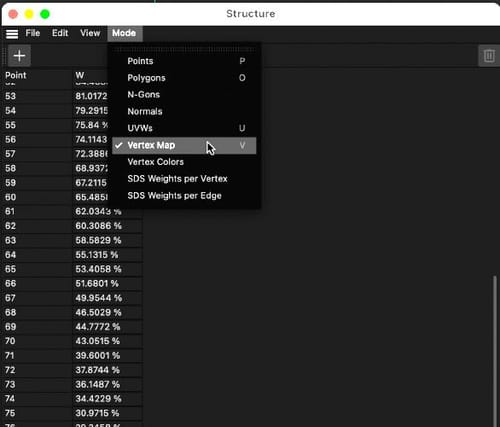
This helps to define the f value that needs to be set to get a working formula with the Point ID of the Spline.
The ID idea helps, even with Splines like a Helix, to change things from start to finish.
Since this would be a 0% or 100% set only, I have placed the Decay after the Formula to have a smoother change.
All the best
-
Thank you, I see. So there's no way to use the grow option in the freeze field?
-
Hi Sweeping Motion,
please share your file and I will have a look into it.
Cheers
-
Here's the scene. Thank you for your help.
-
Hi Sweeping Motion,
Thank you very much for your file. I enjoy working on the target instead of guessing.
Here is your file back; please note that I have nothing deleted but placed things not in use on a layer.
The first file showcases the function; you want to have it grow and then die off. The idea is to have a second Vertex Tag with the same function applied but triggered later. This is then used as a Mask for the first one. Grow then die; if this needs more cycles, perhaps use alembic, or you need to set the second one back to zero, which inverted means the first one is working again. Have a look, as words might be too abstract.
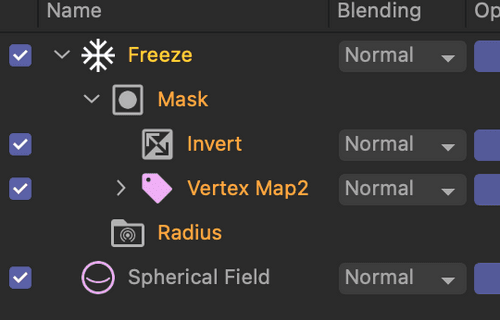
This is the simple version of your file.
https://stcineversityprod02.blob.core.windows.net/$web/Cineversity_Forum_Support/2024_PROJECTS_DRS/20240209_CV4_2024_drs_24_ANvi_11.c4d.zipHere, I took the liberty to dramatize the die-off a little bit. Perhaps it is to your liking.
https://stcineversityprod02.blob.core.windows.net/$web/Cineversity_Forum_Support/2024_PROJECTS_DRS/20240209_CV4_2024_drs_24_ANvi_21.c4d.zipPlease test them carefully before going into production. This is the first time I have set this up that way.
Enjoy your project
-
Thank you Dr Sassi!
-
You're very welcome, Sweeping Motion,
My best wishes for your project.
-
Referenced by A atg