Thank you Dr. Sassi. Best wishes for all your future endeavors. Cannot put into words how grateful I am for your help over the decades.
Posts made by philosophy-chemical
-
RE: Thank for all the questions and trust over the decades, take care!posted in Question & Answers
-
RE: c4d thumbnail doesn't show on MacOS on a MBPposted in Question & Answers
@whereas-stuff I started this thread in oct 2024 -- I'd had the issue for I think like 6 months prior. Much more than 2 years have passed, and despite the fact I've given this company thousands of dollars, an extremely and critically important UI feature still remains unresolved.
I've given up expecting a solution -- I have been using Anchorpoint instead, which was suggested by another user in this thread. It's not super pleasant, but it kinda gets you there 40% of the way.
-
RE: c4d thumbnail doesn't show on MacOS on a MBPposted in Question & Answers
@Tisi said in c4d thumbnail doesn't show on MacOS on a MBP:
@philosophy-chemical Hi, yeah it's pretty sad this hasn't been fixed yet. Right now I need to search for some old Project files in my Archive, it's a joke because I have to open every file to check for it's contents. My workaround for now is to use Anchorpoint
, a great project tool in general which has the ability to generate C4D Thumbnails for its own file view. Try not roll your eyes while digesting the fact that you have to use a third party tool to get thumbnails of your C4D files. Let me know if this works for you, hope I could at least ease the pain a bit.
Thank you very much, Anchorpoint seems to fill the gap
-
RE: Gaussian light beamposted in Question & Answers
Hi Dr Sassi, So I was able to make the gaussian beam as I mentioned, with a 2 height segment cylinder, with middle loop appropriately squeezed. I was able to make it look good with some RS shaders (crucially, had it go transparent when overlapping the lens etc using ramps to mask it with material blender nodes; and I managed to make the light beam itself look okay too, using a combination of noise, fresnel, etc.).
Indeed it was the peak intensity when the beam is converging that proved most difficult! https://i.ytimg.com/vi/MU4eOJw2sBQ/maxresdefault.jpg
(like this is what I was going for, except my light beam is just a single color). I tried for half a day to get something like this, but I just couldn't get anywhere appreciable close... and yes, in the end I did it in photoshop (with duplicated cascades of oval shapes, one slightly larger than the other). I kept fantasizing in my mind about the ability to define a valume structure kind of like how the guy in the linked blender video does... programmatically, or however which way, and also being able to use a shader to model the point-spread which I eventually resigned to doing in photoshop... but oh well, maybe one day.I will continue a bit more to refine what I have, but I think it's more or less acceptable what I've got going.
Thank you for your time and consideration.
-
RE: Gaussian light beamposted in Question & Answers
I'm making this for purposes of scientific illustration... just a pretty picture to explain an experimental setup, so I have some room to be artistic and I have the luxury of not having to be absolutely pixel-perfect with 100% optical accuracy. Discussing this with redshift folks (on discord) I'm advised of methods to make it with Houdini but I have no actionable leads on how I can implement this with c4d/redshift.
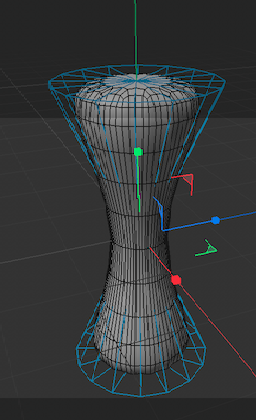
My c4d skill is higher than my Blender skill so instead of just working in Blender I'm choosing for now to make a mesh like this:

(cylinder with 2 height segments; and the middle loop edge I just make smaller... and then put the whole thing in sub-d), and I will give it an emissive appearance and play with opacity settings until it looks enough like a light beam. I expect it might be a hairy process! Given that I'll have overlapping geometry... a particle exactly where the beam-waist is converging... the beam coming out/touching the lens.... If this process of making the mesh look good enough to be a light beam with redshift proves too unwieldy, then I'll bite the bullet and try to make this image in Blender. -
RE: Gaussian light beamposted in Question & Answers
Thanks Dr. Sassi for the response.
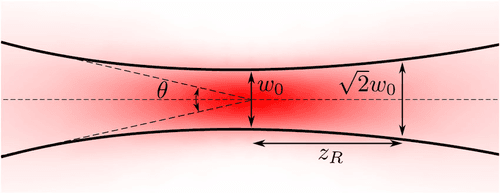
The reason to not use two spotlights is that they start from a single point source. But a gaussian profile has a pretty distinct shape:

Especially for purposes of scientific illustration where beam structure is important, the beam shouldn't look like it's converging to a single point source. The guy in the video has the result down perfect in terms of how the beam should look when it's coming out of a microscope objective.
I'm searching for the OSL shader you referenced at this moment (struggling to find the right one with Google but continuing to try), thank you.
-
Gaussian light beamposted in Question & Answers
Hi guys,
I'd like to create a gaussian beam with c4d/RS -- something pretty much exactly like this:
https://www.youtube.com/watch?v=JVWi-ji-C1QThe way the guy in the video does it goes a little too above my head, so I'm wondering if a simpler approach exists. Maybe a volumetric IES light? Maybe a vdb?
Any words appreciated! Thanks
-
RE: c4d thumbnail doesn't show on MacOS on a MBPposted in Question & Answers
Just wondering, has anyone looked into it?
For me, having updated to newest release of c4d still doesn't resolve this. I've given up hope for Maxon to solve this issue given they were initially notified of this about an year ago by various people and it appears their priorities lie elsewhere, I'm wondering at this point if someone in the community has a workaround solution to this problem
-
RE: c4d thumbnail doesn't show on MacOS on a MBPposted in Question & Answers
I made a ticket and Maxon recognized this was an issue some months ago.
I'm thankful to you, Dr Sassi for your response (and your help over the years, which has saved me through and through), so this isn't to you.
I write rather to express my frustration that Maxon hasn't resolved such a simple thing, a simple thing that happens to be very important. Maybe my workflow isn't ideal in that I rely on thumbnails of many c4d files I have on my computer... but it's just the way I've operated for many years, I rely on the thumbnails when I'm trying to find a past model. And now this task of finding some file here and there takes about 50 times as much and causes incredible distress and frustration.
I just have a bad taste in my mouth that I pay as much as I do for this software and still have to deal with such issues.
-
RE: c4d thumbnail doesn't show on MacOS on a MBPposted in Question & Answers
https://eclecticlight.co/2024/10/31/how-sequoia-has-changed-quicklook-and-its-thumbnails/
Maxon developers need to update some things given that Apple revised the way in which thumbnails are created.
-
c4d thumbnail doesn't show on MacOS on a MBPposted in Question & Answers
Hey guys,
I'm on a m2 MBP (Sequoia 15), with the latest c4d (2025) .
Whereas files would show the thumbnails with a preview of the file model or whatever on earlier version of c4d, c4d 2025 now shows just the c4d icon.
I really would like to have the preview, (don't follow good naming/file organization schemes... it's practically impossible for me to work without this).
Any idea how I can get the file preview thumbnails back?