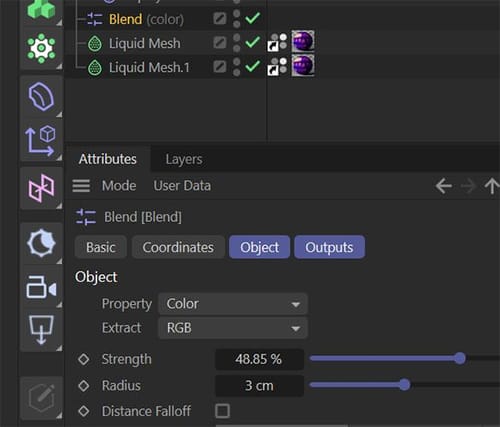
Blend (color) Object.
-
Restarting ciname 4d and no other app's solves the issue.
I cannot find any info on the Blend (color) Object.
Could you please explain.Also I do not fully understand the materials using the Vertex attribute.
Regards,
Pim -
Referenced by
 Dr. Sassi
-
Hi Pim,
There is, to my knowledge, no Blend Object.
Blend Modes: like in Photoshop
https://help.maxon.net/c4d/2025/en-us/Default.htm#html/COM_REDSHIFT3D_REDSHIFT4C4D_NODES_CORE_RSCOLORLAYER-COM_REDSHIFT3D_REDSHIFT4C4D_NODES_CORE_RSCOLORLAYER_GROUP_0.html#COM_REDSHIFT3D_REDSHIFT4C4D_NODES_CORE_RSCOLORLAYER_LAYER1_BLEND_MODEMaterial Blender
https://help.maxon.net/c4d/2025/en-us/Default.htm#html/COM_REDSHIFT3D_REDSHIFT4C4D_NODES_CORE_MATERIALBLENDER-NET_MAXON_NODE_BASE_GROUP_INPUTS.html#COM_REDSHIFT3D_REDSHIFT4C4D_NODES_CORE_MATERIALBLENDER_LAYERCOLOR1Please share the exact name, and I will do my best to share the information.
(Please note I will be back July 07th; in between my vacation, I will check for emergencies.)
(The two other questions are answered in their own threads. Please don't mix. Thank you)Cheers
-
-
Thank you, Pim,
Yes, I'm ready to slow down for 9 days, as I was searching for an Object. It would have clicked with Particle Blend Modifier.

Even the Documentation's URL has an Object in the title,
But I was searching in the Redshift Documentation based on all the Nodes questions and color questions. Sorry about that, my fault.Here is the Manual page, which I think has a lot to offer:
https://help.maxon.net/c4d/2025/en-us/Default.htm#html/OFPBLEND-FP_BLEND_OBJECT_GROUP.html#FP_BLEND_OBJECT_GLOBAL_STRENGTH
Thanks for your patience! I will check in next week, but I try to keep it short; typically, that is the slowest week of the year, hence my timing.
Enjoy