Rope (Spline Dynamics) problem in new C4D releases
-
Hello,
I got to prerender (new logos/textures, etc.) some scenes I worked on earlier this year.
When rendering, I noticed that Spline Dynamics does not work in newer versions of C4D.
Here is the info screengrab of the last version os the scene that worked/rendered OK:
Luckily, I have the 2024 version installed and a simplified scene (I deleted all from the scene except one of the problematic characters), and here Spline Dynamics works OK.
Here is the simplified scene for inspection of the problem:
Notice the teniticles movement, they are dynamic in 2024 and rigid in newer versions of C4D:

Here is the video preview of how character tentacles should move:
https://youtu.be/0gE5SDUVC34
Any idea how to make it work in newer versions of C4D?
Thank you.Best regards,
ZG
-
EDIT: The problem is solved with Tech Support's answer to ZG. It was a problem in the previous version [2025.1], and it is gone in 205.2+ and 2026. Adjust the Resthold sliders accordingly /edit
Hi ZG,
Thanks for the file. I have loaded the file in 2024 to see the effect.
In 2025, the Robe has completely changed. Call up a new Rope tag and compare. It is a complete updated functionality.
I have checked the usual suspect data channels if that was mentioned somewhere, I can't find an entry.
The same result as in 2025 is given in 2026. I have no idea how to replicate your result exactly from 2024.
You asked for an alternative: I explored the use of Joints and IK, set to Dynamic, but it might come close, but not a match.
Example sketch:
CV4_2026_drs_25_CAjd_01.c4d
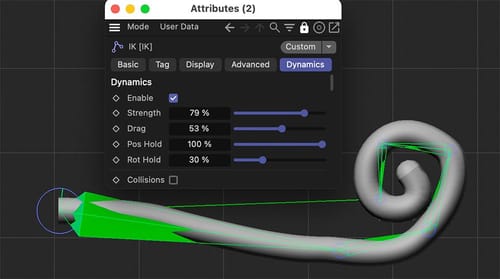
Since I believe that is an issue based on code, and it needs the attention of the developers, to decide if the 2024 features should be possible in 2026, for example, I suggest opening a ticket with support to get at least a second opinion, just in case I missed something.
https://www.maxon.net/en/support-centerThanks for doing that, and sorry for the trouble.
All the best
-
P.S.: ZG, FYI - I filled a report.
I explored this a little bit farther. The Rope Tag with these options was last time native in before v2023. The App 2023 has already a new Rope tag, same icon, but the options are very different. Interestingly enough, it doesn't work before or after 2024.
Anyway, here is a refined Joint Dynamic version
CV4_2026_drs_25_CAjd_11.c4d -
P.S.2: Here is a simulation-based alternative.
This technique utilizes the Connector (the same object) to create the effect.
CV4_2026_drs_25_SIcs_01.c4d
.A different way can be created with this Quick Tip:
https://youtu.be/JwjDc8zIlN0?si=JkTYhXRfqv9idMMS
Here, the Poles Per Point have a much higher variation regarding adjustments.
CV4_2026_drs_25_SIcs_11.c4d
.Of course, in the end, the result counts, and the example should help you find the best option for you.
Enjoy!
-
Thank you, Dr. Sassi.
I had no time to investigate since there was a deadline to pre-render the scene, so I used C4D 2024 to render it as it was.
The rig was made 2-3 years ago by another person, so I had no idea how to fix it.
Anyway, I got the answers from the devs on how to fix it:"We fixed that the "Rest Hold" does not work in <=2025.1.
It just does nothing and was always like 0.0.
With that fixed the rest hold actually holds and 0.5 is a lot.
Lowing that to 0.0 will give the old result that you previoulsy got with it being broken." -
Thank you very much, Z.G.,
I'm glad the Tech Support cleared that up, and thank you for sharing.
I checked it in 2026.0 and the previous version of Rope works as before.For anyone interested, I have set up the project file, to get similar results with the new Rope Tag:
CV4_2026_drs_25_SIcs_21.c4d
Since the effect should be stronger on the end of the Spline the Formula is
id/count
The Vertex Tag goes into Mix Animation> Force.Have a great day.