Shadow hinting
-
Shadow hinting doesn't work. Are my settings wrong?
I am on a MacBook Pro M1 Max with Sequoia 15.17.1 and the latest Cinema4D. -
Hi Dutchbird
M1 Max with 15.5 and 2026.0 produces this for me:
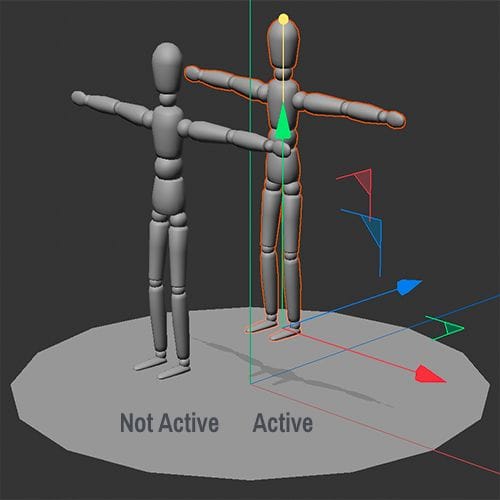
Only the active object is visible, but the Display Mode Gouraud is active (No Lines/Lines)Is that the problem?
Here is the Maxon QuickTip, for anyone reading along.
https://www.youtube.com/watch?v=ZZdvcfKEOL4(Sorry for the delay, this is my week off, and today was the Thanksgiving Holiday, which typically means a lot of traveling.)
Cheers
Dr. Sassi Sassmannshausen Ph.D.
Cinema 4D mentor since 2004
Member of VES, DCS.
linkedin.com/in/dr-sassi-dcc2dcg -
@Dr-Sassi No. This is my problem.
Maybe it has to do with settings somewhere.https://www.dropbox.com/scl/fi/77784pqjfdoube5iuhdvk/Schermopname-2025-11-28-om-09.31.56.mov?rlkey=s91pt2ywsxacq1vb02zw76bs0&st=dc5dk1ko&dl=0
-
Oh. And happy thanks giving.
-
@Dr-Sassi I got this answer from Maxon Support.
Hello Ton,
Thank you for reaching out to us and sorry for the issues you are experiencing while using our software.
This problem has been confirmed as bug already. Unfortunately, this only appears on macOS with M1 and M2 hardware.
Our developer is aware of the issue and I hope this can be solved soon.I'm sorry for this inconvenience.
Due to the nature of software development and testing,
We are unable to offer any dates or time frames on product releases, updates, or bug fixes.
This allows our development teams to remain flexible in addressing priorities,
And ensures that they have the time needed to produce the best products and find the best solutions for our creative user community.Please feel free to check our Maxon release notes page for information on all current releases as they become available.
We will be closing this Support ticket, but it does not mean that we are closing the bug ticket.
For more information on this, please see the FAQ: Bug Reporting, Fixing and Feedback
Kind regards,
SandroCinema 4D Technical Support
-
Hi Dutchbird,
Yes, there are different encounters of it (not working, or artifacts, etc.); however, I am unable to figure out why it works on my M1 Max and not on yours.
I can get to a point where I get artifacts if I switch to a different rendering method or just change from move to rotate.
It is not stable, but the idea is to see a projection of the object below. So, please explore this workaround.Here is the file:
CV4_2026_drs_25_MOsh_01.c4d
The idea is an RS Infinite Light, while set straight down (R.P -90º). The Editor View> Option> Shadow needs to be enabled.
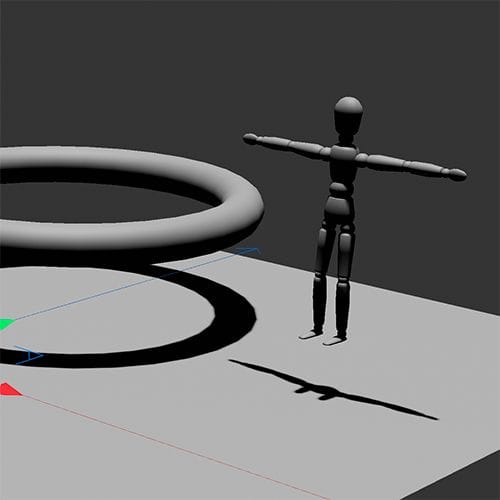
If there is an object creating Shadow over that area you need to work with, drag it into the RS Infitinite Light> Project> Exclude.
Since you can switch the light off, you could create a view differnt ones for more complex scenes.I hope that helps until a solution is provided.
Have a great weekend.