Speed up Spline IK process
-
Hi Pitchi,
Thanks for the file and the link.

I think my dear colleague Rodrigues has done a great job.
Finding a faster way is always a good question.
.
A script would be the question for the Developer Café
https://developers.maxon.net/forum/
Scripts here are not allowed for security reasons. As they can be updated, and it would be beyond my time to check those every hour, to avoid harm.
.
I have experimented a little bit, while keeping the shown results of the video in mind as a target. Like Align to Spline or another option.
Of course, I have to mention that Cinema 4D has the Toon character set up. Which is surely the fastest way to get a very complex, yet easy to animate rig in the "pipeline"..
Below is, in my opinion, the fastest way, especially if you have huge numbers of those.
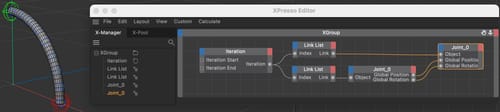
The one joint (bone can be set into many with the shift click "split" function. Convert them into null can be done, but is perhaps not needed. In the example I have done it, to follow the question.)
The transfer is then done with a simple iteration XPresso setup.
.To get many Single Joints, CMD drag one, select the two, CMD drag these, select the four, etc. In no time, you have a lot.
Joints and Nulls each go into the Link List, and both get connected to an Itteration. If you have nine joint objects, then the iteration is 0-8.
Drag one joint and one Null into the XPress editor; they serve as "Receiving Container", and get via iteration>Link Linst all Objects sequentially as output.
Transfer the Global Position and Global Rotation to it, if you like to adjust the Scale of the Joint. Other wise the Global Matrix does the trick with one connection between the Nodes.
.
I have frozen the Coordinates of each object, so if a reset is needed, use the Reset PSR function.
CV4_2026_drs_25_CAxp_01.c4d
.
If you have any questions, please let me know. I'm happy to look into it.
.
Enjoy -
thanks you ! yes I think using a script is the fastest way if I need to create about twenty IK splines; if I remember correctly, they often use scripts for rigging in Maya.
-
Hi Pitchi,
Thanks for the reply.
The file I have shared, I can redo in five minutes. Which means with a coffee break, that would be an hour

Since I do not know your project, it is hard to tell more.
Often, I encounter that going back to the initial idea of the character and its needs might trigger some other ideas.The key would be Python; however, it might take longer to script this than to do it manually.
Here is an example with an PLA animated spline.Here I use the Spline Wrap
The object stays in place “virtually”, and can so easily be changed with "local" Deformers, like the Bulge.
The Splinewrap (I have its bounding box fixed here) can easily change the shape with its integrated Spline Interface Adjustment: Size and Rotation.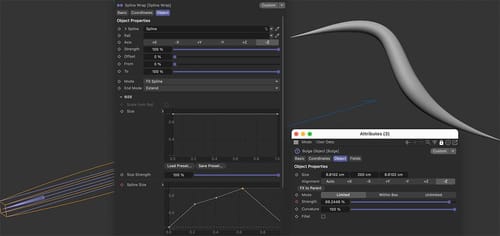
If the single Spline set up creates some trouble, a Raid Spline can be used, but of course, that increases the complexity.
I'm sure there are more ways, but each character setup might need something else.
Let me know if you'd like to dig deeper. I'm happy to look into it.
Happy Holidays!
-
P.S.: One more, perhaps that allows only for more input on your side, but maybe works as is.
The concept is simple: Two Nulls are the main handles, start and end. They each have two child objects attached. These four allow the Tracer to create a spline.
To gain data about the rotation of the two handles, two more Nulls are used as Child Objects for each Handle. This is then used in a second Tracer to produce a spline again, but this time it is a Raid Spline.I have animated one side. The Scale is in the Spline Interface of the Sweep object.
Enjoy
-
Thanks you for the reply
the initial is to rig a face like this : https://www.youtube.com/shorts/3oeox_DL-SI
I'm testing different techniques to make the workflow faster., the pink squared Nulls are Controllershttps://www.swisstransfer.com/d/e072875d-7c88-4f8e-be73-b47056d3b75d
-
Hi Pitchi,
Thanks for the YT link,
You are aware of this setup, correct (?) - but just in case:
https://cineversity.maxon.net/en/series/face-rig-tutorial?tutorial=face-rig-tutorial-introductionIf you have a file, I'm limited to open Dropbox, WeTransfer, Google, Adobe, or Apple cloud services for security reasons. Sorry.
If that is no trouble, please use those. I'm happy to take a look at those.Cheers
-
P.S.: I was too curious, so I used my private account to download it (since it is a new Mac, and has its own router, for now I can take a risk…), your rig is impressive.
Thanks for sharing, and I will think about it. -
Hi Pitchi,
Here is a "One Minute" workflow. I used 12 joints for this, but it works with any number, dependent on how you need it.
https://projectfiles.maxon.net/Cineversity_Forum_Support/2025_CLIPS_DRS/20251225_SplineJoints.mp4
At the moment, I can't think of anything faster. Well, if you have a similar number of joints, then the joint production can be just to copy the group with the Align to Spline already attached. Then, with some routine, it is half the time.
Of course, the handles need some attention, the Joint used for this should be not weighted/bind.
CV4_2026_DRS_25_CAsj_01_.c4dCheers
-
Nice thanks you
yes i tried the face rig tutorial introduction but i can't do exactly what i want. I tried something else; in the IK spline tag, I can link the size of a null to the length of the tangent of a point on the spline. I think I'll create a setup with the spline, joints, and nulls, which I'll then duplicate and place on the character.video link : https://wetransfer.com/downloads/1f5879cfef13990556c146a3b11a22ea20251226105108/1583f6?t_exp=1767005468&t_lsid=fedd0751-1e46-4996-bda5-0e13466adbf7&t_network=link&t_rid=ZW1haWx8YWRyb2l0fGIzNzkzZDA2LTJjNzAtNGM5NS1hYzk4LWM5NDFjNjZjYWM2Yw==&t_s=download_link&t_ts=1766746281
-
I think I've found a fairly simple and quick setup to implement on a character.
video link : https://we.tl/t-NHA42iH0PP -
Thank you very much, Pitchi, for the files and clips!
I took your file and placed some ideas into it, since your request was to speed up things.
The key was to keep the Joint objects out of the Hierarchy; otherwise, any scale on one would affect the object below.
I find no problems using just one Joint object to run the Spline IK. (Not a big time saver…)
Instead of setting up the User Data, you could "wire" the Null object Shape size to the handles, which allows you to get more visual feedback.
CV4_2026_drs_25_CAsi.c4d
Let me know if there is anything else you would like to explore.Cheers
-
good
thanks you, yes it's good for me, i found a good way to place quickly the IK spline on facethanks you !
-
Thank you, Pitchi, for the reply.
In summary, this sounds like an interesting exploration, and I hope you have some time after the project is finished to share your impression, or if you can, the results (if it is public).
"P.S."
To complete this thread, I have explored the Spline Deformer with a Multi-Segment Spline. The option to reset it (Like with the Freeze option) is not given, and we need a solution, perhaps via XPresso. Also, the fine weighting for the face might be relatively hard to achieve, if not impossible. Since this could be a suggestion at one point, I wanted to share it.
CV4_2026_drs_25_CAsd_01.c4d
How it could be animated
CV4_2026_drs_25_CAsd_02.c4d
However, Character Animation might always include several influences, so this is just a brainstorming for now.My best wishes for your project
-
Nice we can have good result with the Spline deformer
It's a shame we can't multiple Deformer Splines on an object and use fields on them. -
Hi Pitchi,
It is kind of possible, but it takes a short detour.
Example
CV4_2026_drs_25_CAsd_11.c4dThe key is to keep the point amount the same, e.g., not Adaptive (Across all elements, including MoSpline)
I think it is time to wrap this into a feature request.Cheers
-
good
thanks you ! While experimenting with different techniques, I noticed that there could be additional tools for rigging. The Create IK Chain tool exists, but not Create IK Spline. A tool that allows converting an edge selection into a spline, then into a joint, and then adding an IK spline with controllers all at once would be ideal. This would eliminate the need to perform each step manually. -
Sound great, Pitchi!
Please share that with Maxon, and if others read a long and find that great, please add you voice as well.
Select edge or a connected series of edges "Edge to Spline"
For the direction of the joints hierarchy "Reverse Spline Direction"
Call up the function and add the amount of Joints "Convert Spline to Joints",
A check box if the Joints needs to be single or in a hierarchy, direction of the hierarchy.
Handles for start and finish or per Created Spline Point (related to the edge selection).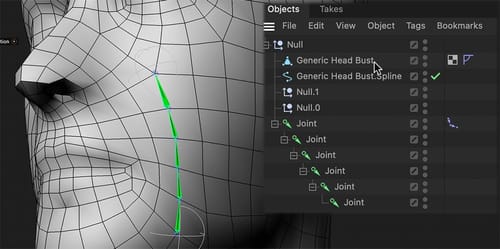
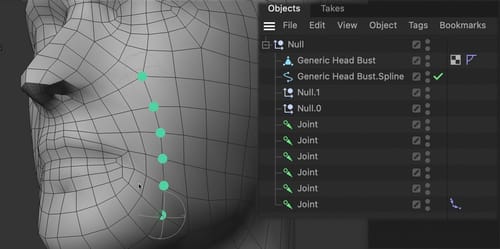
To create this suggestion use the
"Share Your Ideas"
https://www.maxon.net/en/support-centerThank you! I will share that as well.
Enjoy your weekend