basic particles turn on and off randomly
-
Hi resort-sand,
Thank you for the file!
If I understand this correctly, the size is there to provide the glow "sphere".
I have left your setup pretty much as it is, but used the Random Effector only to randomize the color.
Below is the more detailed step-by-step. for anyone reading along. Perhaps it is faster to explore the file.
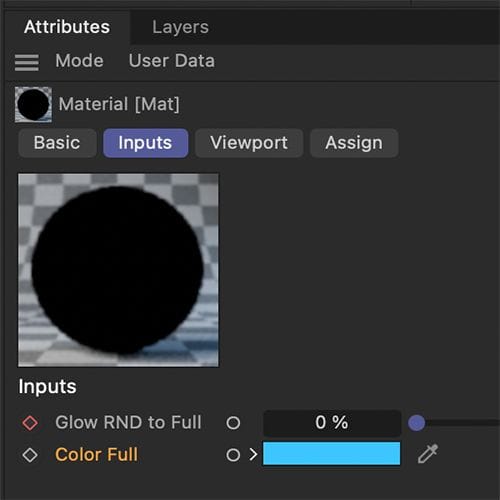
Material
The Color Data is based on Color User Data and the set up as "RSMGColor" Provided in the presets.This color information is all over the place, so I use only the red channel via Color Splitter (Blue or green is equally good, as they are just random gray values after all).
To get it from dark to Yellow, I used a Ramp Node. The idea of those lights is a more organic feel, hence the little variations on the right side of the Ramp.
This is then placed into a Mix Node, as you want to be able to go from Random to Full. To make that more comfortable to animate, I used a Group Node, set to Start node (Material Menu> Node> Start Node.)In this group Node I created an Input-Output and set the parameter to 0-100% with a step of 1% (right mouse click on the input> Edit input. then set up the parameters)
This allows, now, after the material is selected in the Material Manager, to see that input in the Attributes, I named it "Glow RND to Full", and animated it as needed.
The second input of the Group Node is Color. I have set it to blue for now, so the animation and change are clear. Use the warm glow tone for your final use if that is the target.
All of that goes into the Emission Color, and I have set the Weight very high to enable the proper glow in post effects. See below.
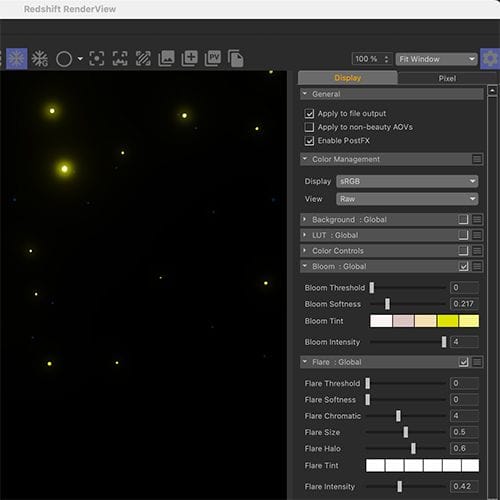
Rendering
If the Redshift Render View is open and large enough, the Cogwheel in the right upper corner should be visible.In the Display Tab, you can set up the Bloom and eventually the Flare effect. I have enabled both.
This produces the Light "sphere" around the fireflies.
The Render Settings have the RS Post Effects enabled
Preview:
https://projectfiles.maxon.net/Cineversity_Forum_Support/2025_CLIPS_DRS/20251230_CV4_2026_drs_25_RSff_01.mp4
.Please let me know if that works for you.
Happy holidays to you as well!
-
Thanks Dr. Sassi, this answers perfectly my requests, I downloaded it and it look much closer to what I wanted to achieve
I guess ... hope your next year will be full of success and peace -
Hello Dr.
I was wondering if it is possible to match the number of the visible rendered particles with the one that is in the viewport ? I am aware that this may affect in a big part the workflow, but at I need to have a fidelity between the designed particles look / number / speed and the rendered ones to be able to previz before committing to render and publish to my clientMany thanks
-
Thanks for the reply, resort-sand, and. the kind feedback!
They are all there, so far I can see, but perhaps too small? Please note that I set the Sampling (Render Settings> Redshift> Sampling for previews typically to 0.1, which is OK, but not production quality. Better is 0.01 or even 0.001, but the render time increases drastically.
Please investigate these suggestions, so we can find what is not working on your side. Please take one step at a time.
- Move the slider of the material to the right (delete the animation)
- Set up the Sphere size to 10cm, for example
- Cache the Particles with the option on the Folder: Particle group
Any insights that lead to solving this problem?
Happy New Year
-
it was my bad, I forgot to exclude the particles group from rendering, so its alpha with a big radius was dominating the alpha channel so it gave me a false flag of the particles number
all is great now, will keep you posted
Have a great Sunday -
Thank you for your reply, resort-sand.
My best wishes for your project, and have a great Sunday as well!
-
It seems it is getting me the caching issue using the new particles system, long story short, I am trying caching the scene here, bit it keeps crashing or freezing
I tried to debug it by recreating it, I think the moment where I ask for negative time values to get my preroll right this is where things get to be messed up
I am attaching the scene, but no need if I can find a proper and clean way to get like pre-roll of certain number of frames with caching
many thankshttps://we.tl/t-0lm0HGQ7Ep
-
Hi resort-sand,
Thanks for the file.
Please run this version of your Project:
https://projectfiles.maxon.net/Cineversity_Forum_Support/2026_PROJECTS_DRS/20260112_CV4_2026_drs_26_PAcp_11.zipI used these steps:
The Cache Object to cache (not the Cache Scene)
The Remesh was converted into a polygon mesh (Object Manager>Objects> Modify> Current State To Object
As wild guess as the Clones were set to Multi-Instances.When this works for you, and all is as you need it, we can pinpoint more where it comes from and file a report.
All the best
-
P.S.: This evening I explored this a little bit more.
Can you share if that happens as well, based on the scene you shared when you create just the cache for the particles - Cache Object?Thank you!
-
Good morning Dr.
I made more debugging based on your recommendations
It seems that only the Mograph object being active is causing the crash, all the other elements: cache scene Vs object, baking geos were not the cause of the crash
I will keep digging
cheers -
Thank you very much, resort-sand.
Does it make a difference if you have it on an Instance Render Instance or a Multi-Instance?
So, caching while the Cloner is off works, and switching the Cloner on after caching shows problems or not?
Either way, that needs to go to Tech-support, so it can move along the fixing "pipeline".
https://www.maxon.net/en/support-center
If you have a minute, please use this URL. Thank you very much!Have a great morning as well. It is past midnight here, and I will call it a day soon.
Cheers
-
Hello
Once the mograph is deactivated the caching runs without no issue, upon finishing, I activated it
  all works normally, it didn't matter after if it is normal instances or multi instance
Thanks for being supportive
Best -
I noticed also the following,
-putting the mograph in Multi Instance with motion blur renders black frames, back to normal instance object and motion blur works
-in AOV with activating motion blur pass (with or without) motion blur activated renders black frames
At least this happens in my scene, maybe I am not aware of the motion blur limitations with particles or mograph based objects
Cheers -
Thank you very much, resort-sand, for the extra data.
I'm glad we got at least the crashes tamed via the workaround.
There is surely something not OK. I hope the tech support is getting to the bottom of it quickly.
The evaluation of a bug is done by the tech support, which is not my scope here.
All the best
-
submitted as a bug
-
Thank you so much, resort-sand.
Sorry that you had to experience a problem in the first place.
Fingers crossed that the switch on and off "dance" is soon not needed anymore.
My best wishes for your project!
-
Hello
I know it is a simple question, but how we can map the radius of the particles so it is getting smaller before the end of its life, I found the "Radius Over Age" scene in the Asset browser but cannot apply it to my emitter scene
-
I forgot to add that also the appearance of the particles should be progressive, let's say birth / death around 3-4 frames progression before reaching the radius
-
Hi resort-sand,
Please ask new questions in a new thread, even if it feels related. Otherwise, the forum will be uncomfortable to read, especially when the initial theme is discussed further, then the second again, etc. While the headline is not changing, and if so, it becomes over time even more difficult. Thanks for considering.
Here is a setup.
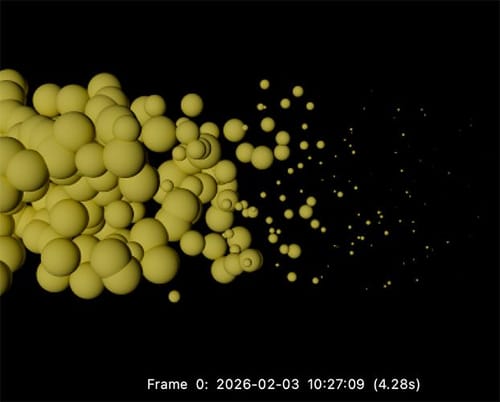
The last frames of a particle getting smaller seem simple, but then we might forget the Variance of the lifetime. To get this handled, the Lifetime and the Age (both provided in Seconds, to allow frame rate adjustments later on) need to be evaluated. Then, if the remaining lifetime is below a certain threshold, the progressive radius change starts. The amount of change for the last segment is in the If Condition. The example has, for a better exploration, a "shrink-cycle" of 2 seconds (See Condition) and a scale down per frame of 0.9 (If Node), adjust accordingly to your needs.
All the best
-
Thanks Prof
My bad for the thread, I didn't want to flood with many threads, will keep in my mind
two questions:
how we can make the birth behaves the same, instead of just popping out, I want to animate the radius progressively until it reaches the radius value
how to tell mograph to copy the radius to the scale of the clones ? I saw you created one but in the scene it stays constant
Best
