Throw a chip bag?
-
Thank you for the input. Sorry about my limited file. I must have done 6-7 tests, but once I failed, I deleted the assets and tried another....hence just the one file.
I received your file. Thank you. But it still misses the mark.I was sort of (hopefully) trying to base it off of this video: https://www.youtube.com/watch?v=c_haELIyIus&t=2199s
You can see the bags have stiffness to them. I guess an inflated balloon or a softbody? The interaction looks good. The part that is missing for my needs is that the motion is just based on turbulence, not a directed throw. If you look at my file, wrong as they may be, they have two bags. The first one shoots up and switches to dynamics at the peak...which would give a slight launch, and then start to fall down. The second bag would be slightly behind. So once the first bag stops its upward motion, the second bag sort of pushes it out of the way. In theory it's a two bag reveal. Bag one float into screen, and then a beat after, bag two pushes it out to reveal that bag. Again, I like the feel of the look in the video tutorial I showed. It just lacks the motion control for the throw. I tried to use wind, but it just kind of collapses the bag.
Any idea....Hopefully I explained myself, but I'm not sure.
I'll keep experimenting...if you have any further input, I'd love to hear it.
Thank you again.
-
Hi PlatPlat,
I assume you have no problems following the tutorial. So I wonder what else is the question here.
Have you set the Gravity to zero, the scale to the bag size, the Bendiness to a lower value, defined what is stiff and hard based on Vertex maps, in several areas, especially for the poles?A balloon setup might not be the way to go, as the bags, going by your initial post, should show some interactions.
The key might be to set up several bags in a row and change one parameter at a time for each from low to high, then cache the scene. things work together, and just producing one result is not helping you feel in charge. Please allow yourself some time. You will see that exploring it systematically will provide you with more control over it, to get what you have in mind.
Example:
https://projectfiles.maxon.net/Cineversity_Forum_Support/2026_PROJECTS_DRS/20260108_CV4_2026_drs_26_SIcb_41.c4d.zipA personal note:
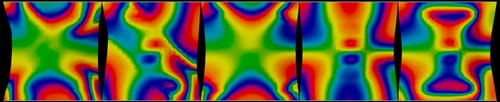
Defining those Simulations should be seen, from my point of view, not as a toss-and-go solution, but more like a kinetic sculpture, where the “chisel impact” is the Vertex map for any parameter that can hold one. Finding the idea to define each part so in detail allows for a very individual art direction, which I believe every artist deserves who understands that art direction means directing the audience's emotions. Yes, there is a learning curve. But it is sure rewarding. I hope these few lines encourage you to invest some time.
As usual, I do things each time again, when I suggest those, as things might have changed.
Example
https://projectfiles.maxon.net/Cineversity_Forum_Support/2026_PROJECTS_DRS/20260108_CV4_2026_drs_26_SIsb_01.c4d.zip
Heatmap of the Vertex map influences
/end personal noteAll the best
-
Hi, again, thanks for replying!
Yes, I can follow the tutorial fine. My question was the keyframed "tossing". As well as the fact I want to have gravity. I've used that "tossing" technique many times before, and it works perfectly. I just never did it with a "soft body". I have no problem running additional tests, as long as I know I'm on the correct patch. As you know, you can spend days testing a technique only to find that I'm on the wrong path or that there's a much easier solution. Which I have unfortunately faced many times...which is why I wanted to run it past you.
Thanks again!
-
Thank you, PlatPlat, for the reply.
The typical problem that I have writing in a forum for a wide variety of skill levels is not to overload the beginner, and not to tread pro's in a way that bores them with detailed (context) explanations. I'm sure I will never find the perfect balance. Well, going by educational theories, things are more complex, but I digress. In short, never take things that I write as an evaluation of skill levels. Thank you.
Yes, the is a danger to get lost in explorations, but please see it always as a gained knowledge option that might shorten the next project development.
Tutorials with abstract objects are easier, as we are less critical. I assume that you are aware of that, but I write in a forum: A chip's bag is something we have typically in our haptic and visual memory, yet what one can see in an animation is not what the next one receives. The complexity starts to trigger that in others. Simulation algorithms don't have that as a template typically.You mentioned Gravity, which has a huge influence on things, but since Gravity is expressed with a time component, we can leave the gravity, but use the Attribute> Scene> Simulation>Scene> Time Scale. Which in return doesn't change animation (Keyframe time of the object's Position and Rotation values, but can follow or not based on the Force or Mix Animation settings of the object. In other words, the Animation you have can guide, but doesn't need to force the Simulation progress. This is just an example of art direction that I can't just share like a template. Timing is important, and not universal or generalizable. Nor is that mix, once rendered, changeable in post.
Thanks for the discussion!
Cheers
-
So...credit where credit is due!
I conducted additional research, and it does not appear that you can directly "throw" an object as a rigid body and then have it inherit its inertia when using a soft body. However, after evaluating the scenes you provided and conducting further analysis, the key is the "with force" keyframing. Basically using that as an "enable" on the off switch. Which is giving me a somewhat passable look.
Your scene (and help) has definitely shaved some time off my pain. For that, I appreciate you!. Thanks again, my friend. -
Hi PlatPlat, you're very welcome.
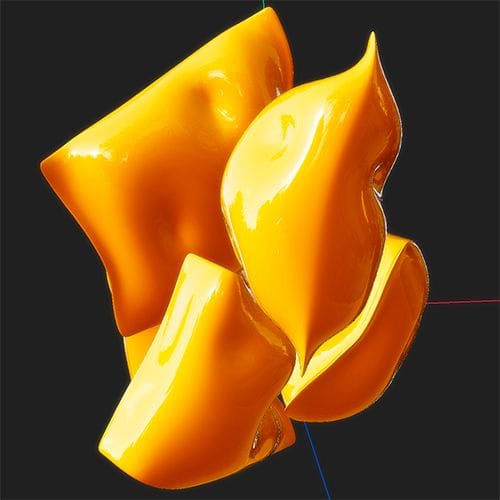
From the time stamp based image of the tutorial (I did not watch it -one hour…, after all, the first two weeks of ‘26 I have time off), but I wanted to share this with you. Take it as a sketch.
You asked about the Balloon while also having Animation running. (One Bag is animated)
Example
CV4_2026_drs_26_SIcb_51.c4d
Enjoy
-
@Dr-Sassi said in Throw a chip bag?:
Hi background-permit,
From the time stamp based image of the tutorial (I did not watch it -one hour…, after all, the first two weeks of ‘26 I have time off), but I wanted to share this with you. Take it as a sketch.
You asked about the Balloon while also having Animation running. (One Bag is animated)
Example
CV4_2026_drs_26_SIcb_51.c4d
Enjoy
Interesting approach!
It misses the gravity, but I like the look! The first part of this animation has this pop-up and fall-down rhythm to it. So it sort of needs to match.
Here is an earlier version: https://f.io/dgWb8ZY9
You can see the "up-down" approach. I am trying to make the bags more dynamic and have them smash into each other....As I said, I think I now have an approach, thanks to your help. Now I just need to dial it in!Enjoy your '26! I'm just getting over the flu myself.....good times

-
Hi PlatPlat,
Yes, the Gravity was off, as it was based on the GSG impression.
No problem, here is a version with a low gravity setting.
Quick example
CV4_2026_drs_26_SIcb_52.c4dAs a side note, you can turn off Gravity in the Scene settings and use the Forces> Simulation. Invert gravity to move bags up, then change it.
My best wishes to get quickly over the flu, not fun.
Have a good start into '26 despite fighting the flu!
-
I took a look, nice approach, thank you! I think I have this flying bag part figured out, finally.
As long as we're talking about this shot, maybe you can answer one extra nagging question. I have the bags animated in a way I like now, and I wanted to add some particles that are being thrown at the bag and have the bag interact with them. Now, I tried these two ways, and both failed. First, I tried adding a rigid body tag to the cached softbody object...didn't work. Then I tried baking off an alembic file, then added the rigid body tag to that, and it killed the baked animation. Doing some research, I did find an older article saying to use the "use animation" checkbox. But seems the new tags don't have that option. I'm at a loss. What is the correct tag set up for having an animated Alembic file act as a collision object?
I didn't upload a file, as this seems more of a "check this off" type of thing. If needed, I can, though.
-
Hi PlatPlat,
Your description is, the bags are cached, and the particles need to react to them. To be clear, anything that is cached will not get new deformations (softbody-wise) from new collisions.
Have you added the Collision from the Particle Menu as well?
The project file …_61.c4d is a simplified setup. The …71.c4d is an updated from the 51.
The bounced Particles go into a new group, not needed, but to showcase which one bounced.If you have to re-cache the bags, switch the Collider tags off for the time of caching.
Examples
https://projectfiles.maxon.net/Cineversity_Forum_Support/2026_PROJECTS_DRS/20260109_CV4_2026_drs_26_SIcb_61-71.zip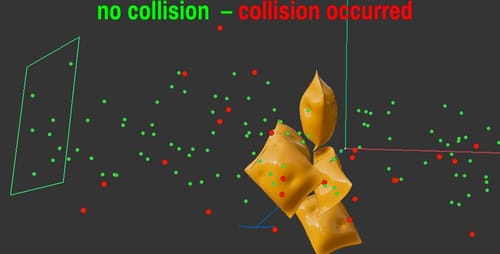
Have a nice weekend
