Sweep and Bevel
-
Not understanding why the bevel controls aren't working. here

https://www.icloud.com/iclouddrive/0068Ixf4qAWXo8yrqosaRatAg#bevels
-
Hi smckenzie,
Thanks for the file.
Here are two options for Bevels.
CV4_2026_drs_26_MObv_01.c4d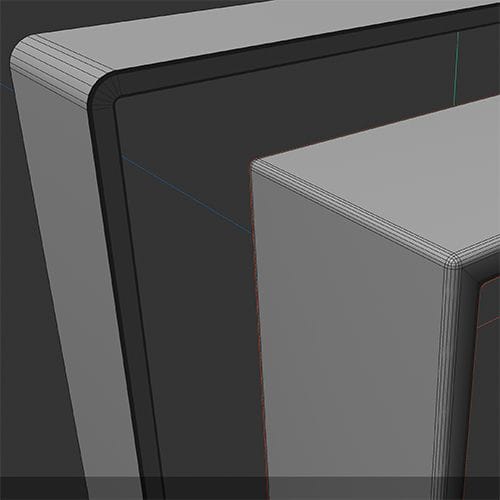
The Bevel tool will not affect generated results; it is for Polygons.
The Way a Sweep result can be beveled is either by setting up the Spline or with the Bevel Deformer.
In some cases, I could see the Volume Object as an …
Cheers
-
Thanks - so why is there a Bevel control under Caps on the Sweep object if it can't be used?
-
Thanks for clearing that, smckenzie,
The caps are on the end of a Path.
You used a closed path, no cpas, no "Bevels".
All the best
-
Got it. So there's no way to procedurally create bevels on closed splines, i.e. stepped bevels on a picture frame?
https://www.icloud.com/iclouddrive/0405f7k3IjtmY2ksuNmD-Pe8A#bevels
-
Thanks for the additional information, smckenzie.
That means you need to get the Caps to the side where you need them, like with the Extrude:
CV4_2026_drs_26_MOpf_01.c4d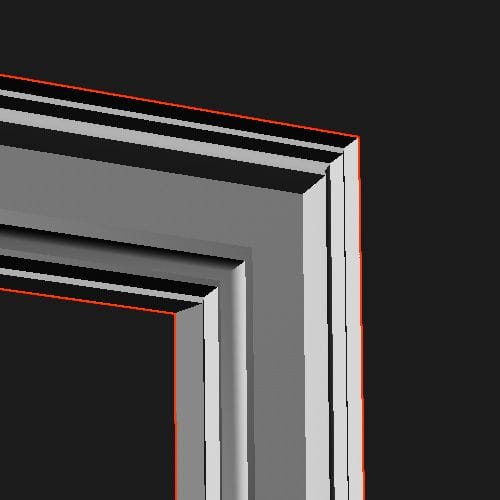
Or just use the setup of yours with the two rectangle Spline and add to the Profile a quick Spline-Sketch
CV4_2026_drs_26_MOpf_11.c4d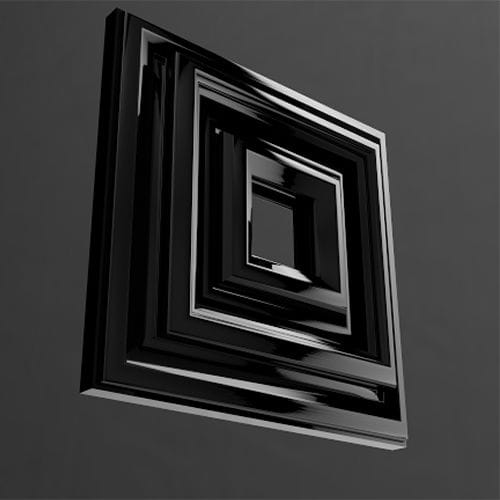
Is this working for you?
Cheers
-
Didn't think of the Spline Mask. That's super helpful, thank you!
-
You're very welcome, smckenzie!
My best wishes!
