CINEVERSITY

    Maxon Logo
    • Login
    • Search
    • Recent
    • Popular
    • Users
    • Groups

    Grid Spacing

    Question & Answers
    2
    3
    22
    Loading More Posts
    • Oldest to Newest
    • Newest to Oldest
    • Most Votes
    Reply
    • Reply as topic
    Log in to reply
    This topic has been deleted. Only users with topic management privileges can see it.
    • Dutchbird
      Dutchbird last edited by

      Stupid question. But how can I set my grid spacing. Can't find it anywhere.
      I used it a lot and now I am into a project where I need it.

      Cinema4D user since R8

      noseman 1 Reply Last reply Reply Quote
      • noseman
        noseman @Dutchbird last edited by

        @Dutchbird

        It's a bit "hidden".
        Go to the "Model Settings" (Snapping, Quantizing, mesh check etc) and Activate the Quantizing.
        The "Move" Value is the Grid Size 🙂
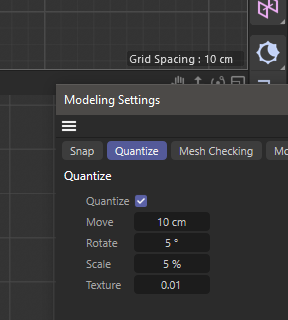
        00508036-9e36-4cfc-ad54-5be880f146f7-image.png

        Dutchbird 1 Reply Last reply Reply Quote
        • Dutchbird
          Dutchbird @noseman last edited by

          @noseman Thanks a lot. That was an answer at Dr.Sassi speed.
          I thought it had to do with the Quantize thing but it is totally different as in the past, years ago.


          Cinema4D user since R8

          1 Reply Last reply Reply Quote
          • First post
            Last post