CINEVERSITY

    Maxon Logo
    • Login
    • Search
    • Recent
    • Popular
    • Users
    • Groups

    Particle Condition not consistent

    Question & Answers
    2
    9
    185
    Loading More Posts
    • Oldest to Newest
    • Newest to Oldest
    • Most Votes
    Reply
    • Reply as topic
    Log in to reply
    This topic has been deleted. Only users with topic management privileges can see it.
    • danphish
      danphish last edited by danphish

      I made a scene of firework using:

      • a Basic Emitter to emit the initial shot
      • a Condition based on Age of the particles shot with Inside Range (Lower: 50F, Upper: 90F)
      • a Reproduce Emitter parented to the Condition so when a particle hits that condition it spawns.

      All was working fine until I noticed there were many particles that were not triggering the condition. Why would that be happening?

      I made another condition to increase the radius after 90F Lifetime to see how many weren't adhering to the condition:
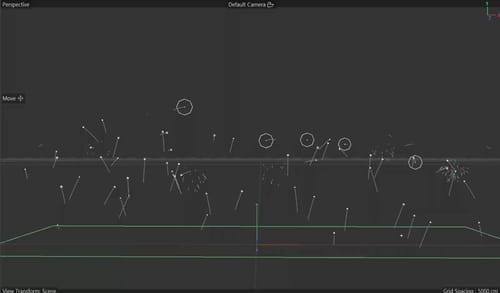
      ConditionIssue2.jpg

      It seems like when I reduce the Reproduce Emitter from 60 down to 10, all works fine - they all explode.
      The settings I had on the Reproduce Emitter:
      Count: 60 (or higher)
      Per Particle
      Count Variance: 5
      Kill Source: on
      Continuous: off

      SOLVED: See below

      1 Reply Last reply Reply Quote
      • noseman
        noseman last edited by

        What is the "Chance" Percentage in your Condition?

        1 Reply Last reply Reply Quote
        • danphish
          danphish last edited by

          In the image above, the chance was set to 100%. I had tried it at different values and still works the same (except 0% which results in no Reproducing which makes sense).

          I'm not sure why some are not adhering to condition. My scene is 600 frames long and the longer the scene plays out - the less Reproducing happens.

          1 Reply Last reply Reply Quote
          • noseman
            noseman last edited by

            You need to simplify the scene and only leave the necessary elements, and upload somewhere I can download it from ...

            1 Reply Last reply Reply Quote
            • danphish
              danphish last edited by

              Thank you!
              https://drive.google.com/file/d/1BIRrYqZWv-YmYvZqiLCkaFTraN_RP73p/view?usp=sharing

              noseman 1 Reply Last reply Reply Quote
              • noseman
                noseman @danphish last edited by

                @danphish Requested access 🙂

                1 Reply Last reply Reply Quote
                • danphish
                  danphish last edited by

                  Sorry, should be good now.

                  1 Reply Last reply Reply Quote
                  • noseman
                    noseman last edited by noseman

                    You discovered a bug in the "Compactify Threshold" Setting in the Simulation Settings - Particles.
                    Set the Compactify Threshold to 100% and it will work...

                    EDIT: Maxon is already aware and is working to fix this.
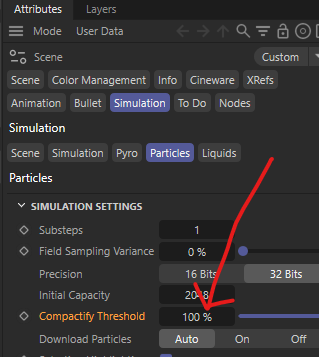
                    image.png

                    1 Reply Last reply Reply Quote
                    • danphish
                      danphish last edited by

                      That's beautiful - perfect. Thank you!
                      1 Reply Last reply Reply Quote
                      • First post
                        Last post