Tool chopping a metal bar
-
Hi Dr Sassi,
I'd like to reproduce a similar effect as demonstated on this video:
https://www.youtube.com/watch?v=2tpgc_pHRl4A cutting tool removing chips of metal on a metal bare.
I've tried different approaches to simulate the process of this tool, for the moment none of them makes sense to me.
Doing it with a deformer will not help as I can't animate the way I want it. Then I thought I could do it with a counter shape and boolean it with the bare, but this is becoming also pretty complicated. My best bet is probably morphing the shape from a state to an other. But I don't know how to reproduce the morphing effect radially, as it should..Maybe you have an other idea?
Thank you for your help.
Cheers,
Arnaud -
Hi Arnaud,
The formula in the video would find its way into a Formula Effector and is then roughly this:
sin(((id / count) + 0) * f * 360.0)+(id/count)
This means a Sine curve that adds slightly over time (the +(id/count) part).Based on that, I created the Loft-Cloner setup and harvested from it the Spline that drives the "knife" or "tool".
Here is an example:
CV4_2025_drs_25_ANco_01.c4d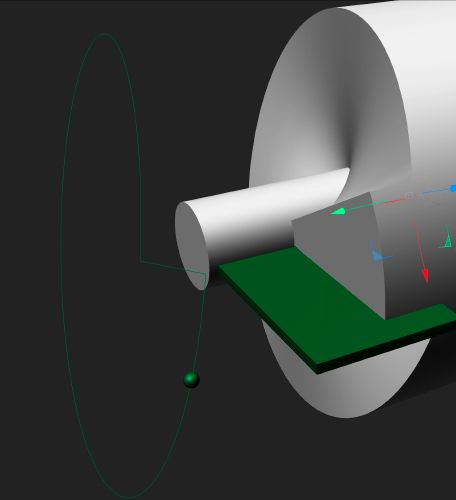
My best wishes for your project
-
Dear Dr Sassi,
I really appreciate your help, the time you spend to make these examples to make us understand the way C4D works. I was thinking of a loft this afternoon, but had no clue how to animate it in this fashion!
I would love to continue your setup, but honnestly I have absolutely no clue how to drive this formula to continue the cuting after the 1st turn.
To be honnest, I never been really good in math and I don't understand the way to drive those formulas.
Is it possible to animate on the fly a different behaviour in the formula based on these oscillations?
So I can replicate what is on the graph (on the video), it's apparently doing a first turn (the red path) then it can oscillate for multiple turns always chopping a bit of the metal (always repeating the red path and then the blue). As now I have the first part (red path, thank you!) how can I initiate the second path (the blue one)? Doing an other formula?Sorry if I ask silly questions, I understand most of the things you did, but the formula part is still very opaque..
-
Hi Arnaud,
Thanks for the kind feedback.
Please have a look here:
CV4_2025_drs_25_ANco_11.c4d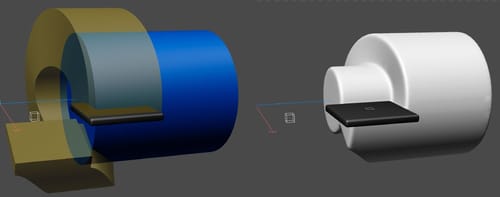
Switch the Volume Objects on after you run the time project one time from frame zero to the end.
The Nulls are either a rig or the two information sources for the Tracer (one main, one rail)
To keep the current position of the Tracer result, I rotate the setup in one direction and then all of it in the opposite. I hope that makes sense.
This is a solution with no math; you just create a volume and subtract it from the cylinder.Enjoy
Dr. Sassi Sassmannshausen Ph.D.
Cinema 4D mentor since 2004
Member of VES, DCS.
linkedin.com/in/dr-sassi-dcc2dcg -
Dear Dr Sassi,
This was absolutely the solution I was after.
With a counter-form and easily animated with keyframe.Thank you so much!
-
You're very welcome, Arnaud!
Thanks for the feedback.
My best wishes for your project.