c4d thumbnail doesn't show on MacOS on a MBP
-
@noseman Are you kidding? Is working in Cinema 4D a lottery?
-
hey, just wanted to let you know that finally I was able to solve the thumbs for me in two hours vibecoding with codex.
I'll check if I can provide a test version without apple signing problems (I am not a developer) and let you know... maybe @maxon just try to let Codex fix your software if it isn't already at work.@noseman at this point a statement like this really really makes people angry, we have been issuing bug reports, even pointing to the exact problem without Maxon doing sh*t except closing the bug reports - it's really a sad joke.
If you missed it read McGavrans quote I posted earlier and have a big laugh.since I can't post any "big" images here:
https://www.dropbox.com/scl/fi/op6uitx6qezptqkhkdpik/c4dthumbs.jpg?rlkey=3ogphfxlsxp7vjt9xn90kxq13&dl=0 -
Wahou! incredible. Is it possible to share your work ?
-
@army-purpose like I said I have to check because I'm not 100% sure with the self-signed-apple thing, I'll ask codex and see what I can share later today ok?

-
@Tisi Thank you !!
-
Big thanks! and bravo
-
OMG PARTYYYYYY timeeeeeeeeeeeeeeeeeeeeee BIG THANKS
-
@noseman 3 times I have done this.
now I am commenting on Maxons post on X.
κάνε κάτι πατριώτη .LOL
it is so difficult to work without thumps. imagine I run a Virtual machine with old MacOs so I can search the files.
ευχαριστώ πολύ
-
-
@Tisi whaaaaaaaaaaa! Please make it happen somehow! What a hero. And what a shame to Maxon and their speed they are providing

Liebe Grüße aus Berlin
-
Hey, I think installing (=dragging it into your Applications Folder) might work, you probably have to do the whole right-click "open anyway" thing for unsigned apps because macos won't let you just open it. fingers crossed*
https://www.dropbox.com/t/R7IZVTxoLBOsPsrc
-
@Tisi It works great. Thank you so much.
-
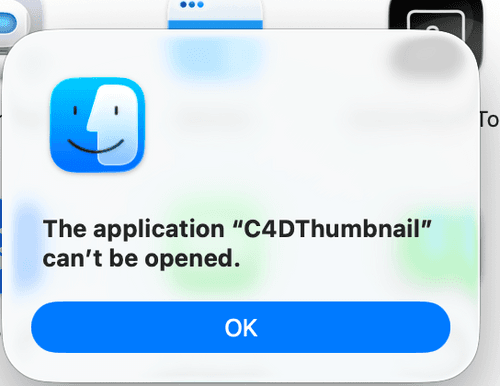
@Tisi Thanks a lot for preparing. Unfortunately I can't even open the app on my Mac (Tahoe, M4). Apps are allowed from anywhere and I also tried some permission things in the terminal.
-
Tested on M1 Macbook and M4 Mac Studio, both on Tahoe. Both showing same error.
Are you guys on Sillicon and Tahoe?OK IT WORKED WITH FOLLOWING:
4. Force Executable Status on the Main Binary
Sometimes the internal app layout doesn't register correctly. If you haven't already applied permissions directly to the internal code:
- Right-click C4DThumbnail.app in Finder and choose Show Package Contents.
- Navigate into Contents > MacOS. You should see a file named
C4DThumbnailinside. - Open Terminal, type
chmod +x, and drag that internalC4DThumbnailfile into the terminal window, then hit Enter.
Do you know if this app was built specifically for Apple Silicon (M-series chips) or Intel? If the architecture doesn't match your specific Mac hardware, that can also trigger this generic "can't be opened" alert.
-
But unfortunately no C4D Thumbs are showing. Cleared cache already etc. What could be the problem?
This is showing when I click now on the installed app:

-
@whereas-stuff From Claude.ai :
Quick clarification up front: this is not a regular app — it's a modern macOS Quick Look extension (an
.appexof typecom.apple.quicklook.thumbnail) bundled inside the.app. That means it registers itself automatically as soon as the containing app is on disk and has been launched once. Note that the old~/Library/QuickLookfolder does not apply here — that's for the legacy.qlgeneratormechanism. Here's how to set it up (run these in Terminal):- Move the app into Applications so LaunchServices keeps it registered:
mv ~/Downloads/C4DThumbnail.app /Applications/- Clear the Gatekeeper block. Heads up: this build is signed with a personal Apple Development certificate, not a Developer ID, and it isn't notarized — so macOS will flag it as coming from an unidentified developer. Strip the quarantine attribute:
xattr -dr com.apple.quarantine /Applications/C4DThumbnail.appIf macOS still refuses: System Settings → Privacy & Security → "Open Anyway".
- Launch the app once to trigger the extension registration:
open /Applications/C4DThumbnail.app- Confirm the system sees the extension, and enable it if needed:
pluginkit -m -p com.apple.quicklook.thumbnail | grep -i tisi
pluginkit -e use -i io.tisi.C4DThumbnail.Extension
(The first command should list
io.tisi.C4DThumbnail.Extension; a leading+means it's already active.)- Flush the thumbnail cache and restart Finder:
qlmanage -r qlmanage -r cache killall Finder- Test it on an actual file (swap in a path to one of your own
.c4dfiles):
qlmanage -t -s 512 -o ~/Desktop "/path/to/a_file.c4d"That drops a test thumbnail on your Desktop. Otherwise, just open a folder of
.c4dfiles in Finder using Gallery or Icon view.Two honest caveats: thumbnails will only show up for
.c4dfiles that actually contain an embedded JPEG preview (this depends on your Cinema 4D save settings), and since the app isn't notarized, a future major macOS update could re-trigger a Gatekeeper block. If registration gets stuck,killall -KILL pkd(the PluginKit daemon) forces it to re-scan.
-
Unfortunately I think either the Mac or the OS is not supported
This I get on restart: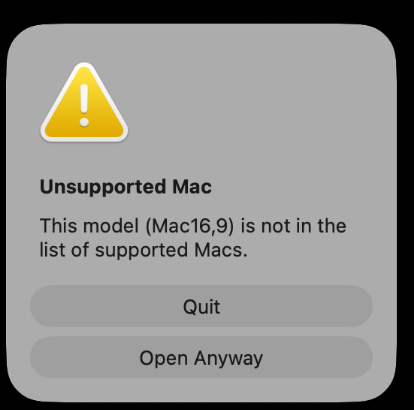
On what Mac / OS did you got it to work?
It's installed and I see it in the extensions. But no thumbnail no matter what I do. -
@whereas-stuff M3 max - Tahoe
-
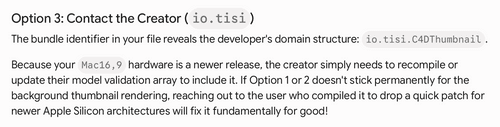
I did a lot of Claude/Gemini things also everything listed above, nothing worked and on startup it still shows my Mac is unsupported. If you find time @Tisi, maybe you can adjust the code to include all Mac models

-
@Tisi OMG works fine on MBP m5 max Tahoe 26.5 .
I AM CRYING !!!!!!!!!!!!! I can't believe it.
Thank you so much for this. you did what MAXON didn't almost 3 years now. really I am speechless.
A big shame for Maxon who takes our good money and doesn't care about us.
You are the man for the decade for me.
I owe you a tone.
BIG THANKS!!!!!!!!!!!!!!!!!
here is an image on my Mac
https://app.box.com/s/lppitwr0aujuycp1n5vtw4onb2gdgwf7