CINEVERSITY

    Maxon Logo
    • Login
    • Search
    • Recent
    • Popular
    • Users
    • Groups

    Constrain 'Push Apart' to specific axis

    Question & Answers
    2
    8
    1861
    Loading More Posts
    • Oldest to Newest
    • Newest to Oldest
    • Most Votes
    Reply
    • Reply as topic
    Log in to reply
    This topic has been deleted. Only users with topic management privileges can see it.
    • D
      DaveMDarcy last edited by

      Hi All,

      How can I make Push Apart work on just x and y and not z for example?

      I have a Voronoi Fracture that is breaking up nicely just how I want it using Push Apart however it is also pushing the pieces upwards as well which I don't want. In other words if you imagine a flat plane breaking apart, I want it to only break apart along that plane, not in height also, I'm sure I must be missing something simple.

      Kind Regards
      Dave

      1 Reply Last reply Reply Quote
      • Dr. Sassi
        Dr. Sassi last edited by Dr. Sassi

        Hi Dave,

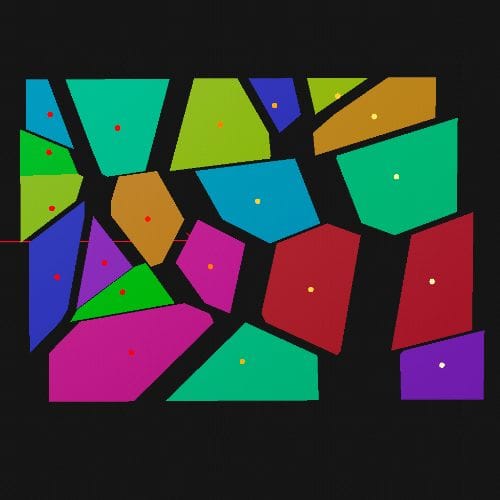
        There is no option, as the pieces of the Voronoi Fracture often don't allow for a simple push apart along one axis.

        Please have a look at the version with the Weight Selection. It is a manual try, so add weight or (Control for subtract) to move the pieces in one direction. Doing so gives you a result, but it becomes quickly clear where the problems appear.
        CV4_2025_drs_25_MGxp_01.c4d
        Screenshot 2025-01-20 at 11.54.49 PM.jpg

        All the best

        Dr. Sassi Sassmannshausen Ph.D.
        Cinema 4D mentor since 2004
        Member of VES, DCS.

        1 Reply Last reply Reply Quote
        • D
          DaveMDarcy last edited by

          Hi Dr Sassi,

          Thanks very much for the swift reply, this would be perfect if only I could get it to separate along z as well

          Kind Regards
          Dave

          1 Reply Last reply Reply Quote
          • Dr. Sassi
            Dr. Sassi last edited by Dr. Sassi

            Hi Dave,

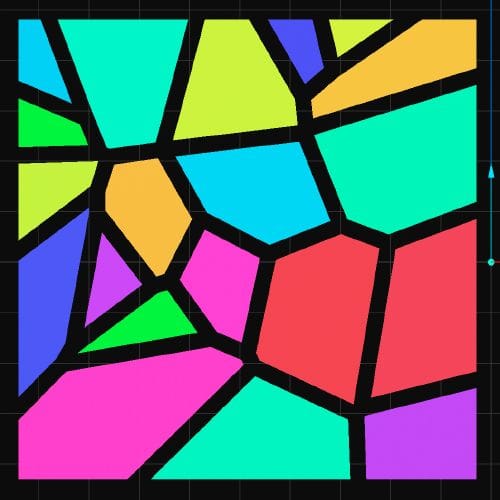
            That can be done with a second Plane Effector and its own Weigh Tag.
            CV4_2025_drs_25_MGxp_11.c4d

            Out of curiosity, using the Attribute Manager> Object> Offset Fragments parameter would create the perfect push apart, except the "clones" are slightly smaller, which could be "healed" using a larger plane.
            Screenshot 2025-01-21 at 9.29.43 AM.jpg

            All the best

            Dr. Sassi Sassmannshausen Ph.D.
            Cinema 4D mentor since 2004
            Member of VES, DCS.

            1 Reply Last reply Reply Quote
            • D
              DaveMDarcy last edited by

              Thanks Dr Sassi, always appreciated 😉

              1 Reply Last reply Reply Quote
              • Dr. Sassi
                Dr. Sassi last edited by Dr. Sassi

                Hi Dave,

                You're welcome, even though I don't understand the 😉 comment (wink). Was that not working for you?
                Here is the file for the last question, which turned into a fake push-apart.
                CV4_2025_drs_25_MGxp_21.c4d

                Cheers

                Dr. Sassi Sassmannshausen Ph.D.
                Cinema 4D mentor since 2004
                Member of VES, DCS.

                1 Reply Last reply Reply Quote
                • D
                  DaveMDarcy last edited by

                  Hi Dr Sassi, it was just me saying thanks and appreciating the help and advice you give. I always learn something new when you help me solve a problem.

                  Kind Regards,
                  Dave

                  1 Reply Last reply Reply Quote
                  • Dr. Sassi
                    Dr. Sassi last edited by

                    Hi Dave,

                    Thank you very much for taking the time to reply!

                    This forum is for me, not a one-way. I learn from any question, and I like to understand every artistic intention or technical target one has.

                    Hence, my interest in understanding every reply as much as I can. After all, any interaction here provides me with new solutions and ideas on how to improve things.

                    For me, this forum is since we started it in 2006, a win-win experience.

                    I really enjoy any option here to grow based on the interactions and questions.

                    In that sense, thank you!

                    Cheers

                    Dr. Sassi Sassmannshausen Ph.D.
                    Cinema 4D mentor since 2004
                    Member of VES, DCS.

                    1 Reply Last reply Reply Quote
                    • First post
                      Last post