Strange topology once material applied
-
I found a material that I liked (from PixelLab). I applied it to a portion of a model that I was sent via CAD. The model in preview looks great, but once the material is applied the topology goes squirrely. I feel like i should know the answer to this problem, but i have drawn a blank here. I have created other materials myself and applied them and the material looks decent. Any idea as to what I might have going on here?
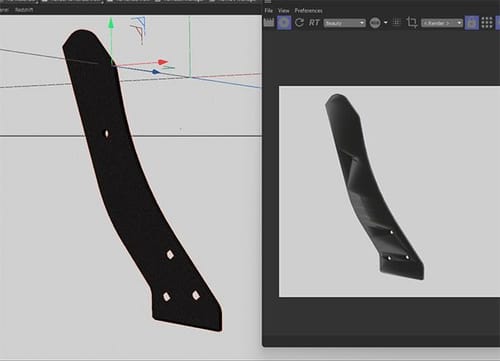
Thanks for the help!
-
Hi river-prior,
Without a file, I have to guess, which is not my favorite way.
Typically, this is a Phong/Normal problem of the model.
Which one (or both): This is not clear from the pictures alone.
It can be also in the model, use the Model check to see if there is something wrong with it.
https://help.maxon.net/c4d/2026/en-us/Default.htm#html/DMODELING-MESH_CHECK.htmlFiles smaller than 1 MB can be attached here as C4D files (no ZIP or RAR). If it is larger, please use only Dropbox, WeTransfer, Google, Adobe, or Apple cloud services. (Security stuff – sorry, also here, upload them not compressed)
The link, please, just pasted, no HTML wrapper, thank you.All the best
-
@Dr-Sassi
Thank you for your response!
It was the model. I spent some time last night going over the topology and was able to find the solution. Thank you for guiding me to the answer.Shawn
-
Thank you very much, Shawn.
Have a great weekend
