CINEVERSITY

    Maxon Logo
    • Login
    • Search
    • Recent
    • Popular
    • Users
    • Groups

    How do I repeat a ramp pattern on an object using the texture node?

    Question & Answers
    5
    27
    3696
    Loading More Posts
    • Oldest to Newest
    • Newest to Oldest
    • Most Votes
    Reply
    • Reply as topic
    Log in to reply
    This topic has been deleted. Only users with topic management privileges can see it.
    • Dr. Sassi
      Dr. Sassi last edited by Dr. Sassi

      Hi bench-support,

      Please have a look here.
      CV4_2026_drs_25_RSrm_01.c4d

      I rotated some of the UV polygons, and it is safer (additionally) to drag the UV Tag into the material (or write the exact name into it, to always ensure you have the correct one.
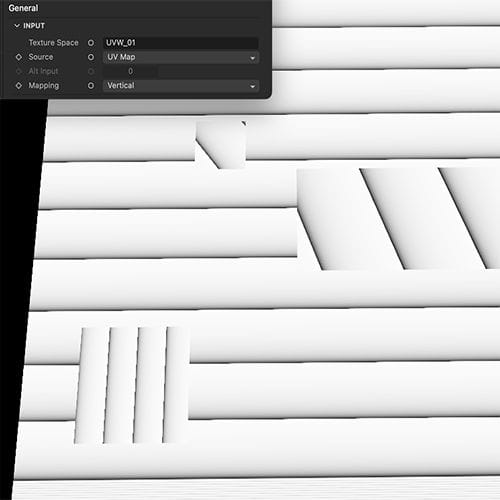
      Screenshot 2025-11-25 at 9.44.30 PM.jpg
      Is this working for you?

      My best wishes for your project

      Dr. Sassi Sassmannshausen Ph.D.
      Senior Trainer, Maxon Master Trainer, L&D - Strategist
      Cinema 4D mentor since 2004, Member of VES, DCS.

      B 1 Reply Last reply Reply Quote
      • B
        bench-sport @Dr. Sassi last edited by

        @Dr-Sassi Thanks for the reply. My particular case is using a material for various objects with user data node but combined with this repeated ramp bump map.. So what could be more effective than using just manually rotating UV map?

        https://1drv.ms/u/c/cd71275177a2d3eb/IQAf6AjLHRbkR62wJvb5O0UUAUDhr_FHNGYOi1Q4lutPBoE?e=mNnNOY

        1 Reply Last reply Reply Quote
        • Dr. Sassi
          Dr. Sassi last edited by Dr. Sassi

          Hi bench-sport,

          The UV-Map has a transform option (three values) and a rotation (single value), but there is no tiling for this Ramp effect. Which means the only way to cover the area is by scaling and offsetting. Which might be quite cumbersome, as the rotation and the scale are not uniformly during a rotation.

          https://help.maxon.net/c4d/2026/en-us/Default.htm#html/COM_REDSHIFT3D_REDSHIFT4C4D_NODES_CORE_UVPROJECTION-NET_MAXON_NODE_BASE_GROUP_INPUTS.html?TocPath=The%2520Node%2520Editor%257CRedshift%2520Nodes%257CRedshift%2520Utility%2520Nodes%257CUV%2520Projection%257C_____3

          Below are two examples, differentiated only where the scale and offset take place (UV Transform node)

          CV4_2026_drs_25_RSrr_11.c4d
          CV4_2026_drs_25_RSrr_12.c4d
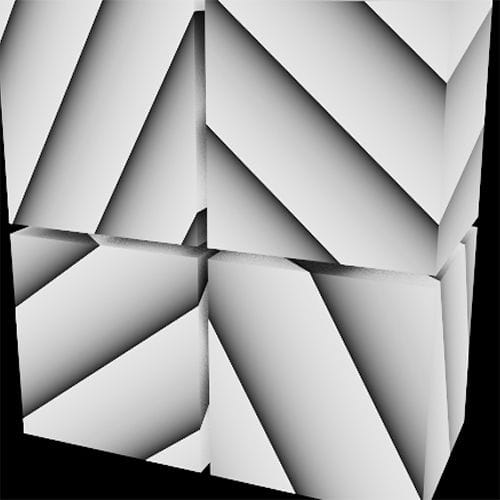
          Screenshot 2025-11-26 at 1.19.43 PM.jpg

          The User Data was copied from the Node (Right Mouse Click, Copy UI),
          Then pasted into the User Data (Click on the top entry UserData Default, to enable pasting)

          For any file sharing, Wetransfer, DropBox, Google, Apple or Adobe Cloudservices. Data uncompressed during upload, URLs pasted fully and plainly.

          All the best

          Dr. Sassi Sassmannshausen Ph.D.
          Senior Trainer, Maxon Master Trainer, L&D - Strategist
          Cinema 4D mentor since 2004, Member of VES, DCS.

          B 1 Reply Last reply Reply Quote
          • B
            bench-sport @Dr. Sassi last edited by

            @Dr-Sassi Thanks for the examples!

            1 Reply Last reply Reply Quote
            • Dr. Sassi
              Dr. Sassi last edited by

              You're very welcome, bench-sport!

              If there is any question, please let me know. Note: Nov 28th is a (US) Holiday here and I will be off-line.

              My best wishes for your project

              Dr. Sassi Sassmannshausen Ph.D.
              Senior Trainer, Maxon Master Trainer, L&D - Strategist
              Cinema 4D mentor since 2004, Member of VES, DCS.

              1 Reply Last reply Reply Quote
              • Dr. Sassi
                Dr. Sassi last edited by Dr. Sassi

                Hi bench-sport,

                There is some improvement in this, with the 2026.2 UV Context Projection.
                Example
                CV4_2026_drs_25_RStr_01.c4d

                As before, the ramp produces only a Square; when rotated, this shows the borders, hence the settings in the Node for this use.

                More about this:
                https://youtube.com/live/ZAom6DvSi3s

                00:49:16 UV Context Projection - UV Transform

                All the best

                Dr. Sassi Sassmannshausen Ph.D.
                Senior Trainer, Maxon Master Trainer, L&D - Strategist
                Cinema 4D mentor since 2004, Member of VES, DCS.

                B 1 Reply Last reply Reply Quote
                • B
                  bench-sport @Dr. Sassi last edited by

                  @Dr-Sassi Wow! This UV Context Projection node is incredible! It's just the missing piece of the puzzle. I checked your file. Now, the MUL and MOD node isn't needed. That one context projection node is enough to do the work I guess!

                  1 Reply Last reply Reply Quote
                  • Dr. Sassi
                    Dr. Sassi last edited by Dr. Sassi

                    Hi bench-sport,

                    Thank you very much for the feedback.

                    You are spot on, and thanks for this insight.
                    I was in the middle of QA and timestamping the news video, when this theme came up – I started thinking about your question.
                    So, I checked it quickly, missing the extra advantage; I have a win as well, thank you!

                    Have a great weekend.

                    P.S.: https://www.youtube.com/live/ZAom6DvSi3s?si=8LscqDJJlmPROpnT&t=2956

                    Dr. Sassi Sassmannshausen Ph.D.
                    Senior Trainer, Maxon Master Trainer, L&D - Strategist
                    Cinema 4D mentor since 2004, Member of VES, DCS.

                    B 2 Replies Last reply Reply Quote
                    • B
                      bench-sport @Dr. Sassi last edited by

                      @Dr-Sassi Thanks a lot for this! Life is easier now. 😄

                      1 Reply Last reply Reply Quote
                      • B
                        bench-sport @Dr. Sassi last edited by

                        @Dr-Sassi Btw, I can't figure out How to do it for ring type outputs without using repetitive knots?
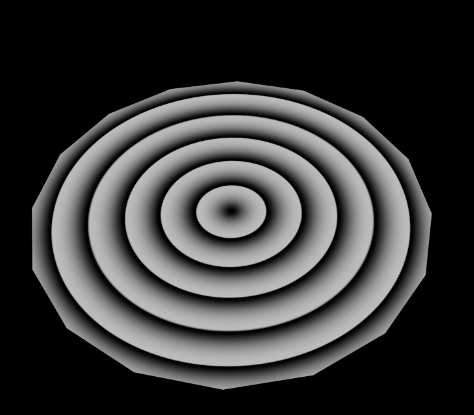
                        58a4ffe4-be5b-4020-b0e2-fdbdb7be5d48-image.png

                        1 Reply Last reply Reply Quote
                        • Dr. Sassi
                          Dr. Sassi last edited by Dr. Sassi

                          Hi bench-sport,

                          I assume I understand what you want, but that is not in the new Node included. Mul/Mod is the answer.

                          Right mouse click on the Ramp allows for doubling the Knots and can be done many times. Yes, not parametrically.

                          Here are three examples, and I assume they are not along your question, just to be on the safe side.
                          One does example does it, but it is a hack, and not even.

                          CV4_2025_drs_25_RScl_01.c4d

                          Screenshot 2025-12-05 at 10.11.17 PM.jpg

                          If there is something else, I'm happy to look into it (in the morning)

                          Have a great weekend

                          Dr. Sassi Sassmannshausen Ph.D.
                          Senior Trainer, Maxon Master Trainer, L&D - Strategist
                          Cinema 4D mentor since 2004, Member of VES, DCS.

                          B 1 Reply Last reply Reply Quote
                          • B
                            bench-sport @Dr. Sassi last edited by

                            @Dr-Sassi Thanks for the clarification.

                            1 Reply Last reply Reply Quote
                            • Dr. Sassi
                              Dr. Sassi last edited by

                              You're very welcome, bench-sport.

                              My best wishes

                              Dr. Sassi Sassmannshausen Ph.D.
                              Senior Trainer, Maxon Master Trainer, L&D - Strategist
                              Cinema 4D mentor since 2004, Member of VES, DCS.

                              1 Reply Last reply Reply Quote
                              • First post
                                Last post
