CINEVERSITY

    Maxon Logo
    • Login
    • Search
    • Recent
    • Popular
    • Users
    • Groups

    How do I repeat a ramp pattern on an object using the texture node?

    Question & Answers
    5
    27
    3670
    Loading More Posts
    • Oldest to Newest
    • Newest to Oldest
    • Most Votes
    Reply
    • Reply as topic
    Log in to reply
    This topic has been deleted. Only users with topic management privileges can see it.
    • B
      bench-sport @Dr. Sassi last edited by

      @Dr-Sassi Thanks for the examples!

      1 Reply Last reply Reply Quote
      • Dr. Sassi
        Dr. Sassi last edited by

        You're very welcome, bench-sport!

        If there is any question, please let me know. Note: Nov 28th is a (US) Holiday here and I will be off-line.

        My best wishes for your project

        Dr. Sassi Sassmannshausen Ph.D.
        Senior Trainer, Maxon Master Trainer, L&D - Strategist
        Cinema 4D mentor since 2004, Member of VES, DCS.

        1 Reply Last reply Reply Quote
        • Dr. Sassi
          Dr. Sassi last edited by Dr. Sassi

          Hi bench-sport,

          There is some improvement in this, with the 2026.2 UV Context Projection.
          Example
          CV4_2026_drs_25_RStr_01.c4d

          As before, the ramp produces only a Square; when rotated, this shows the borders, hence the settings in the Node for this use.

          More about this:
          https://youtube.com/live/ZAom6DvSi3s

          00:49:16 UV Context Projection - UV Transform

          All the best

          Dr. Sassi Sassmannshausen Ph.D.
          Senior Trainer, Maxon Master Trainer, L&D - Strategist
          Cinema 4D mentor since 2004, Member of VES, DCS.

          B 1 Reply Last reply Reply Quote
          • B
            bench-sport @Dr. Sassi last edited by

            @Dr-Sassi Wow! This UV Context Projection node is incredible! It's just the missing piece of the puzzle. I checked your file. Now, the MUL and MOD node isn't needed. That one context projection node is enough to do the work I guess!

            1 Reply Last reply Reply Quote
            • Dr. Sassi
              Dr. Sassi last edited by Dr. Sassi

              Hi bench-sport,

              Thank you very much for the feedback.

              You are spot on, and thanks for this insight.
              I was in the middle of QA and timestamping the news video, when this theme came up – I started thinking about your question.
              So, I checked it quickly, missing the extra advantage; I have a win as well, thank you!

              Have a great weekend.

              P.S.: https://www.youtube.com/live/ZAom6DvSi3s?si=8LscqDJJlmPROpnT&t=2956

              Dr. Sassi Sassmannshausen Ph.D.
              Senior Trainer, Maxon Master Trainer, L&D - Strategist
              Cinema 4D mentor since 2004, Member of VES, DCS.

              B 2 Replies Last reply Reply Quote
              • B
                bench-sport @Dr. Sassi last edited by

                @Dr-Sassi Thanks a lot for this! Life is easier now. 😄

                1 Reply Last reply Reply Quote
                • B
                  bench-sport @Dr. Sassi last edited by

                  @Dr-Sassi Btw, I can't figure out How to do it for ring type outputs without using repetitive knots?
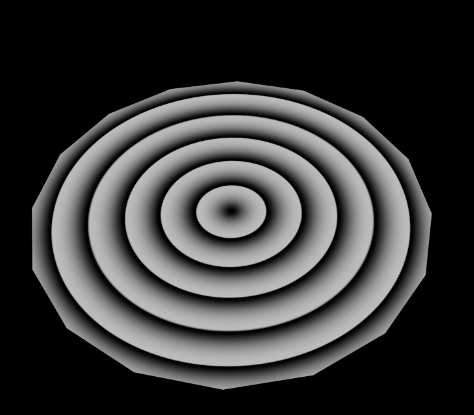
                  58a4ffe4-be5b-4020-b0e2-fdbdb7be5d48-image.png

                  1 Reply Last reply Reply Quote
                  • Dr. Sassi
                    Dr. Sassi last edited by Dr. Sassi

                    Hi bench-sport,

                    I assume I understand what you want, but that is not in the new Node included. Mul/Mod is the answer.

                    Right mouse click on the Ramp allows for doubling the Knots and can be done many times. Yes, not parametrically.

                    Here are three examples, and I assume they are not along your question, just to be on the safe side.
                    One does example does it, but it is a hack, and not even.

                    CV4_2025_drs_25_RScl_01.c4d

                    Screenshot 2025-12-05 at 10.11.17 PM.jpg

                    If there is something else, I'm happy to look into it (in the morning)

                    Have a great weekend

                    Dr. Sassi Sassmannshausen Ph.D.
                    Senior Trainer, Maxon Master Trainer, L&D - Strategist
                    Cinema 4D mentor since 2004, Member of VES, DCS.

                    B 1 Reply Last reply Reply Quote
                    • B
                      bench-sport @Dr. Sassi last edited by

                      @Dr-Sassi Thanks for the clarification.

                      1 Reply Last reply Reply Quote
                      • Dr. Sassi
                        Dr. Sassi last edited by

                        You're very welcome, bench-sport.

                        My best wishes

                        Dr. Sassi Sassmannshausen Ph.D.
                        Senior Trainer, Maxon Master Trainer, L&D - Strategist
                        Cinema 4D mentor since 2004, Member of VES, DCS.

                        1 Reply Last reply Reply Quote
                        • First post
                          Last post
